Mail > Window > Show next/previous tab
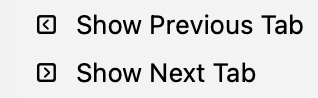
—an angle bracket inside a box—
Is that supposed to represent tab+[arrow key]?
(My tab key hasn’t worked for a while so I can’t just try the key-combination)
Mail > Window > Show next/previous tab
—an angle bracket inside a box—
Is that supposed to represent tab+[arrow key]?
(My tab key hasn’t worked for a while so I can’t just try the key-combination)
Those are simply menu-item icons. Something Apple’s started doing for no apparent reason.
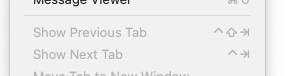
The actual keystroke-glyphs for TAB and BACKTAB should be ⇥ and ⇤, respectively. Although in actual practice, BACKTAB is usually presented in menus as SHIFT-TAB: ⇧⇥
I don’t think Apple is responsible for these specific icons. They don’t appear next to the corresponding menu items in the latest version of Safari, for example.
They’re allegedly in the Mail app, which is from Apple. (I’m still running macOS 15, so my app doesn’t have any menu icons).
But note also that the keyboard shortcuts appear to the right of the menu item, not the left, so that’s not what these icons represent. Here’s a clip from my Mail app’s Window menu (version 16, macOS 15):
As for Safari, it’s already been noted that Apple hasn’t been 100% consistent with their choice of menu icons across apps.
Not relevant: @yb379 included a screenshot that makes clear he’s talking about icons to the left of the menu item.
My working theory is that he’s still on Tahoe. I don’t see these icons in Golden Gate.
As I understand it, those images got added in Tahoe then Golden Gate removed or reduced them. A web search came up with a terminal command that should remove/reduce them but I have not tried it.
defaults write -g NSMenuEnableActionImages -bool NO
As others have noted, I see those small icons on the Show Tab commands on my computer running Tahoe (both Mail and Safari) but not on Golden Gate or Sequoia.
We’ve discussed this issue about the menu command icons on Tahoe before.
This is about showing previous/next tab views when Tab Bar is enabled. It’s not about the tab key. It’s just goofy icons for these view tabs (the box) and previous/next tab.