Originally published at: Mysterious Mac Login Failures? Check Your Input Source - TidBITS
The other night, I received a somewhat worried phone call from Tonya’s father while finishing dinner out with friends. He and my mother-in-law had upgraded her M1 MacBook Air to macOS 26 Tahoe, but afterward, they couldn’t log in. An error message also seemed to imply that her Apple Account password was incorrect. Although she uses the machine relatively lightly, she has two important Pages documents in progress: a memoir-writing class assignment stored in iCloud and a talk she’s preparing on her desktop. Neither was backed up. 
Troubleshooting such problems over the phone is nearly impossible, and we were slated to visit the next morning anyway, so I suggested to my father-in-law that, in the meantime, he try logging in to her iCloud account on his Mac to see whether her credentials still worked and to verify that one of the documents was there. The email they sent later that evening confirmed that there were no problems with her Apple Account or iCloud storage.
The next morning, Tonya arrived first and confirmed that the MacBook Air’s keyboard was working but that it wouldn’t accept the login password. Happily, when I arrived shortly afterward, I was able to identify the problem at a glance. Do you see the tell-tale clue in the screenshot below?

The key is the Input Source menu in the upper-right corner. Normally, it reads U.S., but it had switched to ABC – AZERTY. At that moment, I didn’t know that it was a French keyboard layout, but I did know that it was different from the standard U.S. QWERTY layout. QWERTY and AZERTY share most key positions, but the A and Q are swapped—and her password included an A. Since she was typing in a password field that showed only bullets, the input source swap wasn’t clear. Once I clicked the Input Source menu and switched back to the U.S. keyboard, her password worked, and she was in. That also likely explained the problem with the Apple Account password.

She doesn’t speak or write French, and they had no idea how the AZERTY keyboard had been added to her Input Sources list. Tom Gewecke, my go-to expert on Mac language issues, said it’s not uncommon for people to report input sources being added during macOS updates, though mostly Spanish layouts that affect only punctuation keys.
Indeed, when I navigated to System Settings > Keyboard > Input Sources > Edit, the ABC – AZERTY input source was listed, so I promptly deleted it. If you have any input sources listed that you don’t use—especially if you don’t know how they got there—remove them immediately.

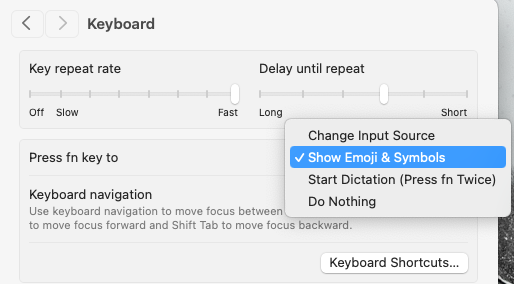
The only remaining question was how AZERTY became the active input source. Although there’s no way to know for sure, my theory is that, shortly before or during the unfamiliar process of upgrading macOS, she accidentally pressed the Globe key, which, by default, changes the input source. (Maybe that shouldn’t be the default, Apple?) If you don’t use multiple input sources, I recommend switching the Globe key to Show Emoji & Symbols, Start Dictation, or Do Nothing. Do that in System Settings > Keyboard, too.

All’s well that ends well, and my father-in-law promptly moved her talk from the desktop to iCloud, where, even if it’s not properly backed up, it will at least be available on other devices.
Although this may seem like a highly specific story that I’m telling merely to boost my tech cred, there are two more general lessons to keep in mind:
- When troubleshooting, widen your field of view: In this case, the only reason I solved the problem and Tonya didn’t was that she was focused on the password field at the bottom center of the screen, whereas the necessary clue appeared only in the top right. Beyond the physical field of view in play here, successful troubleshooting is often aided by noticing behaviors that may not seem directly related to the problem at hand. Don’t focus too hard, or you might miss something that will set you on the right path.
- Avoid unnecessary configurations: Although my in-laws had no idea how the AZERTY input source was added, many people intentionally dabble with other input sources, languages, and regions. If you or someone you know has strayed from or added to their keyboard, language, or region defaults, that could introduce troubleshooting complexity later. In general, if you’re not using some configuration or don’t remember why you added it, delete it to avoid future confusion.
 . But that breather gave me time to think what else it could be. Next day I saw the wrong Input Source and discovered I could change it at the lock screen.


 , maybe because I always had several accounts, and also all the Macs were controlled by Remote Desktop. In later years, I have gotten this habit when I make passwords: I check if it works on both US and Norwegian.