My MacBook is updated to OS 27.2. How do I access Spotlight search? It used to be on the upper right menu bar.
@dougb2 , my Macs are still on 26, so am not 100% sure about 27, but have you tried command-spacebar to summon Spotlight?
Or if you want the magnifier icon in the upper-right Control Center, make sure its box is ticked in Menu Bar Settings (I have deselected it in the screenshot below):
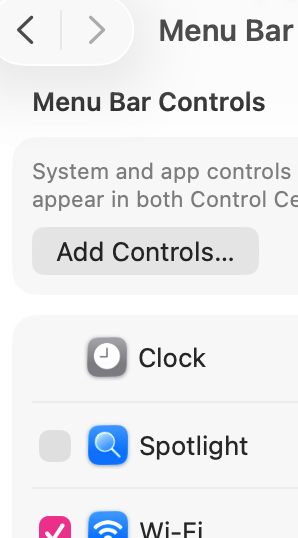
2 Likes
See topic I want Spotlight back. Golden Gate 27.2 replaced Spotlight with Siri. I don’t like it either.
1 Like
If one asks Siri (invoked via Command Space), Siri thinks, than responds:
“I’m unable to open Spotlight right now because that feature is currently restricted.”
I’ve long used Alfred as an adjunct to Spotlight, configured to launch using Option-Space. Give it a try
1 Like
I updated from 26 to 27.2 the other day. I retained my magnifying glass icon in the menu bar and cmd-space to invoke Spotlight still works just fine. AFAICT Spotlight works very similar to the way it worked in 26. I will note though that I turned off Siri/SiriAI (System Settings > Siri) so perhaps that retains traditional Spotlight.
1 Like
I think you’re correct about things changing when you turn on Siri AI.
From what I see, turning on Siri AI does make things work differently in Golden Gate. I liken it to “one ring to rule them all”. Here’s what I’m seeing when turning on Siri AI:
The Spotlight icon disappears. The Siri icon is left in the menu bar (circle with a squiggle through it).
When clicking on that icon, (or using Command-Space as a keyboard shortcut).
Using Command-1, 2, 3,4 changes the search into looking for Applications, Files, Actions or Clipboard respectively)
As you type, Spotlight starts returning results below what you’re typing in. Also note the options to search the Finder, Web, iCloud Drive…
It’s only if you hit return that things start behaving differently than Spotlight did. You may see “- Ask Siri” being displayed as you’re typing - that’s a big clue. If you hit return (or, as in the game show “phrase your answer in the form of a question”), what you’ve searched for now gets submitted to Siri AI. You’re now in chatbot mode with Siri AI.
Personally, I’m not annoyed by it. I’ve found AI chatbots to be very helpful (I’ve used Anthropic’s Claude quite a bit lately with some programming debugging and other technically oriented tasks). I haven’t played around much with how the new Siri integrates with local apps so it will be interesting to see how it’s behaving.
1 Like
Google says the problem is that the Siri replacement for Spotlight prioritizes world knowledge over local results, which makes it useless when you want it to find your local files.
Has anyone tried Tembo? Rumor is that it is a GUI that uses the Spotlight metadata.
The Easy Find app from Devon Technologies is also out there. I’ve downloaded but not yet tried it. Freeware.
I’m not seeing that in my admittedly brief testing unless I submit the search to “Ask Siri”. I do have “Show Related Content” turned off in System Settings > Spotlight.
Also note that once you bring up Siri AI, Command-2 is a keyboard shortcut that focuses your search to files. It also seems to search by default both file name and content.
1 Like
I’m finding that in Golden Gate 27.2, even with Siri AI turned off, Spotlight is terrible at returning local results.
Didn’t there used to be settings that could tell it not to return anything from the Internet? Now as far as I can tell, your only options are: Apps, Files, Folders, iPhone Apps, and Menu Items.
Let’s say you want it to find apps installed on your Mac. For that, you must have Apps selected. But the settings don’t just say “find these things”, it actually “Allows items and their content to appear in Spotlight” (emphasis mine).
So, if Apps is on, and I search for a file with Netlix in the name, a top hit is the Netflix stock price! That’s because there’s a Stocks app, and stock prices are part of its content. And, it will return iPhone Apps even if iPhone Apps is turned off. That is, returning iPhone Apps is actually controlled by Apps, not iPhone Apps.
There is no way to disable this.
If I search for a file with Netflix in the document name, that I recently have used and updated, it is way down in the results. Before that, I get:
- A web site I visited once
- Two Netflix - From iPhone apps
- A folder
- A Netflix .ipa file
- A different Netflix document
- Another bookmark
- A file from 2013
- A file from 2024
- An email
- Another file from 2024
- Three more emails
- A file from 2024
- and so on
Oh wait, it does not return the file I want.
What’s really aggravating is that while I’m typing in the query, sometimes the item I want will show up at the top of the list, but then I type one more character in the name, and it vanishes, never to return.
I can’t figure out how this got out of beta.
Yes.
Up to and including Tahoe, the Spotlight settings gave us a checkbox list of categories to include/exclude. You could prune that list down to the point where all a Spotlight search would return is essentially files/folders on your Mac.
But in Golden Gate, even if you turn off all the AI/SiriAI sugar-coated gravy, there is no such checkbox option anymore.
Sadly, the direct result of that is that we face poorer list quality. Now some will point to Finder search and say that that is where you should go to do those kind of searches. And while that might hold for a pure file search on your FS, for those of us who have become accustomed to using Spotlight as a quick/lightweight/accessible launcher, that doesn’t serve as a proper workaround.
that’s what I was going to suggest. My primary Mac’s on Tahoe, may go to 27 in coming weeks. I haven’t been using Spotlight for a long time, mainly for reasons @mschmitt points out, so have been relying on LaunchBar, and tightly limiting Spotlight’s reach in Settings.
If LBar doesn’t find what I’m looking for, I use a Finder search. Yesterday I was able to find emails and photos from 2018 on a backup from an older Mac using Finder with a couple of added search parameters. Satisfying.
Recently here in TBT was mention of an app called Easy Find I think, also used for local file search. I haven’t tried it yet. In case you would switch from Spotlight. I think you can also reassign command-spacebar from Spotlight to something else if that muscle memory action is important.