I am a long-time user of Cocoatech’s Path Finder, a Finder replacement that adds many useful file manipulation tools. My main Mac is an 2019 iMac 27-inch, which is now “forever Sequoia” as it’s no longer supported for MacOS major versions.
This morning I got a prompt to update to the new version of Path Finder. Two observations:
It’s clearly been rewritten to remove much of the interface cruft and clutter that had been carried along for many revisions.
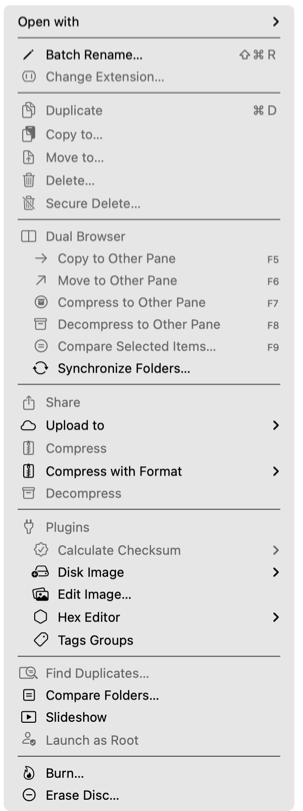
(more to my point) This is version 26.0 (not, say “12”), and it now has the Tahoe menu icons to the left of almost every menu item.
I’ve followed the discussions about the interface annoyance these icons represent, but to this point it’s been a mere curiosity. Now the annoyance has apparently followed me.
Here is a representative menu in all its icon’ed glory.
Yes, that was the one that caught my eye immediately. I don’t know what resources Apple provides to developers (like, say, an icon library), but since so many of the icons look exactly like icons I’ve seen in other apps and system apps, I think if there is a library that the hexagon is included.
Of course, there’s also the possibility that it’s not a “hexadecimal editor” as you surmise, but an actual Hex Editor to fine-tune spiritual entanglements for your enemies. Or your operating system.
These just don’t bother me at all. I still don’t get all the vitriol about this. That said, I suspect that future MacOS releases will have a setting that turns them off, or something similar. Apple isn’t dumb.
The terminal command does indeed remove many icons in various apps, but not all. This is quite frustrating. I find the icons to be very well designed, however I find them not only unnecessary but visually distracting. They essentially accomplish the opposite of what Apple wants.
I tried it. It doesn’t seem to work on a Sequoia-based Mac.
Not that big a surprise. I suspect the developer embedded them to ensure that their menu items would match Apple’s for Tahoe. (None of the “standard” MacOS menu items has an icon, which is what led me to that conclusion.)
I suppose I can always ask them to add a toggle in the preferences, or simply go with the flow.
I’m kinda in agreement with @ddmiller that eventually the default toggled by the Terminal command will make its way into System Settings.