Am having a Numbers terminology ‘bad keyword’ day. Sequoia and Number 14.4.
In a table, I have a column for date, til now formatted as text so it displays the way I want it to.
Wanted to put in some rows with dates in future and have the cells highlighted so I know at a glance which rows are future data.
Followed Tips instructions, but a couple problems occur:
I try to change cell format from Text to Date & Time (either singly or a group) but it remains at Text
I tried to find rules for ‘highlight if date is after today’ but can’t find the syntax to match it. ‘Date is After 1 (or zero) days ago’ doesn’t change cell format at all (perhaps as the cell hasn’t changed to Date & Time)
So, any ideas? why wouldn’t the cell format be allowed to change? (I’m not aware of having ‘locked’ the cell format, if it is even possible in Numbers)
Presuming I get the cells to change format, would that be the correct Rule syntax to change the cells with dates after today to a different format?
I’m wondering what the benefit is in having a cell which you use for dates to be in anything other than a date cell. Do you not wish to use any of the pre-formatted options on dates that Numbers offers?
In any case if you set the cells to be dates the conditional formatting is pretty easy. Here, green is past, white is today and orange is future. (Forgive me, I’m from Ireland)
Thanks @tommy , the benefit for me is the workbook contains only a calendar year, so the year is not important to enter; I enter dates as DD.MM, which is not one of the Date&Time format options in Numbers. I don’t use DD/MM, as the / on my keyboard is above the number 7, so it requires shift-7 and moving my right hand back to position. Using the period, is one finger movement and I don’t have to move my eyes or hands. So I leave the field at Text format til now.
I see your rule for conditional highlighting is similar to what I’ve tried, so maybe this will work!
Problem is, I entered some test dates, selected the cell, and tried to format it as Date&Time, it showed D&T until I clicked away somewhere. Then selecting the cell again showed Text format.
So maybe the problem is not my highlighting rule but that Numbers is not allowing me to set Date & Time formatted cells for some reason.
I just made a new empty table, selected a cell and formatted it Date&Time, 1/5, no time. entered data as 1.5, entry displayed as 1.5, but selecting cell and checking its format, Date & Time were no longer the format, but Automatic.
After couple of more attempts and additional cells in the new empty table, I was able to enter a date as 20.10 and it was changed to 20/10 and retained the D&T formatting settings. Adding the conditional highlighting worked as expected.
So… somehow it’s working now in the test table. Maybe I make this change next year in my 2026 Workbook, and will have to do my date formatting the way Apple wants, with a / not a dot. I must be Doing It Wrong.
Glad you worked it. I wonder if the period rather than the slash might have been possibly construed as a decimal point, perhaps that’s why it’s not in the list of Apple formats. I also, by the way, use periods to separate my dates outside of Numbers.
Possibly a cultural thing, I associate dashes with US telephone numbers, periods with European telephone numbers. The French frequently use a comma where I would use a period in a price or financial quote. I do wish it was more configurable in the Numbers app. Perhaps file a request with Apple.
Thanks @tommy , I still need to dig into why this year’s column of cells where I put dates can’t have its format changed from Text. Ah well, next year is almost here.
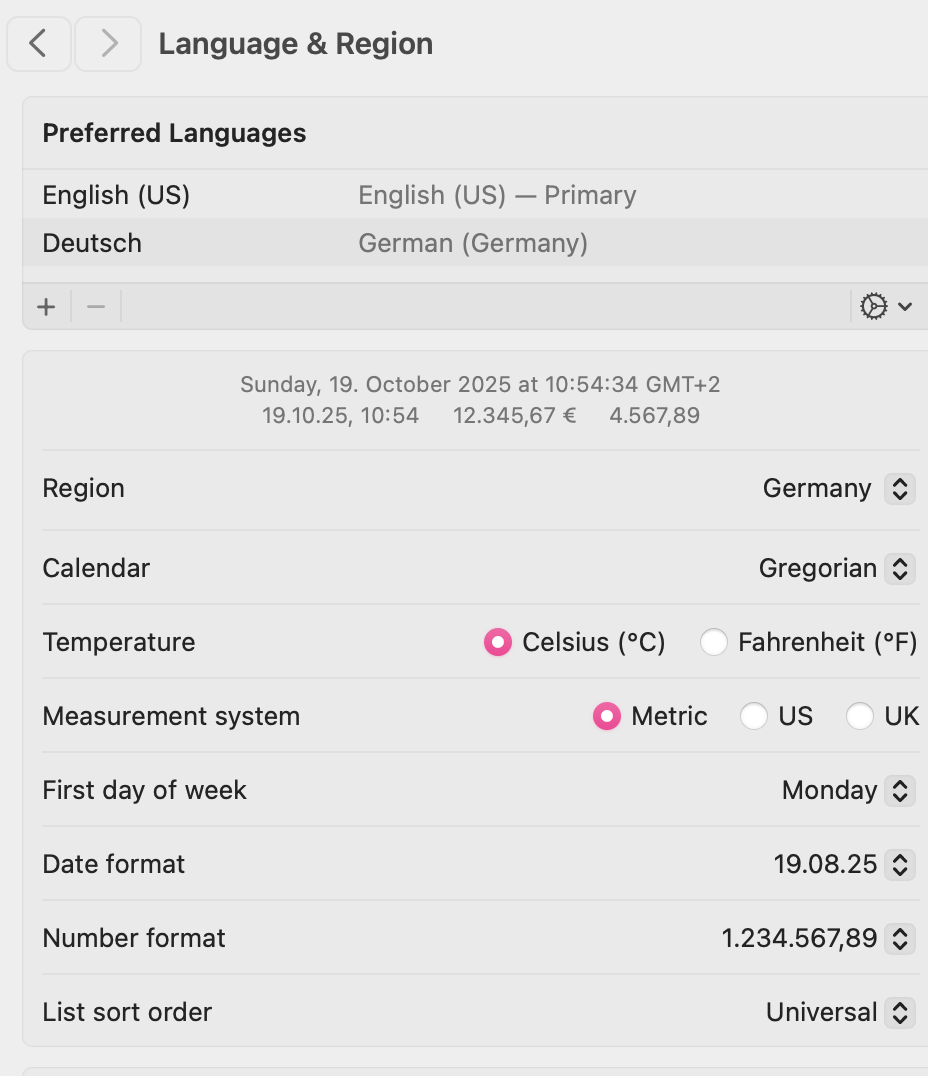
As an interesting point, I just thought to look at Language and Region Settings and the dot style is actually set, yet not available in Numbers:
I have found it an interesting challenge to learn new formats and such. I’ve spent time in places where number formats for instance are different, ie use of dots/periods and commas, as well as placement of commas.
Sometimes there are two digits between commas until a certain number then it changes to three digits! And my primary laptop has a German Keyboard, and when I sit at the desk and use bluetooth with a US keyboard, I switch the Mac over to US. Stuff like this helps keep the brain cells active I hope.
TBers for your help & patience as I worked out this topic online.

 TBers for your help & patience as I worked out this topic online.