Apple has released version 15.4 of Keynote, Numbers, and Pages for both Apple Creator Studio subscribers and the rest of us. Numbers gets the biggest update, adding a long list of new trigonometry, statistics, and logic functions. This humanities major is happy to let the mathematicians play with the bulk of the functions (such as ACOT, which returns the inverse cotangent, or arccotangent, of a number), but the new DAYS function (calculating the number of days between two dates) should be handy. The full list of added functions is included on the release notes page (which hasn’t always been the case when new functions dropped, as noted by Six Colors).
Pages enables you to use Screen View to optimize content for reading and focused writing. Keynote introduces a beta feature for Apple Creator Studio subscribers that automatically creates new images for slides. All three updates gain a new collection of professionally designed templates for Apple Creator Studio subscribers, and all users can now request access to collaborate on a shared document and query Siri about using the app. System requirements have also been bumped to macOS 26 Tahoe. ($129.99 annual Apple Creator Studio subscription; Keynote, 921.8 MB, release notes; Numbers, 741.1 MB, release notes; Pages, 901.4 MB, release notes; macOS 26+)
Here in the UK the Apple website steers you to a release notes page which has Numbers 15.3 as the latest release and therefore the new functions in 15.4 remain a mystery. However, DAYS does appear in the documentation elsewhere so we just don’t know which things have been added.
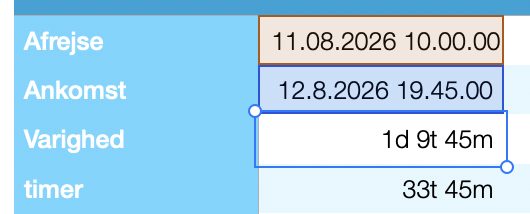
As it may not be commonly known, and I should stress that I am not sure what features “DAYS” will have, you could always use dates and time in Numbers for, for instance, finding the duration of something. I here use it for travel time for tax purposes, first giving me the number in days and hours, then just in hours:
(in Danish, Afrejse is departure, ankomst is arrival, Varighed is duration, subtracting the two dates above, Timer is Hours, showing the duration in a different way.)
I haven’t used the function yet, but one thing I can guess is that the result can be used in numeric functions. Until this I’ve been using the DATEDIF function DATEDIF(firstdate,seconddate,DAYS) because, unlike Excel, you cannot subtract one date field from another and get a numeric result - you get a duration result, and you need to convert that to a number (which could be days, hours, months, years, seconds, etc.) to subtract from another duration, for example. This is very different from Excel, giving the result of a subtraction of two dates or times in days (with a decimal for any fraction of a day), which can be converted to other time measures through multiplication or division.
One of my small annoyances with Numbers as someone who used Excel (and Lotus 123 before that’s) is that you can’t take a date field and add a number to it to get a date in the future - you need to convert the number to a duration, or if it’s a constant make it deliberate, 28d rather than just 28.
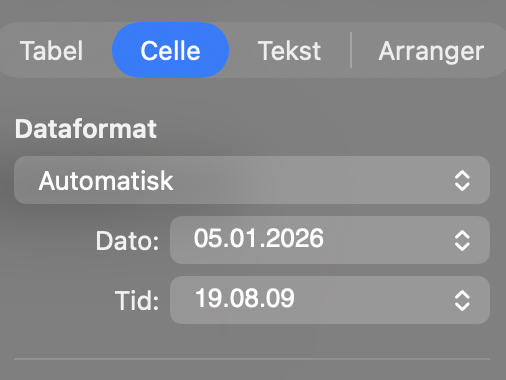
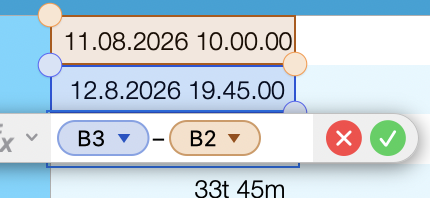
How did you format the Afrejse and Ankomst cells, and what was the formula/function in Varighed please?
I think I came across this problem some months ago and found that Excel/Libre and other spreadsheets had the ability to compare two dates and give a number of days, but Numbers didn’t. Good that it will finally get it but I won’t be updating to 15 so it would be nice to know the formula/function for use in v14.
Good question, I probably tried a few times myself, when I started using this years ago: The Data format of Afrejse and Ankomst are as follows: Dato is date and tid is time in Danish:
Unfortunately, Numbers 15.4 breaks collaboration with users who are still on 15.3.1.
Since Numbers 15.4 requires macOS 26 Tahoe, which in turn requires an M1 chip or later, this can become a real problem if you’re using an older Mac. I found that out the hard way.
You’ll be told that you need to upgrade either Numbers or macOS.
So, if you’re collaborating with others in Numbers, check which versions everyone is using before upgrading to Numbers 15.4.