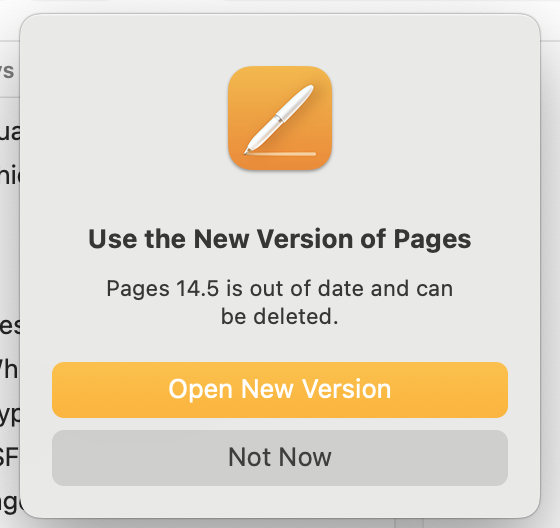
I use Pages & Numbers exclusively for word processing & spreadsheets. Today, when opening documents in each, I received a message (from Apple) stating neither app will be updated & directing me to the Application site/app to download new versions of each, still named Pages & Numbers. I was confused as I hadn’t seen anything previously about these changes.
I downloaded the “new” Pages app, w/a similar but different icon. Might function the same but looks quite different than “old” Pages, needed a lot of customization to the toolbars, etc. Haven’t downloaded the “new” Numbers app yet as I’m dreading the customization it will likely require. My iMac currently has both Pages apps installed, the new one doesn’t replace the old one.
I was completely unaware Apple was re-doing the apps. Have I had my head in the sand? How did I miss any notification this was happening? Don’t understand why Apple didn’t just migrate the old apps into the new.
Interested to see what others think about this & if there are any suggestions how to make this switch less painful. Thx for any input.
A good overview of what Apple did was published yesterday on MacRumors:
My spreadsheet learning days were spent mostly on Excel so when I decided to stop buying MS Office, I moved to Libre Office. I had a look at “Apple Office” but I didn’t want to take the time to figure out how to use it since the transition to Libre is easy for anybody who is already familiar with MS Word, Excel, Powerpoint, and Outlook. Yeah, word processing and slides don’t vary too much but spreadsheets have a steep learning curve IMHO.
I originally used Word & Quattro (yes, I’ve been around for awhile). When I moved to Apple in the early 2000s, I switched to Pages & Numbers (Quattro had been gone for awhile, had been using Excel); both have been sufficient for my use.
I’m retired now so all documents (word processing & spreadsheets) are for personal use only, my needs are minimal.
Thanks for the link to the article. Since it’s unlikely I’ll need any of the new/upcoming features, maybe I’ll just stick w/the “old” versions of Pages & Numbers.
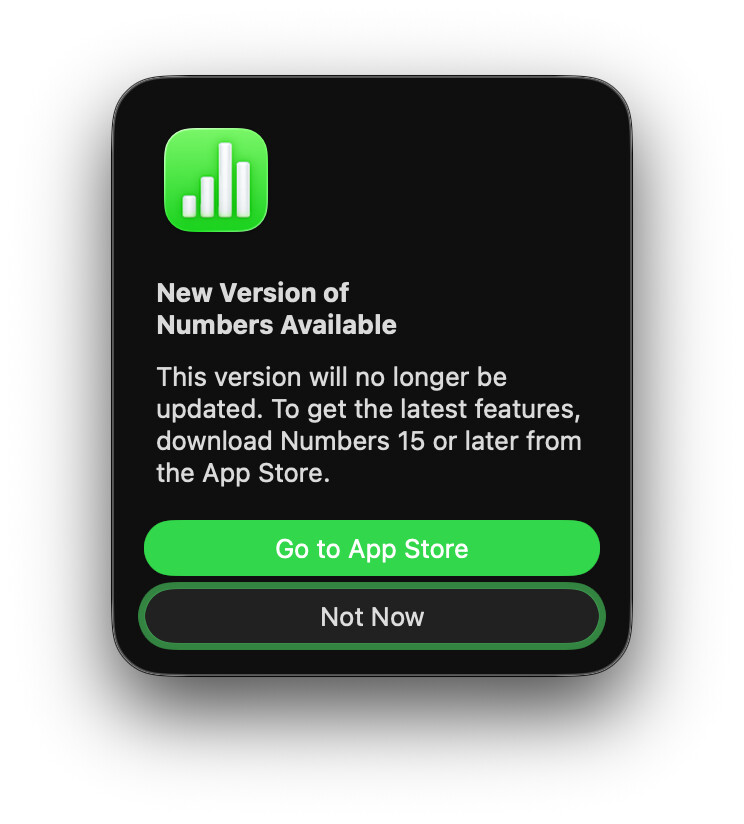
Interesting. I saw the general update go through for Keynote, Pages, and Numbers. After seeing @sf.ross ‘s note, I launched Numbers (not a real frequent user, myself). I assume this is the alert she saw:
It seems odd to me that there is such an effort being made to draw a line between versions 14 and 15. I mean, why not just update the app, like normal? Why have the two versions? My understanding is that if I don’t pay for the new subscription Apple is offering, then nothing will change.
My understanding, from the coverage that I read, is that they’ve shifted from having separate Mac OS and iOS entries in the app store to having a single entry in the app store that runs on either platform. This is a one-time shift on the Mac side to get from the old Mac-only app store item to the new multi-OS app store item. (The “new” app entry is the old iOS entry, which is why Mac users have to go through this process while iOS users do not.)
Yes, that’s the alert I received. Admit I probably reacted hastily as I was rushed & initially thought I didn’t have a choice, so I updated Pages. As mentioned previously, both apps are only for personal use, not business. If possible, might delete new Pages app & continue to use old Pages & Numbers. A bit concerned that at some point they won’t be functional & will have to start all over again w/other apps.
Jason Snell has a good explanation / critique of the way this app rollout was done on macOS over at Six Colors. It bothers me that macOS users should be the ones to have to go through this confusing process; no one that I know who regularly uses spreadsheets uses a phone as their primary platform for that sort of work. I expect to hear questions from a few family members about the surprising dialog soon.
As for me personally, seeing upsells for “premium templates” when I only want to do a little budgeting makes me sad, but about what I expect from Apple these days. Thankfully LibreOffice works nicely for my needs, it’s just a matter of converting some older files.
I updated Numbers this morning and updated my daily workout spreadsheet - everything is working fine and looks good with the new version, plus the old version remains on my Mac if I need it. I don’t create too many spreadsheets from scratch; mostly they are just duplicated and renamed from my old ones (my yearly budget, workout, credit card tracking, and estimated tax calculating spreadsheets.) Sometimes I do quick little spreadsheets, such as when I calculated the difference between switching from cable TV to streaming (with YouTube TV plus the other subscriptions I’d need to match it.) I’ll never need artificial intelligence or fancy templates for that.
I still haven’t used Pages for anything, but I generally also use it very casually.
Last year I switched all of these spreadsheets and word processing documents from Excel and Word to Numbers and Pages, mostly to stop paying Microsoft the subscription, so it’s a little ironic that Apple decided to go this way. That said, for what I need, I don’t need it, so I’ll just keep using the free versions, and I suppose I’ll have version 14 to fall back on if Numbers and Pages goes premium-only. I can see Apple doing this for the Pro apps, but for basic Pages and Numbers and Keynote? - I hope they stay free and updated.
I installed the new Numbers and haven’t noticed any differences in use. However Pages won’t install. I just get a spinning wheel on the App Store page - anyone else had this? Fortunately I can still use the previous version.
For my work needs, I do need to use Microsoft Office 365… I also come from the Lotus 123 / Quattro Pro era and I like doing small spreadsheets for personal use in Numbers. Do not like the move to the freemium model, I am afraid that the free part will stop being developed and the new features will come only for the subscribers. Do not plan to subscribe.
I also have tested other options that run on MacOS and are similar to MS Office, so no big changes in the way they work compared to MS Office, just less features:
After reading comments by others, as well as a couple recommended articles, realized I have no need for a new version of Pages or Numbers, particularly since it appears there will eventually be costs involved. The current/old versions meet my needs, which are simple & I’m not interested in AI features. I deleted the new Pages & didn’t install the new Numbers.
If Apple makes further changes & the new versions become absolutely necessary (possibly w/fees), I’ll explore other options, such as LibreOffice, which was recommended by a few people.
Appreciate the testing of other suites. When I was working, I also had to use Word & Excel; coming from the “old” days of Word Perfect & Quattro, didn’t like the MS Office options but didn’t have a choice.
Now that all my documents - word processing & spreadsheets - are completely for personal use, I’d like to continue to keep everything as simple as possible. Hopefully, Apple won’t “force” me from the current 14.5 versions of Pages & Numbers.
I’m downloading the latest appropriate LibreOffice, after reading several positive comments here on TBT. I have the feeling it will be good to have a backup/alternate to iWork.
‘less features’ is a positive aspect for me. I use Numbers daily for home bookkeeping and annual income tax filing, Pages for the occasional printed letter, and Keynote I haven’t opened in a very long time. I don’t need anything fancy from Numbers, it has already more features than I need or know what to do with. I tried keeping our expenses by hand for two years and kinda got into the swing of it after a while but a couple of handy tricks in a spreadsheet can really help.
The main point of these updates got perhaps a bit lost in the discussion. The new apps (> 15.x) can utilise () a number of AI supported functions, the MacRumors article describes them. If you don’t need them or don’t want to pay, you still have a normal version. Apple has officially stated that Pages/Number/Keynote will stay free to use. I’ve lost the link to the source of this statement, but it was definitely an official Apple statement.
well colour me confused. I just assumed that I was supposed to use the NEW version as the older version is being “retired“. I have no desire to give Apple a penny to use any of their Pages, Numbers, or Keynote apps. Are they pulling a fast one on us.?
No, that’s just standard corporate “confusing speak” to get you to do what they want.
One time, I was wanting to upgrade one component of Microsoft Office 95 to Office 97 and I was confronted with a dialog box that if I had done what they had wanted, would’ve deleted everything in Office 95 leaving the one Office 97 program. I stared at that box for about 10 minutes until I figured out what to do.

 Thankfully LibreOffice works nicely for my needs, it’s just a matter of converting some older files.
 ) a number of AI supported functions, the MacRumors article describes them. If you don’t need them or don’t want to pay, you still have a normal version. Apple has officially stated that Pages/Number/Keynote will stay free to use. I’ve lost the link to the source of this statement, but it was definitely an official Apple statement.