This persistent notification is always POST upgrade and even if dismissed, it just keeps coming back! Anyone know how to get rid of the damned thing?
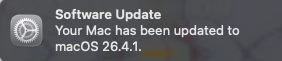
No matter how many times I dismiss it, it keeps coming back. Not just Tahoe, either.
Have you tried clicking on the notification instead of dismissing it with the ‘x’ in top left?
Absolutely, yes. And back it comes a few minutes later
1 Like
No clue. Never happens to me more than once with iOS or iPadOS.
Nick, was the macOS update installed while logged in to the Mac with a different account from the one you usually use? For example, if it were run from a local admin account, while you usually log in with a personal, standard account? If so, you may need to log in using that local admin account to dismiss that message there. Then restart the Mac. After that, if you log back in with your personal account, you may not see that message any longer.
If that is not the case, or does not help, then try having a discussion with Google’s Gemini about this. I find it to be a pretty good troubleshooting assistant. 