This is a continuation of my earlier thread re: losing connectivity between my Mac and iPhone since updating to Mac OS 26.6 (and 6.1, 6.2). Sorry to start a 3rd new thread on this, but I’ve received no emails in response to my last followup.
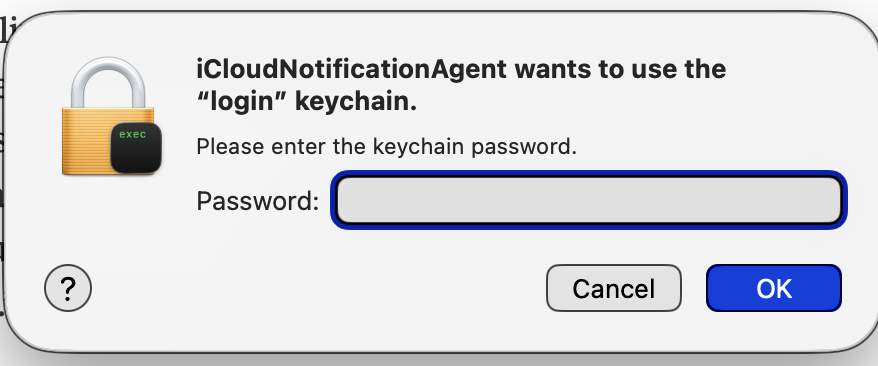
I tried following Doug M’s suggestion to log out of my Apple account before restarting, and it didn’t make much difference. Just a few hours after restarting (used to be a day or 2) I started getting prompts to enter my Keychain password. I’ve been confused about whether those prompts are real or could be fraudulent. They look like this:
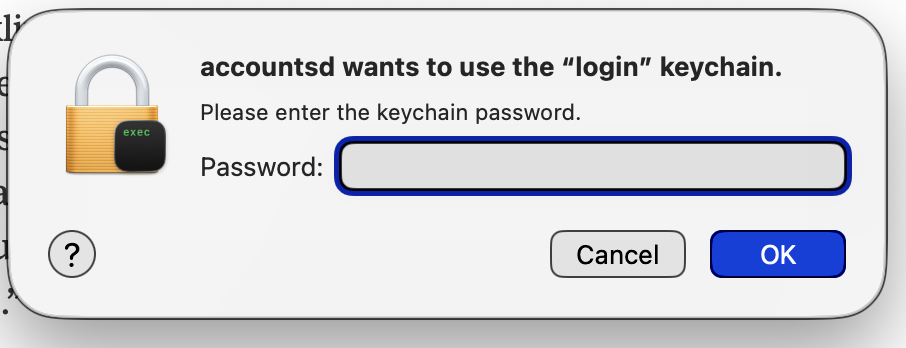
… which I took to confirm my suspicion that something fishy was going on, so then I Cancelled 2 or 3 other requests, including this one, which I’d seen before and always Cancelled, since I don’t know what ‘accountsd’ is:
I did enter my PW, however, when prompted by what appeared to be a request from zoomus, as I was in the midst of connecting to an important Zoom meeting.
At this point I have no idea what is going on. Has no one else had this issue with Tahoe 26.6?
I’ve had no issues like that on any version of Tahoe.
At this point I’d consider my second suggestion: create a new user account on the Mac, log in to your Apple Account, and see if you can use iPhone Mirroring from that account. If that works, I’d then consider moving files from your current account to the new one.
Or, of course, contacting Apple Support and see if they can help resolve the issues with your current account.
It’s been a while since I have done it, especially Apple Music files - I subscribe, so it’s easy to simply download files from iCloud on a new user account for me.
I am traveling without a Mac, so hopefully someone will chime in with a good, detailed response. But, simply, you can move files in their folders from the old account home folders to /users/shared and then, from there, to the same locations in the new home folder. (Probably one folder at a time.) That should copy the music library as well. You’d probably need to do a global file ownership change when you copy them to the shared folder (hopefully somebody will chime in with instructions for that.)
You can also use Adam’s SetShot app on the old user account to record changes from the defaults in the Settings app and make sure that they are maintained in the new user account.
Then it would be the boring task of opening all of your applications and making sure that the new user account has access to them.
Again, hoping that someone will chime in before I am home next Wednesday with more detailed (if not better) instructions than that.
A start, though, is making sure that iPhone Mirroring works in the new user account without the same issues.
I replied to one of your earlier posts saying the same thing you’re describing kept happening to me in Big Sur and Sequoia, but although I did a fair amount of troubleshooting and research at the time, I never found a solution that explained everything, and whatever the issue was went away completely when I moved from an Intel MBP to a M4 MBP in Sept. '25. FWIW, that alone would make it seem to not be specific to Tahoe.
I looked back at some notes I found from when I was troubleshooting the issue (mostly in 2024). I too at first was concerned about making sure the prompts were legit, and everything I found when searching for the meaning of the various processes or keychain items asking me to login to this or that indicated that they were legit, even if it wasn’t clear why they showed up in the first place.
Since you asked specifically about the “accountsd” prompt, when I just now searched that word by itself, i.e not “accountsd popup” or “mac accountsd login request”, Google’s AI answer went straight to a brief explanation of what that process does, and then multiple reasons (with links of course) both for why it may be showing up as a login request and what you can try to stop it from happening. It also asked for more details so it could help me further, but I didn’t keep going. I wasn’t using AI much at that time, Claude or ChatGPT would be my preferred choice now, but for something like this I wish I had been.
The purposes of any of the other processes that get shown in the login prompts and/or keychain requests can all be found just as easily of course, and once you had a better understanding of some of them individually, you could try reframing a new question explaining that all of these things are happening at once and see if it can help tie it all together for you. If you’re not using one of the AI tools to help you troubleshoot this, I think it’s worth a try.
Have you tried to boot into Safe Mode. Hold Shift during startup on Intel, or hold the power button to reach startup options and Shift-click the startup disk on Apple Silicon? Then restart normally. This is to clear cache corruption that can be the reason for this. It is a trick that has solved a lot of problems for me in the past.
I don’t have a specific answer, much less an actual solution, all I know to do for an unusual message like that is to search it.
I started typing the message in your screenshot into Google and didn’t even get half way through the 2nd word when it completed the full, exact phrase. Like the other popups, it seems to involve or be related to a problem with keychain in some way.
Besides what the AI search results show and summarize, you may want to start here, which is from this past December:
As with the earlier one, there are multiple Reddit and Apple Community forum posts about this specific message. Unfortunately I can’t offer anything more specific other than pointing to those links. Good luck with it!
Brian, I’ve had a busy last week and just got around to trying this. I’m running an Apple M2 processor, but holding down the power button doesn’t give me any options before the Mac restarts. I tried just holding the shift key down during restart but don’t believe my Mac opened in Safe Mode. (It’s been so long since I’ve tried it that I don’t remember what that looks like.)
Messages opens now, but it only shows the messages that were there a week ago before I lost the connection. Will see if I start getting those keychain prompts again. I did take a look at my apps that open on login and replaced one that was a little bit out of date.
When I boot into Safe Mode, I usually use a wired keyboard because I don’t think certain BT keyboards connect soon enough to detect the Shift down. Apple keyboards seem to always be connected and don’t seem to have the delay.
Many thanks for the link to Eclectic Light’s safe mode instructions. 2 things were either missing from the Safe Mode instructions I got earlier, or I overlooked them:
It’s necessary to Shut Down first in order to get the screen showing boot options.
I had to let go of the shift key and press it a 2nd time to get the ‘Continue in Safe Mode’ button to appear.
Everything seems to be working now; the real test will come in the next day or 2, which is when I’d lost my phone connection in the recent past.
After 2 days after a Safe Mode restart followed by a regular one, the connections to Messages and iPhone Mirroring seem stable so far and I’ve only gotten 1 unexpected keychain prompt.
The only thing that still doesn’t seem right is that Messages on my Mac doesn’t seem to be fully synced with Messages on my phone. Some messages I’ve read on the phone still aren’t showing up on my Mac screen; I don’t believe this ever happened before this last round of problems.
Thanks to all who’ve helped me sort this out.
Brian.
Also copy/pasting of text between my Mac and my phone is still not as reliable as it was prior to Mac OS 26.6. Have others seen this, or is it likely an artefact of the problem we’ve been discussing?
At this point I can only suggest following @ddmiller advice. Do it only for finding out if it makes a difference. Then solve next steps when you have a conclusion.
Regarding copy/paste I have the same reliability problem.
I think I’m going to have to consult a local technician. I’m afraid that rebuilding my Apple account may be beyond my skillset and the outline he posted already referenced things I was unfamiliar with.