Is this just me, or are others seeing this too? In the dock, nested folders display with a generic document icon instead of folder icon if they are aliases or symlinks. This happens regardless of option to display as folder or stack. If the generic document icon is clicked, the aliased folder’s contents display correctly, instead of launching what appears to be a document.
Confirmed on macOS 15.6.1. Don’t think I’ve noticed this before, and I don’t keep folder aliases in my Dock, so I’m left wondering (along with Ace–the band, not the forum moderator) how long this has been going on.
Thank you. I don’t have aliases in my Dock either, but I do have symlinks within Dock folders. And when drilling down that structure, this bug really throws me off at times. Until I remind myself that that generic document icon is actually a folder that, when selected, allows me to drill further down.
I also suspect this has been in there for a while, certainly since Sonoma. Possibly longer.
Reporting to Apple.
I seem to recall running across this issue long ago, as in back in OS X was still new. Maybe it was fixed in the interim and regressed, but my memory may not be reliable.
At the time, I figured it was one of those interface oddities that was a consequence of trying to fold classic Mac features into a completely different, UNIX-based OS. I remember thinking that it probably was one of those easy-to-describe features that actually would be a lot of work to implement.
(Does anyone remember hierarchical folder Apple Menu tools like BeHierarchic?)
Works fine for me on Ventura. The aliased folder displays as a folder with an arrow, exactly the same as in the Finder.
I have seen temporary oddities for Dock icon displays before, though. You could try some combination of killing the dock (kill dock) and resetting the icon cache (sudo qlmanage -r cache), but my notes say that when icons are wacky, only fix that works is to reboot.
Devontechnologies (maker of several useful utilities, such as DEVONThink) has a freeware app called XMenu that they describe as:
Add one or more out of six menus to the right side of your menu bar. They give you access to your applications, folders, documents, files, and text snippets. Launch any app with a single menu choice or insert text snippets into your documents.
(scroll down)
1 Like
This is not temporary by any means. Proper display is permanently broken for both aliases and symlinks. A reboot will not change anything.
My favorite was FinderPop.
[Update: When I got a Powerbook G4 with OS X, I switched to DEVONtechnologies XMenu. I don’t remember why I stopped using it.]
2 Likes
Huh. I wonder if we’re all doing the same experiment? All I did was make an alias to a folder, and then drag that alias to the dock. It looks like a generic document (blank white with the dog-ear corner) with the little arrow that marks an alias.
Then I misunderstood. I thought that this was:
- Folder in dock
- alias in this folder > another folder
Because, why would you drag an alias to the dock? Entries in the dock are essentially aliases.
Both are correct. On Sequoia the bug shows either way you do it. I am encountering the issue with nested folder aliases (as per the thread title), but the trial @fischej suggested shows the same bug so as a simple test is perfectly fine.
On Sequoia it’s broken. On Mojave it isn’t. Somewhere in between Apple broke this. It’s been reported.
A free donut is waiting for anybody who can tell me if this bug has been fixed in Tahoe.
1 Like
I’m seeing it too, but it seems intermittent. I have a folder, “QuickList” that contains aliases to my commonly-used documents and to a folder of files. That folder was dragged to the dock. When I open it (in grid view, so make the images large enough to see clearly), I see:
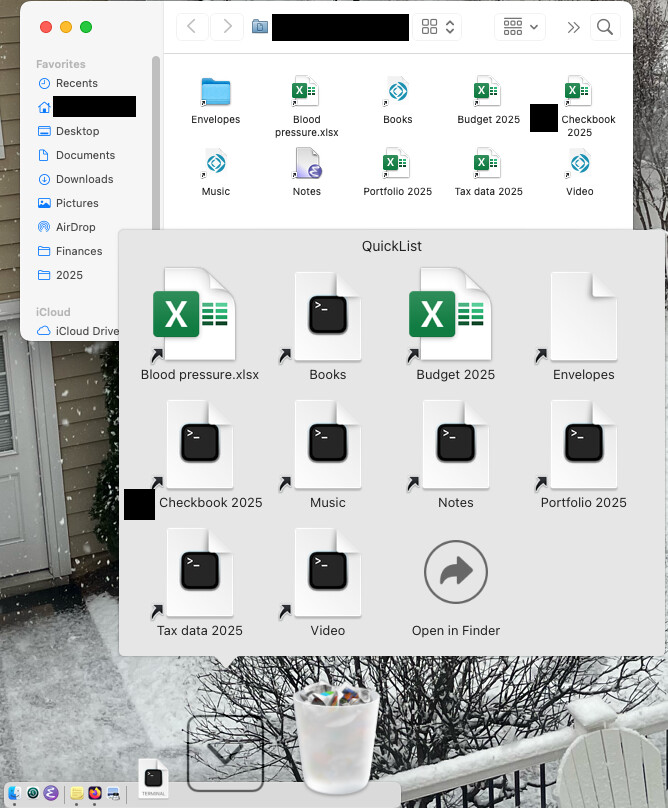
Interestingly, two of the files appears with their proper icons. The remaining ones are showing generic “Terminal” icons. And the folder (“Envelopes”) is a generic document. If I hover over Envelopes in List view, so the sub-list expands, the icons there are all correct. Which makes sense because “Envelopes” is an alias to a folder of actual files.
It wasn’t always like this, but I don’t know exactly when it changed. I normally open the folder in List view where the icons are so small I didn’t notice.
This is on macOS 15.6.1 (Sequoia)
Works for me on Sonoma (14.7.7)