My MacBook Air M3 (macOS Sequoia 15.7.5) has started moving the icon for the internal hard disk down one slot on the startup screen. (By “down one slot”, I mean that I can move the icon from its location after I wake the computer to a position a bit higher on the screen, then select View > Clean Up Selection, and the Finder will happily put the icon in the top right position on the startup screen.) As far as I can recall, this started in the past week or two and the icon is repositioned every time I wake the computer. (One time, a screenshot occupied that position and the Finder put the icon for the internal hard disk in the next available slot down.)
Here’s a bit more detail that I think should not be important. I run the MBA in closed clamshell mode with two displays. The startup screen is a portrait-oriented display to the left of a landscape-oriented display. Both displays are connected to a CalDigit hub. None of that has changed in months.
I installed macOS Sequoia 15.7.5 on March 26, and maybe that is when this behavior started.
How do I get the Mac to leave the icon in the top right position on the screen? Thanks.
I have a similar setup and the same issue but also the external drive icons move to inconvenient locations at startup or when closing the MBA for clamshell mode. There doesn’t seem to be a way to fix it.
Thanks. I have not had the issue with desktop icons (drive volume or otherwise) moving around, but I hardly ever open the clamshell. I do have windows move from the secondary to the primary screen if I have any open when the computers goes to sleep.
One aspect that is particularly frustrating is that macOS will happily put a new icon (such as a screenshot or a newly mounted drive) in the vacant slot where it refuses to leave the internal disk icon. It’s like that top right slot is somehow marked “unavailable” at wake up, but then released.
I don’t think that’s it. In my experience, that slot will remain unused, if other icons in the vicinity are too close to it.
Since I use a clamshell setup when at the desk, but also carry my MBP around a lot when I’m working around the lab or going to meetings, I often find that, as the resolution switches with the screens, the grid icons are attached to (I have snap to grid set) changes. And at times, that has changed in such a way that for the grid in use that that time, that top right spot no longer appears available. A mounted disk then gets displayed somewhere else even though it might appear as if space is available at that top right.
If you, however, first go jiggle the already displayed icons so that they get aligned to the updated grid, that top right spot becomes properly available, and the mounted disk does end up there again.
Why the grid does change the way it does, just based on changing displays, that remains unclear to me. Perhaps it’s because the grid is defined based on starting at the top left corner, whereas disks are default displayed at the top right.
It seems that we are discussing two similar but different phenomena. Except when I need to Allow Accessory to Connect and the accessory is the display or the hub to which it is connected, I have not opened my clamshell in months, and what I described (internal disk icon moving down but top-right slot later being occupied by a new icon) has happened multiple times since I last opened the clamshell.
Or perhaps you’ve nailed it. Maybe when I wake the Mac, it first tries to put the hard disk icon on the internal display, moves the icon down because of a different grid alignment, then (later in the wake-up sequence) moves the desktop to the external display with the icon in the lower slot.
Whatever it is, I do wish that the Mac would not put an icon above the internal disk icon.
I have a similar problem – not sure if it’s the same thing. I’ve always put the internal HD icon in the top right-hand corner of the screen and I also now put my permanently-connected Time Machine external drive immediately below it. If the machine is restarted for any reason, those two icons are put in a random blank space, but the space they previously occupied is left blank. Everything else on the desktop remains exactly where it was. Why do they get moved when nothing else does?
I recall having similar problems with the drive icons “staying put” in the upper right corner. I fiddled with icon spacing a little, whether that helped or not is unsure. But lately they’re staying where I put them.
If you don’t want to re-order your icons, you can CMD-drag them, and they will snap to the nearest grid-points (as defined by your desktop/folder’s grid spacing - View → Show View Options).
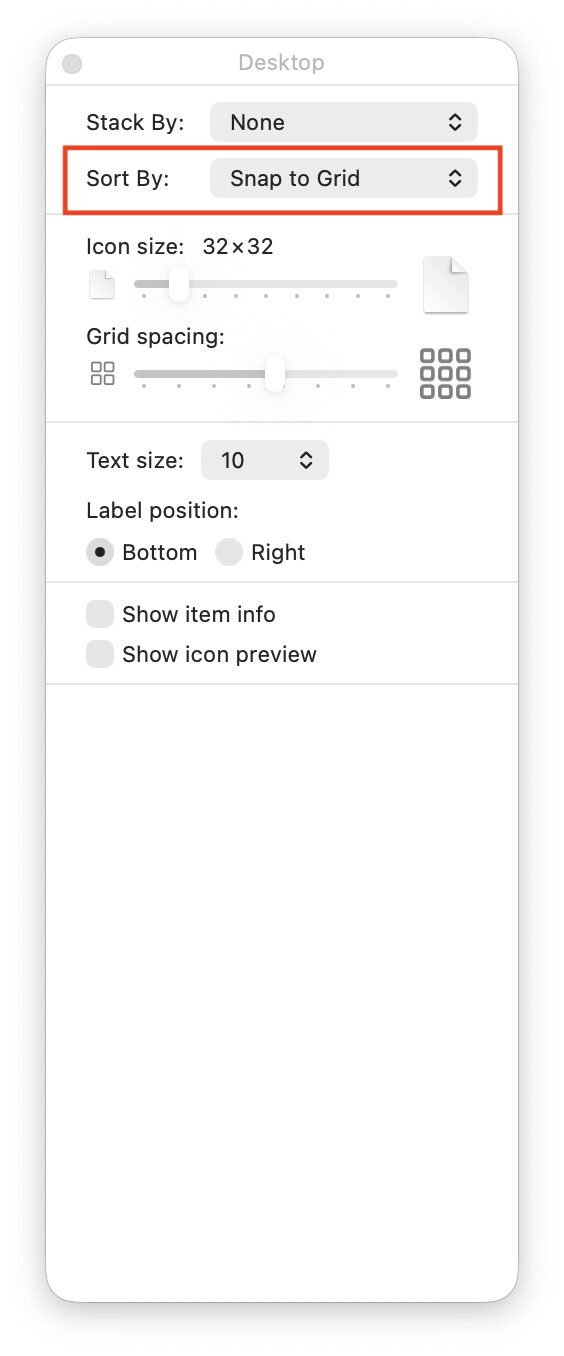
You can also set a folder to Sort By: Snap to Grid, so ordinary drags will always snap the coordinates to grid points:
The Finder stores the positions of Desktop icons for volumes in ~/Library/Preferences/com.apple.finder.plist, in dictionaries under FXDesktopVolumePositions.
It remembers the position of every volume you have ever mounted! Every CD or DVD. Every disk image, including disk images from installers. My iMac has 2,360 remembered volumes! Including, 19 for different versions of my current startup drive – it looks like it is matching on the volume name and some kind of id.
It could be there’s some problem with the preferences. A nuclear option is to rename it, but you lose all the Finder preferences you’ve set.
Since I have file icons strewn about the desktop on two screens (but where I want them), I’m reluctant to try this, since I assume it would relocate those icons from where they are. Is my concern appropriate?
I just tried that and will see where the startup volume appears the next time I wake the Mac. But is this any different from moving the icon, and then (while it is still the only highlighted icon on the desktop) selecting View > Clean Up Selection, which fails to maintain the icon’s location?
I don’t have that. Nonetheless, my Mac does remember the positions of volumes on SSDs. A Finder search for com.apple.finder.plist in Library fails, so maybe it has a different name in macOS 18?
Thanks for the follow-up. Now I have two comments.
I found the file, but the Finder search did not. I copied the filename and put it in the Finder search and the search failed. Somehow the Finder is excluding the file from a search. Oh, well, Apple is probably protecting me from myself.
I copied the file’s contents into a BBEdit file and asked BBEdit to find the string FXDesktopVolumePositions in the file. That search failed. I then asked BBEdit to find the name of my internal disk in the file. That search failed. I then asked BBEdit to find the name of an external disk whose position the Finder remembers. That search failed. Either something has changed since Ventura or I’m doing it wrong, but it’s simple enough that even I should be able to get it right.
The .plist is a “Apple binary property list”, which means it is an XML properly list but compressed into a binary file for efficiency. To read it you need to open it in something that understands this format. Such as:
I used Thomas Templeton’s (author of Find Any File) free Prefs Editor
Quick Look understands binary and non-binary .plists.
If you have Xcode installed, .plists open there by default. An advantage of Xcode over Prefs Editor is that Xcode can open any .plist, while Prefs Editor is designed to only work with .plists in the Preferences folder.
The Prefs Editor page lists some other alternatives
Apparently I wasn’t clear; sorry. My first comment was that the Finder wouldn’t help me find the file (but I found it by scrolling through the folder). My second comment was that I copied the contents of the file (using Quick Look and command-C) and pasted those contents into BBEdit, but then BBEdit could not find the string FXDesktopVolumePositions in the file.
Since I was able to read and copy the contents, it seems that Quick Look is “something that understands this format.”
This will trash all saved stored desktop volume icon positions, but it will leave all the rest of your Finder preferences unchanged.
It will not be any different. I suggested it because sometimes icons get repositioned if there’s another icon nearby (possibly overlapping), and priority seems to be given to icons that are on grid coordinates.