I’ve been using the Divvy app (Mizage - Divvy) for many years (early 2000s?). It easily allows managing the size & placement of multiple apps on my iMac screen. During the last couple Mac OS updates, I’ve received notifications that in a future (soon) Mac OS update, Divvy will no longer function.
I’ve sent a couple emails to Mizage asking if Divvy will be updated for future Mac OS but haven’t received any response.
It’s possible there is now a built-in Mac OS feature that provides this function, when I started using Divvy, there wasn’t.
Does anyone know if there is now a built-in Mac OS function for this? If not, any suggestions for a replacement for Divvy? Divvy has been incredibly useful - and simple to use - all these years, use it multiple times/day.
Thank you!
Interesting app, never heard of it. I’m used to overlapping windows for many years now and use four fingers up or down on the trackpad to see what’s open.
This MacRumors article of 2 years ago announced the new macOS window management features that have been integrated into the green window button and Window Menu since then.
Windows and Linux also have some variations on this theme of keeping multiple windows visible.
A quick web search on this turned up another app called Rectangle. I never heard of it or use it or have any connection. Maybe it suits your needs if the macOS options don’t.
It looks nice, and supports a broad range of systems starting from Snow Leopard onwards, but appears to be an abandonware, as the last update in the App Store was 6 years ago. I’ve never seen anything that would allow this kind of arrangement of windows of different sizes. Probably, the closest to it in terms of functionality might be a free app named Amethyst, you can give it a try.
I originally purchased Divvy directly from Mizage; all updates have been directly from them, the most recent update was sometime in the last year. When I purchased Divvy, it was still standard to purchase most apps from the developer, it was the early days of the app store, many apps weren’t yet available thru the App store.
I can use the trackpad to see what apps are open but Dizzy allows me to have 2 (or more) apps open in clearly defined spaces at the same time. Helpful when filling out a document using data from another app or balancing my Checkbook app while referring to data in a Numbers spreadsheet.
I’ll take a look at the MacRumors article mentioned, maybe Mac OS does offer this function now. It wasn’t available 20+ yrs ago (I’m sooo old!) but maybe it is now.
Thank you.
I found Tiley. Have used it a couple of months and is very satisfied with it. Works very similar to Divvy. Tiley — Arrange Your Windows with Ease
Read the MacRumors article. The settings shown in the article (Desktop & Dock) don’t correspond to the settings on my iMac; I’m running OS 26.5.1. I can use the green window button to move windows & I’m glad to hear that’s an option, thank you. Using the green window button seems to default to an entire 1/2 screen (top to bottom). Divvy is still much easier, as I can choose where to put each window, the size of each window, & allows more than 2 windows at a time. To be fair, I rarely need more than 2 but it is helpful to have some extra space around the windows.
If Divvy does “go away”, I will make adjustments & start using the green window button.
Thank you.
Thanks for the Tiley reference, it appears to be similar to Divvy, actually states it was inspired by Divvy. I’m not certain how frequently it’s updated as it mentions “requires macOS 14 (Sonoma) or later”, so I’m concerned that it might also be headed to incompatibility w/future MacOS versions.
If Tiley is still around & functional when Divvy “bites the dust”, I’ll give Tiley a try. Thank you.
Have you tried Magnet?
Haven’t heard of it. Will take a look at it. Thank you.
The pro version lets you create your own configuration of window sizes and locations, with your own shortcuts.
Just came across these settings, which I’d forgotten about. Maybe useful, in Desktop & Dock Settings:
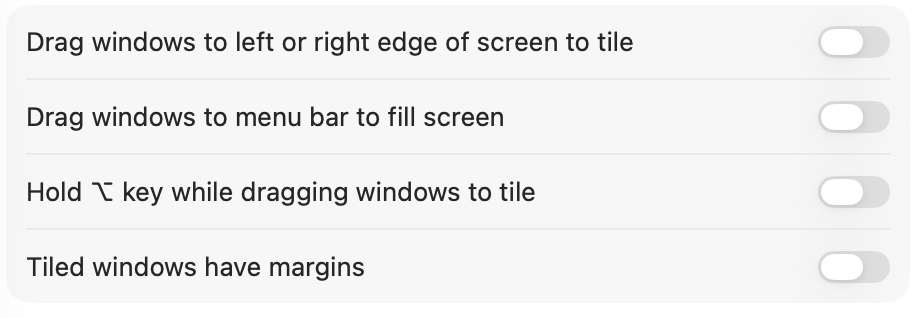
That corresponds to the settings on my iMac, which are different than shown in the MacRumors article.
Thanks for the update, it confirms that I have everything set appropriately.
Perhaps worth re-reading How to Tame Sequoia’s Window Tiling - TidBITS
Thank you, I will do that.