Originally published at: Apple’s HomeView: A Peripheral in Search of a Purpose - TidBITS
I have had trouble writing this article, and it’s more than just mental fatigue from my post-concussive symptoms (see “What a Broken Wrist Taught Me About iOS 27 Dictation and macOS Voice Control,” 21 September 2026).
Apple’s new HomeView is an odd device, and I don’t think it will be clear what it’s actually good for until people are using it in the real world. Plus, it relies heavily on Siri AI, and my experience with Siri AI so far is that it takes significant effort to learn to use it. Not so much how to use it, but realizing that a particular problem could be solved by Siri AI and seeing if it can be. Sometimes yes, sometimes no.
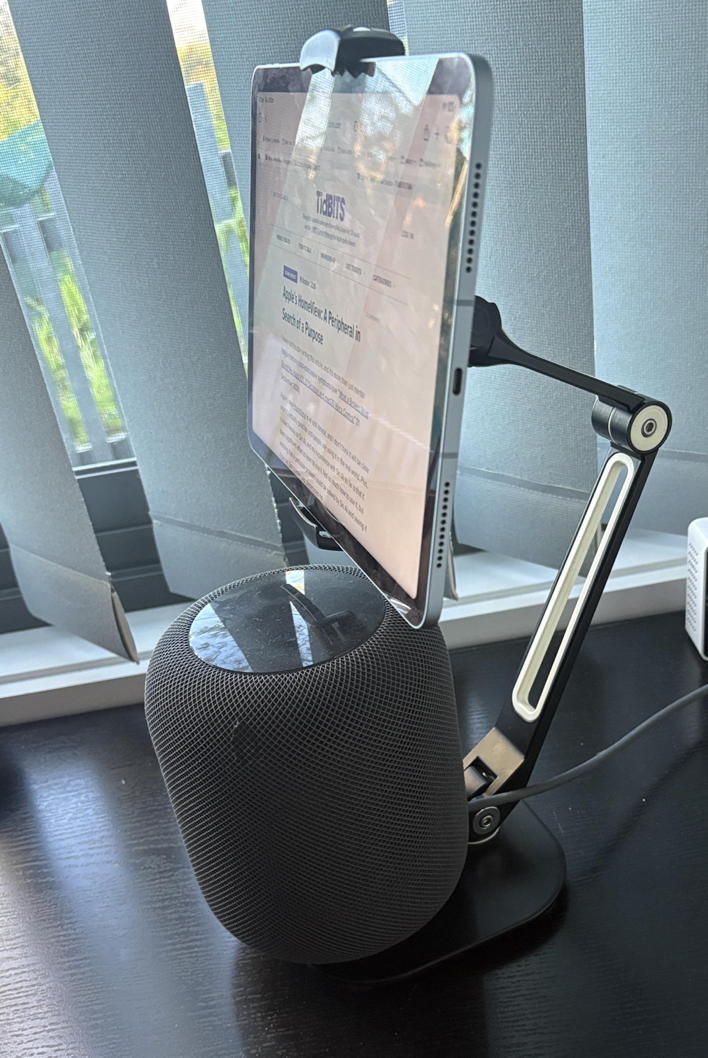
So what is the HomeView? It’s essentially a HomePod speaker with a small square screen attached to an arm that moves up and down. Rumors dubbed it the “HomePad” because it seemed like an iPad mini bolted onto a HomePod. There’s also a wall-mounted version that lacks the HomePod-like base that contains a subwoofer. You interact with the HomeView primarily by voice, although the screen also accepts touch input.

What the HomeView Can Do
Although the HomeView has an A18 chip and can thus run a selection of Apple apps, the only third-party audio and video apps it supports are those that also work with CarPlay, which is truly weird. (Yes, CarPlay now supports video apps when the car is parked.) As far as I know, Apple has said nothing about opening the HomeView up to developers in the future.
Given how many apps Apple makes today, the HomeView can still do quite a lot, although without the choice and flexibility of Apple’s other devices. Built-in apps include Alarms, Calendar, FaceTime, Find My, Home, Intercom, Messages, Music, Podcasts, Reminders, Safari, Settings, Timers, Weather, and World Clock. With a paired iPhone nearby, you also get Audiobooks, Classical Music, News, and TV.
All of those apps should be familiar and will give you a sense of what you can do with the HomeView. The question is, which of those things do you want to do by talking to Siri AI or using the HomeView’s small screen instead of on your iPhone, Apple Watch, iPad, or Mac?
What Is the HomeView Actually For?
The Apple Watch is the device most analogous to the HomeView because Apple intended it as an extension and alternative to the iPhone. Reading a notification only requires a glance at your wrist rather than pulling your iPhone out of your pocket or bag, and you can use Siri on the Apple Watch to start timers, set reminders, reply to messages, and more. More importantly, the Apple Watch is, at its core, a functional wristwatch that shows the time and, optionally, other relevant data through complications. It’s also a health and fitness tracker that significantly extends the amount and kind of data that can be collected beyond what the iPhone would provide. We understand what the Apple Watch is for.
Similarly, the HomeView seems to be an extension of your iPhone—and the iPhones of your entire family—that lets you perform a selection of Apple app-mediated activities on a larger screen in a living area. It’s like an Apple Watch for your table.
But what is the HomeView for? That’s a different question than what it can do. Arguably, it’s a tabletop clock, showing you the time without you having to look at your wrist—in its resting state, it shows one of a selection of what look like oversized Apple Watch faces. And it’s certainly a HomePod, so you can use it to play music or listen to podcasts, although it’s far from unique in that regard. For some people, the HomeView might be a dedicated FaceTime video conferencing device that’s easier to use than an iPhone, iPad, or Mac. But in our world, being limited to FaceTime means we won’t use it much, since most of our video calls use Zoom or Google Meet.

Apple produced a 3-minute promotional video that purports to show a “typical” family using a HomeView. The ad has drawn criticism from John Gruber and TidBITS readers, who were horrified by the behaviors portrayed, and more to the point, it doesn’t seem to show the HomeView making life any better. Certainly, nothing in that video matches how any “typical” morning has ever gone in our household.
Although we use our HomePods heavily to turn lights on and off and listen to music, it’s hard to think of much else we would choose to do on the HomeView. The one exception to that is using a wall-mounted HomeView to display recipes. I have long thought about attaching an iPad to the wall in our kitchen so that we could use it to display recipes from Paprika and the occasional food blog. I haven’t done so mostly because I haven’t found a mount that looks good, installs easily, and is adjustable enough for both Tonya and me, given that we’re quite different heights.
However, Apple says that the HomeView will display recipes reformatted from the Web. As someone who cooks seriously, I’m skeptical of HomeView’s one-step-at-a-time approach. I always want to read an entire recipe and see instructions alongside the full list of ingredients—how else will I get a sense of how much work the recipe is, how long it will take me, and whether there are any gotchas in how the author chose to present the instructions? What, you didn’t mention preheating the oven?
Ultimately, it’s telling that Apple calls the underlying software “HomeView Software,” rather than something like “homeOS.” As with the HomePods, which rely on an iPhone for setup and can do only what Apple has programmed them to do, the HomeView is currently a peripheral, not a platform. Whether it’s interesting to you depends on whether you find common activities on your iPhone, iPad, or Mac awkward because of their form factors.
Pricing and Availability
At least the HomeView only costs $299, making it $50 cheaper than a second-generation HomePod and $150 cheaper than an entry-level iPad. Bloomberg’s Mark Gurman has suggested that units have been sitting around in warehouses long enough to predate the increase in memory costs triggered by AI data centers.
I’m not excited about the HomeView, and Tonya has been highly negative about a permanent screen on the dining room table. Still, I may pick one up once I see how others use it in the real world and can imagine where it can live without being awkward to plug in. Pre-orders are available now, but availability has already been pushed to early December from the original 13 November 2026 promise.
The wall-mounted HomeView is the same price, but it will require one of three purpose-built mounts from Schneider Home, whose prices depend on how they distribute power to the HomeView: $59.95 (USB-C), $79.95 (AC), or $129.95 (PoE, power over Ethernet). Perhaps a future model will have a robotic arm (see “Could Apple’s Research Robot Bring Personality Back to Hardware Design?” 12 February 2025)—that would make it more fun.