XML file error when trying to visit website?

I’ve been an internet user since… late 80s or so and I don’t recall ever seeing something like this:
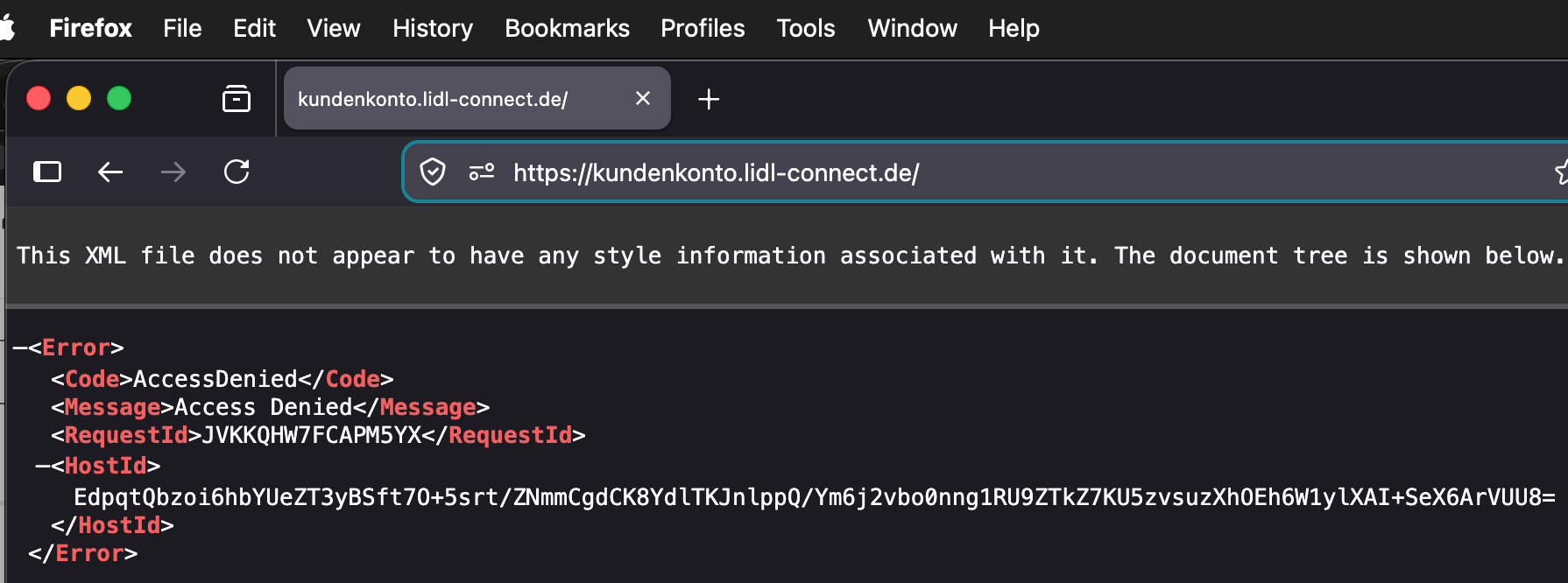
Same occurs on Orion browser. MacOS 26.3. Both browsers worked with the site in the last weeks at the same url. Other pages from the same company display normally.

Online search for the plain language text pops up a bunch of results on tech forums at least back to 2020, and much of the discussion is over my head. Searching to see if the site was down or hacked revealed nothing. Worrisome is that even searching for ‘lidl-connect’, a long established site for mobile phone/data service, didn’t even show this site in results.

I viewed page souce and similar code came up:

Maybe a website update went astray somewhere in the code?

What can I do to troubleshoot if this is my Mac, browsers, web connection or the desired site?

Also looked in Firefox’s Developer tools and the Console showed a couple of warning triangles and highlighted:

The character encoding of an HTML document was declared using the XML declaration syntax. This is non-conforming, and declaring the encoding using a meta tag at the start of the head part is more efficient. :1:1

This page is in Quirks Mode. Page layout may be impacted. For Standards Mode use “”.

Maybe an April Fool’s Day prank?

I thought maybe I’d hit some odd key combination that in Firefox invokes an alternate view of a page, but it’s same in another browser so seems afaik to be a web page issue.

If any modern day web site savvy TBTer can explain what this might be in relatively plain language I would be keen to read it. For now I’ll figure it’s a temporary issue and all will be well tomorrow.

There’s nothing that you, as a user, can do to troubleshoot this. It’s an error message being returned by the host server.

2 Likes

Looks like it’s working now. I get a Login screen, at least.

Thanks @fischej !, I tried it around 30 min ago and it was still the xml stuff.

Have tried restarting the Mac and browsers, still there. I also tried an iPad and the site worked normally. Since I have my login stuff on the Mac, I’ll try again and if it’s a no go will take care of the needfuls on iPad.

As I wrote that paragraph, I was getting a ‘drafts offline’ notification here on TBT and then most of my reply was gone.

There was also a problem with my wifi, which appeared to have fixed itself after disconnecting everything and plugging back together.

Seems a mix of poltergeists and gremlins may have moved in…

So I’m still getting the xml warning on the Mac browsers, and the ipad displayed the login page, I entered my data and got an “accessDenied” twice and a long string of gibberish.

So the iPad isn’t a solution either.

Will have to see if they have a customer service phone number, as I need to access the account to see if I have enough balance to continue the internet service past Sunday. Oy.

FYI: I put the URL in your second screen shot into DuckDuckGo browser 1.183.1/macOS 13.7.8 . The login screen loaded and I didn’t see anything unexpected.

1 Like

Have you disabled iCloud Private Relay and cleared any cookies or browser caches related to the site (Safari > Settings > Privacy > Manage Website Data on a Mac)? Recently, I had trouble viewing a site until I cleared it from Safari’s memory.

Thanks @aforkosh , good tips there. I don’t use iCloud Private Relay but I haven’t cleared caches in a long time. Maybe I thought quiting the browser would do it routinely but I need to go look at that in Firefox and Orion. I don’t use Safari, and have a Shortcuts Automation in place to quit it when it does.

Following up my last post, I finally tried it on the iPhone 13 mini, which I didn’t expect any different result, and as its small screen makes it harder to type the phone number and long password, but behold and lo, it logged in and I was able to check my available GB, confirm cycle ending date and new plan, and see the monetary balance.

Hang on, I’ll check on the cache clearing…
Firefox: nope, same result; also cleared everything, relaunched, same;
Orion: nuked more than caches, relaunched same failure.

Sigh.

I checked Little Snitch and only one google thing was blocked, i approved it, tried again, still the error comes up. As a side note, also noted in LS that Orion seemed to have contacted dozens of urls from browsing days or weeks ago for some reason. Firefox only contacted sites relevant to last 30 minutes or so.

On a last whim, I again tried loading the url with NordVPN paused and gadzooks, the page loaded, I logged in and it, just, worked like it had up til Weds! The iPhone and iPad were running thru Nord when I tried them, if I’d paid attention I could have tried to isolate the Nord IP that was troublesome.

We switched from PIA to Nord about a year ago and we”ve seen quite a bit more connection troubles like this. One day it works, another not. On a recent week’s trip to Bavaria, Nord didn’t work once in three different physical and network locations. I wrote and asked if there was some regional blockage but got a very noncommital dodge-the-issue reply.

Ack! so anyway the immediate issue is worked around, thanks for those who replied.

Same here. One of the reasons I switched to Tailscale. That and the price (TS is free).

1 Like