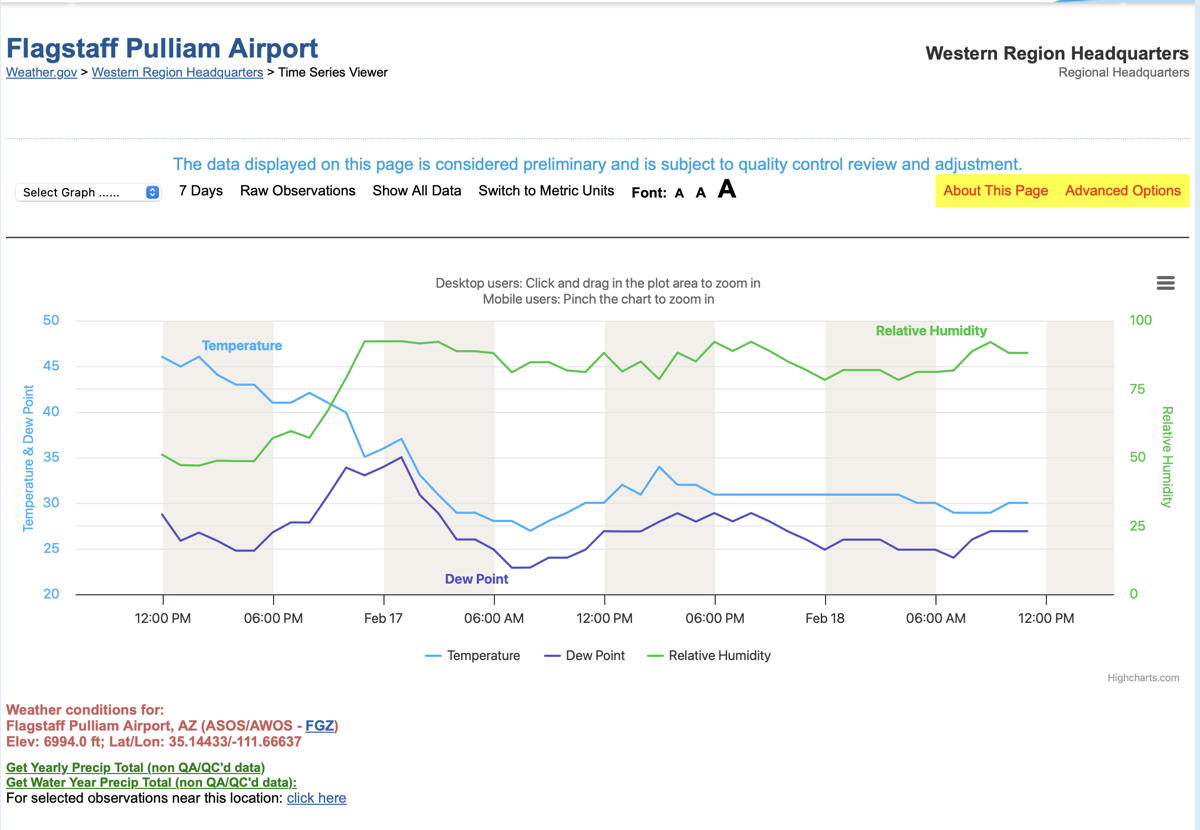
I rebooted into my clone drive running Safari 26.2 26.1 and that works. Next, Iogged in to my “pristine” test account and it fails. Lastly, I disabled extensions. Works in 26.2 26.1 but not 26.3.
I don’t think it is possible anymore to install older versions of Safari but would be happy to learn that it can be done. Perhaps I need to reinstall Sequoia (v15.7.3) via Recovery???
I use Cookie.app to remove web site data from all but a few sites. Every restart of Safari (which I do multiple times per day) clears website data so that should have been removed.
But as a test, I went into Safari and cleared everything. No change.
However, it’s good to hear that it works for you. That means I may be able to troubleshoot this. Which version of Sequoia are you running (15.7.3 or 15.7.4)?
I was doing updates today (Sequoia and Safari) and did the latter first. Once I ran into the problem I stopped updating.
I tried the site using Tahoe 26.3 Safari and it loads fine. Also, works with the latest version of Firefox 147.0.4 and I do use the Strict Privacy mode for Firefox which can cause some sites to not load completely but both browsers work under Tahoe. This is using an M1 Air. One thing I noticed is that Firefox loads the site a bit faster.
I had some time this afternoon for troubleshooting (it’s snowing…nowhere to go) and realized that it fails with multiple browsers (Safari, Firefox, Brave, and Orion). So it is probably not a Safari problem.
It worked this morning with Sequoia 15.7.3 and Safari 26.1. It failed with Safari 26.3 and updating to Sequoia 15.7.4 did not fix the problem. It does work on my external boot drive running Safari 26.1 and Sequoia 15.7.2.
I rebooted my cable modem and router…just in case.
I have done several reboots and Safe Boots without success.
TL;DR: solved! Edit: didn’t last long…not loading again. Edit2: Working again. Have been in touch with the webmaster; he agrees the problem lies with the highcharts site.
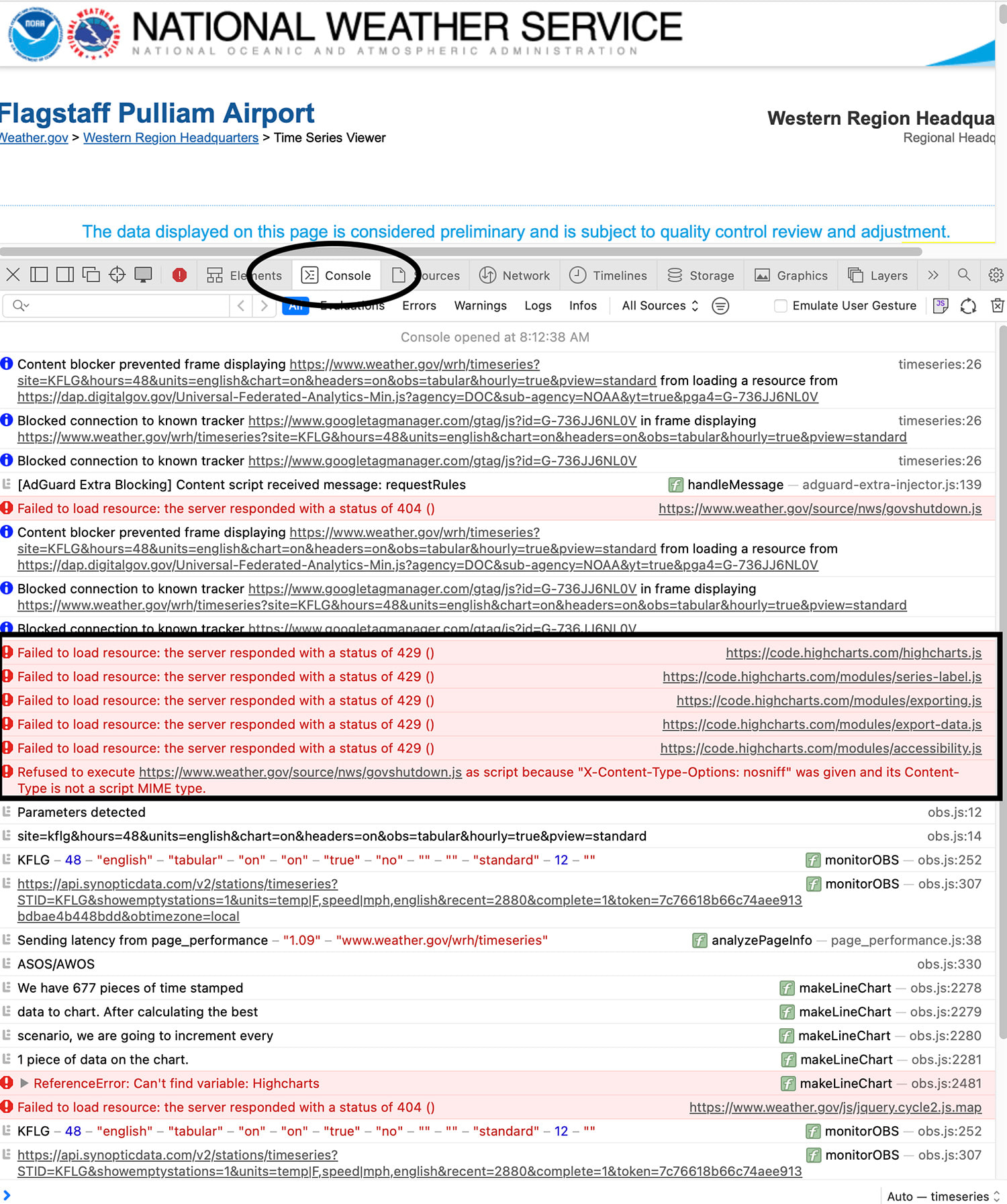
I again had issues with the site this morning so I opened the Web Inspector window and examined Console. It indicated that several sites were showing HTTPS Error 429 – failure to respond. The failing sites were the ones where the graphs are remotely generated. I have posted a screen shot below.
However, while I was still troubleshooting the site began to work again! It’s curious that it failed for me but worked for others (Thanks for those reports!) and worked in an older version of Sequoia and Safari. Could this be related to different CDN’s being used?
Sorry to have wasted folks time on this – but I enjoy a good computer mystery.
Both of you responded that the site worked for you. I can usually get the site to work once – then it fails after that. The error I get from looking at the Console is HTTP 429–Too Many Requests. I then need to wait until the IP block expires which seems to be about one day. Then it works again.
Would you be willing to perform a simple test? Access the site. Leave the site and then return. Repeat one or two times. Does it continue to load? Thanks!
I have been working with the webmaster as we try to figure out why Safari is sending too many requests to that site.
I also don’t have an issue with this site – I visit it often (in a 26.4 MacOS, and an older Mac), however I use the URL customized to my zip code (which is translated to a Lat Long, never noticed that). I’ve visited 3 times today, zero issues to report. Seems like it some other trigger for your failure, what sort of extensions and/or plugins do you use? Maybe it is your ISP doing something sneaky?
I tested the site again using Tahoe 26.3 using the current Safari as well as Firefox and both work fine in loading the link in your first post. I quit both browsers multiple times, restarted the computer, reloaded the page many times and both work fine every time.
Now, what is interesting is this: I generally use an older Sequoia version, 15.0.1 as the next version started that AI background data issue where even if you had it turned off, it was still downloading data and not just a little but something like 7-9 GB. I only realized this after watching my hotspot data numbers increasing and checking Activity Monitor which indicated the data being downloaded even with AI turned off. I think this started with version 15.1 and I checked this with the next couple of updates and it kept happening so I eventually reinstalled the 15.0.1 version on a separate partition and kept upgrading the other partition which eventually went to Tahoe (but I digress). Also, the 15.1 update caused an issue with my older Airport Express when listening from iTunes so that was the final straw (it would stop playing after about 30 minutes if there was no internet connection and this was easily reproducible and still the case in Tahoe).
I tested your site in Sequoia 15.0.1 the other day and it did not work in either Safari or Firefox 147.0.4 which is the same Firefox in Tahoe although the Safari version is older. However, tonight Safari still does not work but Firefox is working fine even though it didn’t the other day. So I’m beginning to wonder if that weather site itself has an issue. As I mentioned before, I use the Strict Privacy option in Firefox which can cause some sites not to load but that doesn’t seem to matter here.
EDIT: It’s also working now in Safari 18.0.1 in Sequoia 15.0.1 LOL!
EDIT: One other thing is that your link does not work when using Private Window mode in both Firefox and Safari.
It’s still working fine on sequoia for me on a Mac mini. Multiple tabs, multiple reloads.
I might try creating a new user account, log in with it, and see if the problem recurs with that.
If that doesn’t help, I definitely don’t use little snitch - I might try uninstalling that and rebooting (as opposed to simply disabling) to see if something with that causes the issue.
I have tested it with extensions turned off with the same result…so that may not be the cause.
It does work when using iOS 18.7.2 and Wi-Fi which uses the same ISP. Curious.
Thank you for testing this.
I wonder, too. As mentioned, I’m working with the webmaster but I will have to present a convincing case.
Thanks, all. I have more to report but will do some additional testing before posting.
Another day…more testing. Unfortunately, I can only test this a few times before I get my IP blocked by the site. The block lasts about a day.
This morning I tried to access the site using Firefox. It worked. I closed Firefox. I then tried to access the site using Brave. It failed. I then tried Firefox again and it failed. I have appended a screen shot of the failure for Firefox.
I then started up Cloudflare VPN which gave me a different IP address. It worked in Firefox – once. Subsequent attempts failed with an IP block.
I few days ago asked perplexity.ai why I was getting “Too Many Requests” and Error code 429. Here is the response (I think this link is short lived).
I’ve tried these suggestions, including the VPN – which works briefly – and disabling extensions, clearing cache and cookies, closing tabs. Otherwise, I’m not sure why my browser(s) are sending multiple requests – or why the site thinks that is happening.
I can access it via Safari and Brave on an iPhone/iPad which has the same IP address.
I installed Wireshark to monitor network connections but it has a steep learning curve and I have not been able to find the issue.
I have been in communication with the webmaster about this issue and have been sending him output from numerous tests. Today he informed me that there have been some changes…
It’s working on my old Mini Catalina install using Firefox 148.0 and Safari 15.6.1. Both did not work when I checked previously. Will check my M1 Air later.
EDIT: Checked this evening on my M1 Air and both Safari and Firefox work fine with the site under Sequoia as well as Tahoe.