I really don’t understand the reasoning for this, and it has caused me to hang up on yet another support person that when I go to flip open my home screen and swoop up, that it hits the disconnect button and hangs up on the phone. The fact that those two areas are so close to each other is an example of really bad design that for some reason should’ve been fixed long ago. Has this happened to other people? Is there a solution for this or a way to move that button so it’s not in such a position? Or is there a way to get to the home screen without getting near the button?
I just ran into this in the new CarPlay. A call came in and I touched by car’s screen to answer it, but there was a slight delay responding and I thought I hadn’t touched so I touched it again. On the 2nd touch, the icon changed from green “Answer call” button to a red “hang up call” button and I pressed that and hung up on the call!
Stupid design.
1 Like
I make very few voice calls, but I notice this on almost every other app I use that has a tab bar at the bottom. If the app remembers which tab was selected, it’s always the middle one due to my last swipe-up gesture to return to the home screen.
It seems to have gotten much worse with iOS 26; perhaps the swipe gesture recognizer takes longer to register now, and “phantom” taps get thru.
Yep. I’ve done the same things as @raykloss and @xdev. Apple should be embarrassed by these designs. Back in the 90s, we knew enough not to put buttons that would delete data or perform other major changes in the same position on a subsequent screen as a previous button that did the opposite.
1 Like
FWIW you don’t need to swipe up from the middle. It works pretty much anywhere along the bottom of the screen.
1 Like
That’s true, but the visual cue was put at the center so naturally that’s where a lot of us have been trained to drag.
And once that becomes a habit, it’s very hard to un-train. Much easier IMHO would be to not put a ‘destructive’ button in the vicinity.
1 Like
The problem that I’ve had with the disconnect button is that it acts so quickly and then shows whatever screen you were on before the call, that if I accidentally double-tap, it taps to disconnects then taps whatever is in the same area in the pre-call screen. If I had made a call from my Favorites panel of the Phone app, for example, it initiates a call to whoever is in that position on the Favorites panel.
I understand that a double-tap is my error, or maybe it’s seen as two separate taps (but that would be a separate problem in and of itself!). But it happened to me so often (a few times a month) that I whittled my favorites list down to five or six items so nobody is in that position just so I could avoid the problem. (Luckily, I have few friends, so that was a good solution for me : )
1 Like
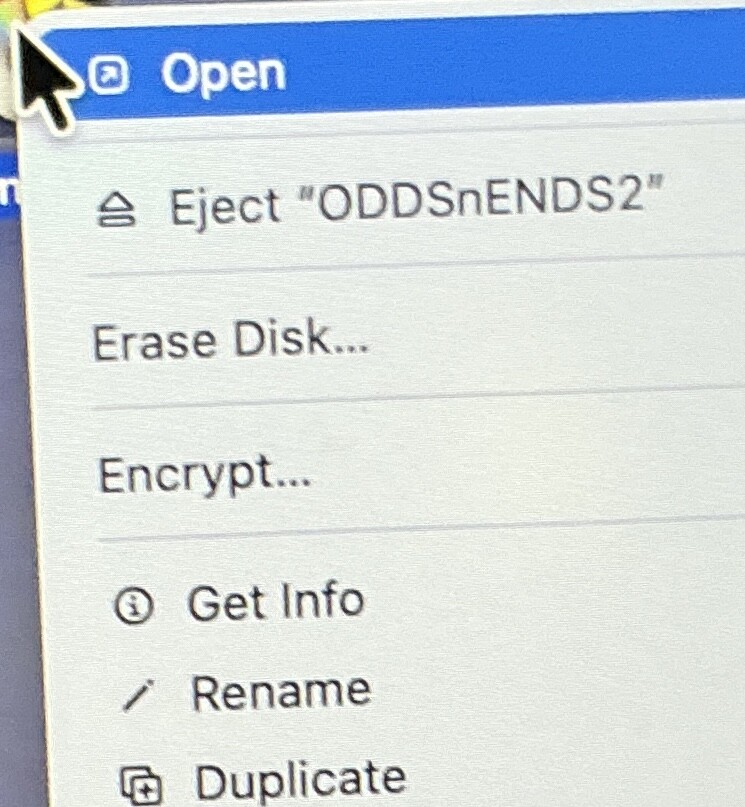
I’ve had the same thought, but in practice I don’t think it’s too big of a deal. It doesn’t immediately start erasing, it brings up a dialog and just hitting return doesn’t do anything until you enter a name (I don’t know if entering a name and hitting return starts the erase or not, I don’t have a drive I want to erase  ). So it seems like it would be difficult to accidentally erase a drive. Worst case you hit escape or click cancel and choose Eject more carefully.
At the same time, it does seem questionable to put something you probably never want to do right under something you do all the time.
2 Likes
@mpainesyd ('zacktly! I wonder when I am eventually going to goof and tap erase. Hopefully there will be a confirm step before it actually erases!
The click zone for the eject button seems to me also really tiny, smaller than in earlier OSes, so I end up using the context menu more.)
As to the OP, I make and get so few phone calls I can’t recall where the buttons are. So making a call is for me so to speak an act of intent, so I usually look at the screen to find the buttons first. Sometimes when I finish a call and bring the phone from my ear the screen is black for a few seconds. I recently repositioned a camera blocking sticker so maybe I also blocked the ear sensor…