iPhone calls going directly to voicemail: one possible cause

I was struggling with a problem where some incoming calls would sometimes go directly to voicemail, without ringing. The problematic numbers were consistent, and the calls that went through were consistent.

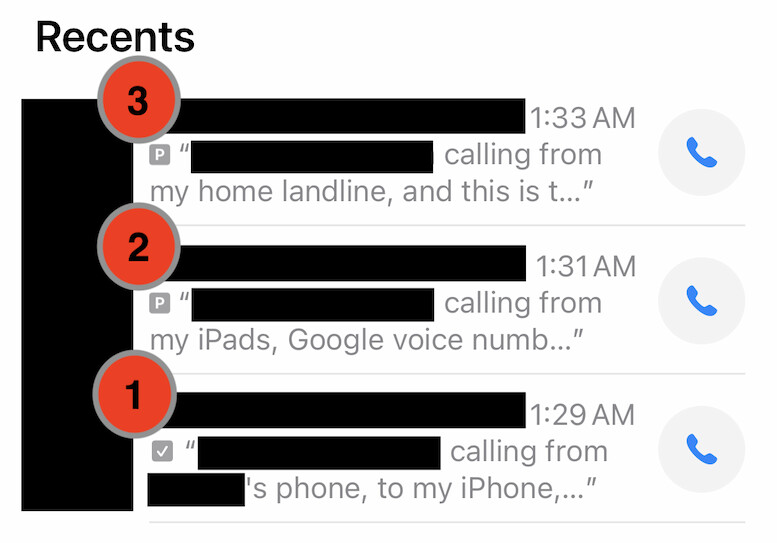
In addition, voicemails for the problematic calls showed a small “P” icon, which I associated with dual-sim phones (which is not the case for my phone). In the below screen grab of an experiment I ran, call 1 (from my wife’s iPhone) rang my phone before the voicemail was recorded, but calls 2 (from my Google Voice number via my MacBook), and 3 (from my landline) went straight to voicemail.
I assumed there was some kind of block list or filtering issue. My initial web searches all pointed to the same suspects: do-not-disturb settings, items in the block list, unknown caller settings, some others. All those suggestions either did not cover my case, or did not address the issue.

A call to Apple Support, then a trip to the Apple Store, did not help; the final suggestion to wipe the phone and start from scratch was a non-starter for me, given the state of my very lived-in device (ported from phone to phone over many years), and the fact that the symptoms seemed clearly filtering or blocking related (and not a software or hardware defect/issue). I even stopped at an AT&T store to see if there were some account settings that could be the cause, but they insisted there were none.

Well, it turns out (based on a late hunch) that the problem was due to the ActiveArmor app provided for AT&T customers (which includes a call-blocking feature). The problematic numbers showed up there in the Recent Calls log (and marked to be sent to voicemail). Either marking those numbers as “Not Spam”, or turning off the block features altogether, seems to eliminate the problem.

I would have expected both Apple and AT&T to be aware of this possible cause for the problem I encountered, before suffering a frustrating series of support calls/visits. I only found corroborating evidence after including “ActiveArmor” in my web search.

I hope this helps others who run into a similar issue.

3 Likes

The Verizon Call Filter app does this (it’s an option) for Verizon customers as well. I was burned by this last week - but I figured it had something to do with the app, so it was easy to fix.

In the Call Filter app, tap the “Block” at the bottom and check any rules you have set up (Spam & Category Filters, Neighborhood Filter). Any call that the app thinks matches those filters will not ring and will optionally go directly to voice mail (that’s a setting in Spam & Category Filters)

Thanks for posting. Your situation doesn’t apply to me, but I appreciate when people try to help each other. And I agree that ATT and probably Apple should have suggested that you investigate the app provided by ATT, as your scenario doesn’t appear to be an edge case.

My phone carrier is US Mobile and I have not installed any app such as ActiveArmor. I found some setting to have my phone ring only for numbers in my Contacts, and that works most of the time. Nonetheless, infrequently, some numbers in my Contacts go to voicemail without ringing, and rarely, some numbers not in my Contacts do ring. It’s probably about two to three calls per month that exhibit the inappropriate behavior, so it’s not a big deal, but I’d be interested in suggestions on what to check.

I imagined that there are a variety of similar apps from other carriers that perform the same function and that may have been installed by default, or installed long ago and forgotten. One thing that surprised me were the numbers that were flagged as spam, including my personal home number (which I’ve had for decades), as well as clearly spammy numbers that went right through. So I’m not sure how good ActiveArmor’s spam rules are.

When I got very frustrated trying to answer my iPhone when it was in my pocket before the ringing stopped, I tried setting it to automatically answer the phone, which I normally keep in my pocket. What I did not realize immediately was that in setting the phone to answer calls automatically, I had managed to turn off the ring. I don’t get many calls, but one day when I was driving to pick up my wife, I suddenly heard her voice coming from the phone inside my pocket. Until we managed to figure out how to make the iPhone ring again, from time to time I would hear a voice talking from my pocket without any ring. None of those calls went to voice mail.

Automatically answer without a ring? Maybe I’m showing my lack of imagination, but it seems like that would be useful in an extremely limited set of circumstances.

It was when I was a new user of an iPhone which was only a couple of years ago after my old dumb phone broke and my wife gave me an old iPhone of hers. I keep the phone in my front left pocket, where it was hard to pull out when it started ringing, and often the callers hung up before I could answer it. (I can’t read the much of the iPhone screen if I don’t have my reading glasses on, and I don’t were the readers if I’m not working at my desk.) I set the phone to answer automatically when called, without realizing that would also turn off the ring. When I heard my wife’s voice through the phone while I was on my way to pick her up, it seemed to be a useful capability – being able to talk to her through the phone while trying to find her without having to hold the phone. However, that turned out not to happen very often, so I abandoned it after a while.