Text handling can vary significantly between websites, so I’m not entirely surprised that some might block whatever trick Apple uses to do the replacement, perhaps unintentionally.
I highly recommend StopTheMadness Pro, it corrects a lot of issues websites cause and would likely address this. It’s well worth whatever I paid for it, it saves me from degraded experiences all the time.
3 Likes
Has anyone else noticed that Apple Intelligence seems to be aware of your text replacement list, and seems to be able to predict when and where you use them? Sometimes without typing a single letter of the replacement’s shortcut.
E.G., I have several unique signature quotes I use via Text Replacements, and once I use a typical phrase like ‘Sincerely,’, the next suggestion has been pretty good at choosing the right signature replacements, seemingly based also who I’m communicating with, and/or what email account or app.
Delightful. A shortucut for a shortcut.
I used Text Replacements in combination with Type to Siri before Sequoia. Since the upgrade, the functionality is broken on macOS, but works fine on iOS. What’s strange when I tried your solution, Adam @ace is that the check mark on Substitutions > Text Replacements reappears on itself when I uncheck it and start a new entry in the Siri field. Has anyone tested Text Replacements in Type to Siri and got it working? Thanks
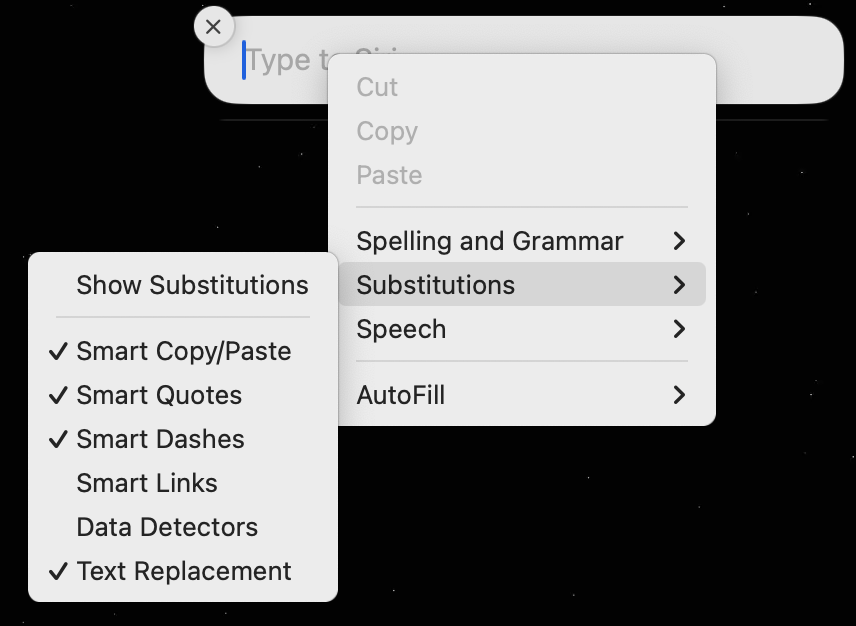
i’m trying to find the edit>substitutions on the apple calendar app…does it exist?