So I have 31G of music on my phone. It comes from a very curated list as I have over 80g on my desktop. It exists on a standard playlist, set for shuffle. Goal is to avoid hearing the same song twice.
So I create a Smart Playlist that references that curated list to only play songs with 0 “listens.”. Obviously I’d choose this playlist on my phone.
Will it work?
VERY curious what happens if/when I do a sync? I do NOT want my “curated” list to be less than what it originally. Should I just totally avoid that? Will any music already on my phone get deleted? Or anything on my Curated list be deleted off that list?
My Plan B is to not use the smart playlist. When I do a sync, I move those songs that have been played to a spare “already played” playlist. Much more of a pain to deal with, I’d love my primary method to work.
The only difficulty I see is that, to the best of my knowledge, those playlists are only updated when you sync them between the phone and your Mac. If you play on shuffle and never “break” a chain of shuffling the playlist between syncs, then it should work, because shuffle doesn’t repeat tracks until the entire playlist being shuffled has been played. But if you switch to another playlist or an album or even just a single track, the record of what’s been played won’t change the contents of the playlist until you sync again and those play counts are recorded in Music on the Mac.
At least, that’s how I understand it, based on my own experience with such syncing.
I’d be happy if I could just find a way to get plays on my iPhone via a third-party app instead of the Music app to record and sync play counts at all. I listen to music on my phone far more often than on my Mac, but the play counts don’t get tracked because I use jetAudio for playback on my phone instead of Music.
It should work. Regarding what will sync, double-check the sync preferences in the Finder.
You’re clearly not syncing all music, because that would copy everything. So you will want to sync both the curated playlist (in order to make sure all those tracks are synced) and the smart playlist (which will contain a subset of those tracks).
Your curated list should never change, and its tracks should never get deleted unless you remove tracks from that list and then re-sync.
The smart playlist will lose tracks as they are played (not sure if it will happen as they are played or only when you sync), but that won’t affect the curated list, and therefore won’t affect what tracks are stored on the phone.
Note, however, that if your smart playlist is only selecting “0 listens”, then that list will shrink down to zero over time. You may want to use a different set of rules to avoid this. For example, I’ve used a rule like “not played in the last 30 days”.
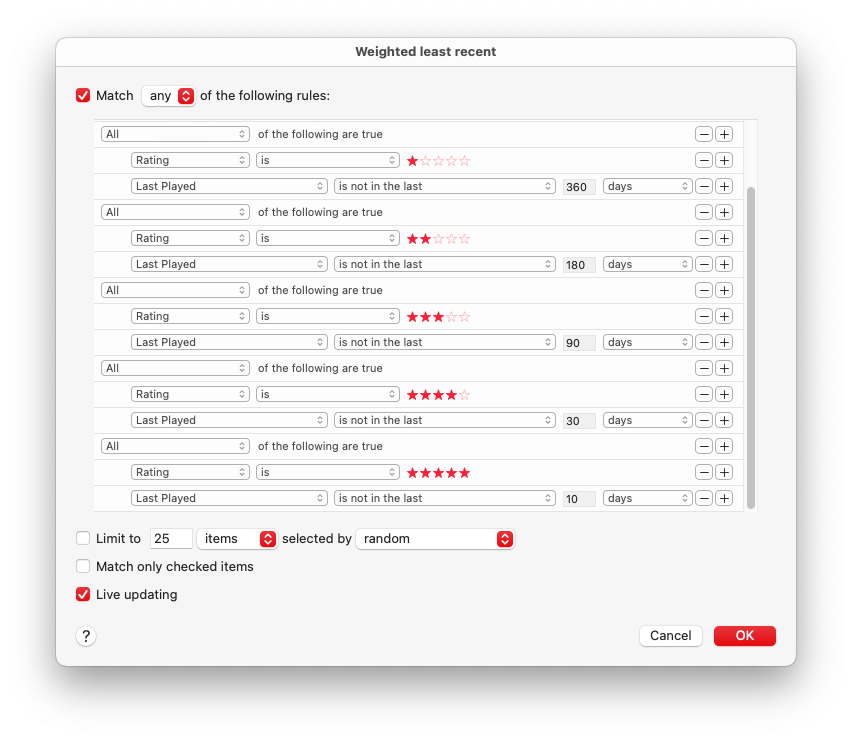
I actually have a much more robust (and complicated) smart playlist because I want to play my favorites more often than the others:
This contains 6 rules (only 5 of which are shown in the above screen-shot):
Match any of the following rules
All of the following are true:
Rating is no stars
Last Played is not in the last 90 days
All of the following are true:
Rating is 1 star
Last Played is not in the last 360 days
All of the following are true:
Rating is 2 stars
Last Played is not in the last 180 days
All of the following are true:
Rating is 3 stars
Last Played is not in the last 90 days
All of the following are true:
Rating is 4 stars
Last Played is not in the last 30 days
All of the following are true:
Rating is 5 stars
Last Played is not in the last 10 days
So the songs I like more get rotated into the playlist more often than the songs I don’t like as much (treating zero stars as 3 stars, since those are tracks I haven’t gotten around to rating).
Thanks for the confirm… yeah I don’t mind it eventually disappearing as I have 8498 songs in my Curated set!
Now I’ve got a way worse issue. Launched Music, plugged my phone in… and nothing, it is not seeing the phone. Head the the Finder and I see it listed there, twice. Both say for my 17 Pro. I click on one of them and I get the “Trust “iPhone?”I click on the Trust button and it is an endless spinning wait symbol in the window. So I read the thing more completely, it does say something about selecting Trust on the device. Except it does NOT show that, I would have seen it when I plugged it in. I unlocked it and THEN saw the trust notice, and now I am connected, but it still is listed twice in my Finder window sidebar…
I did a sync, even though no music gets copied. I DO see there were 23 songs that played twice. Now to set the smart playlist to be used on the phone, will see how it goes going forward. So far, so good. Too bad I can’t see what REMAINS on my phone as selecting that in Music only shows a long list, but no the count of songs.
I’ve seen things get confused like this once or twice in the past. I’d reboot both the Mac and the phone (when the USB is not connected) to clean that up.
The trust message is not new, and it can be a bit confusing, since as you discovered, you have to unlock the phone before you see the request on its screen.
You’re right that Music doesn’t show the count of tracks on a connected device. iTunes used to show this in the status bar, but Music doesn’t show that bar at all for devices.
But if your device is sync’ed to a playlist, you can select that playlist in Music (in your case, either the curated playlist or the unplayed-subset smart playlist) and view the item count at the top of the window or in the status bar (if enabled) at the bottom of the window.