I’m trying to add a few songs from my Mac to my phone for the first time since updating to the OS26 versions, and the ‘Add to Device’ menu item no longer seems to be available in the Music app. These are songs I’ve downloaded from CDs or the internet (e.g. Bandcamp), not from iTunes.
I’m seeing 3 Apple Community threads with similar issues and they’ve all been closed. The only suggestion I’m seeing is to use the Sync feature, which wants to first delete everything I already have on my phone, which is not a viable option. How can I manage this?
I despise streaming services and have never subscribed to one – old fashioned perhaps, but that’s how I operate. I want to be able to choose what songs I have on my Mac and what I have on my phone. There isn’t functional cell service in many of the places I drive regularly, so doing everything via streaming isn’t even an option here. Is Apple now saying I can’t add music to my phone if I didn’t get it all from them?? What’s the best workaround?
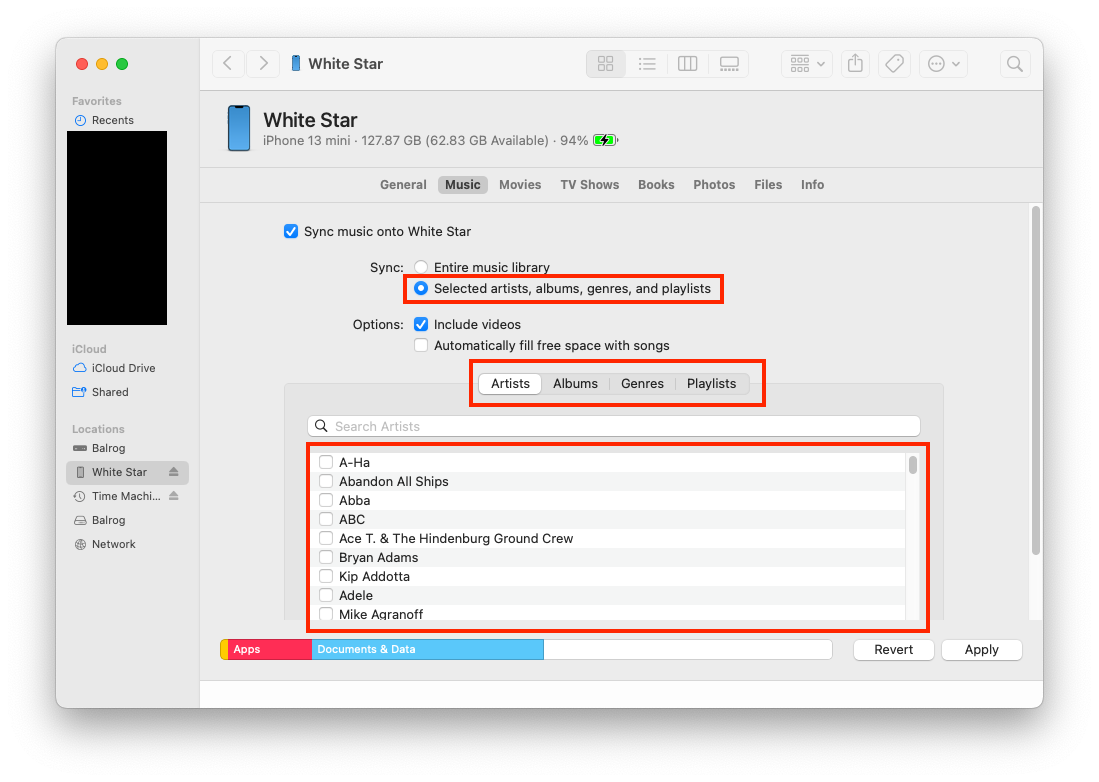
Via sync (I do it via a USB cable). Get to the Sync settings page from the Finder (if connected via USB) or by clicking the Sync Settings button in the Music app. On that page, you can choose the music you want to sync. If you don’t want to sync all your music, you can choose to sync specific artists, albums, genres or playlists.
Back when my iPod was too small to hold all my music, I would create playlists in Music and sync them. I could easily change what’s on the iPod by changing the playlist and re-syncing.
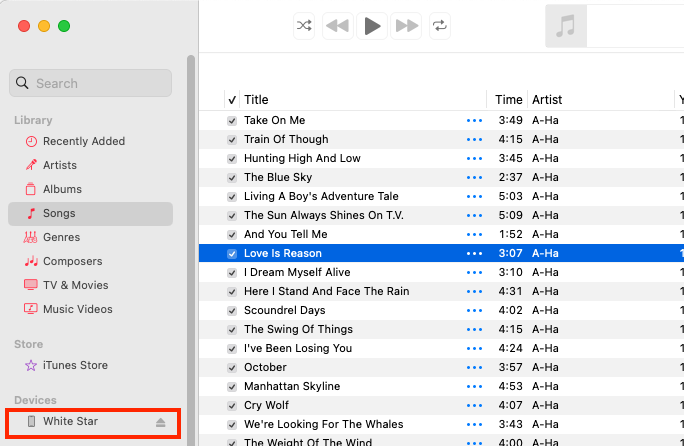
In Music, you can drag/drop songs/albums/playlists to the device in the left-side column:
Why will Sync delete everything? If you enable Music syncing, it will replace the phone’s music with what you sync. But it won’t affect anything else.
That having been said:
If the songs exist in your Music library, just add them all to the playlist you want to sync. It doesn’t matter if you bought them from Apple, ripped from CD or downloaded from somewhere else.
If not, see if Music can transfer them to your Mac first. If your right-click on the device, there’s a “Transfer Purchases” option. This should copy music from your phone to your Music library. I may only work for songs you purchased from the iTunes Store, but give it a try anyway.
I’m pretty sure I tried dragging songs over to the iPhone tab on the left menu in Music and it didn’t work. Will try again.
Problem with syncing is I already have 100 or 2 carefully curated songs on my phone and it would take much too long to recreate that from scratch. Esp. if I had to do it again every time I want to add something new. Does that make sense? Or am I missing something?
I tried again to directly drag songs over to my phone in Music. The first one I tried worked, but after that I could see the icon showing a file moving but it didn’t actually transfer. I tried ejecting and replugging the phone and it still doesn’t work. The first song I dragged was there, but not the others.
iMazing seems to do the job, but there’s a limit of only 50 transfers in the free version. Oddly they don’t show up in the phone’s song list on my Mac, but they do appear in Music on the phone.
That’s why you make a playlist. You don’t manually drag tracks to the phone. You drag them to the playlist, which you sync. And when you’re done, you don’t delete that playlist. So when you want to add something new, you just add more tracks to it and sync again.
Sync doesn’t simply trash your phone - that would be a really dumb feature. Instead, it does whatever is necessary so the contents of your phone matches what you have configured for sync - the specific artists, albums, genres or playlists you request. And it remembers your choices for future syncs.
Thanks. I’ll try that. Then switching to the Playlist method if that doesn’t work, I suppose. Esp. after my free use of iMazing expires. No way that’s even close to being worth $50 every year to keep using. Zero chance I’ll ever pay for that.