I’m no longer using NWP, but I just launched it and opened some documents I had written in it in 2025. Everything seemed fine, but there’s nothing fancy in them.
I would never do my primary writing in Word. I’d spend more time screaming than thinking. FWIW, I now use Mellel, which does have equation support – how well, I can’t say because I don’t need equations. When I need to interface with people who require Word documents, such as publishers, the export seems relatively sufficient. I double-check it, of course, and I do find glitches that need my attention in Word. But even that it not enough to get me to spend my productive time in Word.
I use both Simplified and Traditional Chinese in my translations of Buddhist texts and Nisus Writer Pro has been an invaluable tool, fielding seamless switching back and forth from Chinese to English and back again. Nisus’s future demise is painful to contemplate. Could Mellel replace it? Oh my, if only somebody would kindly release Nisus’s code as open source their merit would be substantial!
Last night Nisus Writer reminded me of one of its nicest feature – the ability to save what you’re writing every minute. That may seem excessive, but when you live in a neighborhood with overhead wiring and reckless drivers, a potential disaster may not be far away. There’s nothing like a BANG!!! a couple of doors down the street, followed by a moment of flickering lights and then darkness. This time it a drag and drop error, so I had to rely on TimeMachine every hour to save the bacon the file I wanted, but it reminded me how nice it is to have minute-scale backup.
I find it to be simpler to switch between two input sources in Mellel (with its primary and secondary fonts) than in Nisus. I was a devoted Nisus user in pre-OSX days, but after moving to OSX the problems I encountered in switching easily between English and Japanese while retaining different font settings for each were one of the reasons that I stopped using Nisus and started using Mellel, and I have been using it happily ever since.
Hi All, I have some important info about Nisus. I joined the Nisus forum today to try to post there, but while joining worked, I got a message that an admin will check my post before it is visible to others. I then looked at the user list and saw that for as far back as November 2024 (yeah 24 not 25), all users who joined since that time are shown as having 0 posts, so only users registered before then can start posting. This makes sense for an un-administered forum since otherwise it would get filled with spam. But it also means new users of Nisus have zero voice. I am copy-pasting my intended post in the next post (in case there is a length limit or some other quirk). Please, someone with posting privileges on Nisus forums, post it for me there, so that people considering purchasing the software are aware of the state of things.
Here is a copy-paste of my intended post on Nisus forums:
I have been lurking here and reading about Nisus software for a while. Apparently I’m not the only one, as while I was logging on I noticed there are over 750 people looking at the forums as I type this. I finally registered to make a post because I haven’t seen any other posts raising a particular important issue.
I think it is well known now that Nisus is ending its long and successful life, and it is not likely to be “rescued.” But I am used to using old software (on my old computers) and the current Nisus is a lot newer than my current favorite “word processor” (and layout software) which is Pages '09, before the big re-write of iWork. I keep around several computers with old systems in part to use that (and other) older software. (Yes I also have much newer computers, using Linux and Windows. But I love my old Macs.) So I was considering Nisus for a while, as well as the software for searching Apple Mail. They work on my current primary Mac, which is running Catalina, an OS that can’t run Pages '09. So Nisus software still has value, even if it is no longer updated.
I made a purchase on January 19 using Nisus’ website. My credit card was charged for the purchase. But in the field where there was supposed to be a software key, instead of a software key, there was an error note and a message to contact customer service. Meaning, the system that takes payments for Nisus software is not capable of generating keys anymore, while it is capable of charging credit cards for those missing keys. Worse still, I tried all 3 email addresses I found for Nisus. One of them bounced my message and two of them remain unanswered. To me this is clear indication that Nisus owners aren’t keeping the site alive to make money, but just no longer able/willing to pay any attention. I suppose people making purchases end up calling their credit card company to reverse the charge, but I really want to avoid that.
I hope this is helpful to other lurkers who are looking at this software and considering buying it. It is very sad, but it is fair to warn others. If I eventually get a reply (and hopefully a software key, before my monthly credit card bill payment is due), I will post here that it is probably safe to purchase, if a bit risky. But right now I want to warn everyone considering a purchase that until we hear an update about what is going on, it is not a good idea to make any purchases from this company.
Thanks very much to user “Elbrecht” for posting my message on the Nisus forum. I should add that in addition to not being allowed to post (because I can’t get past the “first-post-admin-check” gate keeping) I am also not permitted to send private messages on the Nisus forums. The forums have had no administration since sometime in November 2024. No users who jointed since that time have been able to participate, and the website – and company – really seems to be abandoned. I am hoping for a rescue but it seems bleak.
I considered moving to Mellel, but I am worried that it uses its own file format. I was an early adopter of WriteNow, and for many years I thought that I had lost all of those files. (I just learned that if you add a “.wn4” file extension, LibreOffice can open the files!) But I am worried of a replay of that problem.
Secondly, I have no idea how to effectively share a Mellel file with another user. Exporting as a common file format and then importing the changes seems like a lot of work. Perhaps this is what Google Docs and LibreOffice are for—but then why use Mellel also?
I’ve noticed the Nisus website has been down for several days, which isn’t a good sign.
Moreover, I’m getting notifications from my Mac that Nisus has code reaching back to Intel days, and that it won’t work with future OS releases sometime in the future. I don’t know if it means the next release, but if Nisus folds its functionality days are indeed limited. I haven’t come close to finding a suitable replacement, so I can only hope that day is far into the future.
My guess is that an announcement about OS-incompatible software will be made during a Developer’s Conference.
Mellel is a professional-level word processor aimed at people who often work with longer or structured documents, like academics, scientists, and so on. It also has excellent support for multiple languages in the same document. I applaud Mellel for building an important niche in the marketplace for itself, but it’s not for everyone.
I see people discussing issues accessing various file formats, with LibreOffice suggested as an alternate to Nisus. A major strength leading to features exceeding other word processors has always been Nisus’ incorporation of open source tools from Unix. One example is access to GREP for essentially unlimited document munging, provided through the easy to use GUI of Nisus’ Find, PowerFind and PowerFind Pro. Another is LiberOffice tools for format translation opening or writing documents, selectable as a preference.
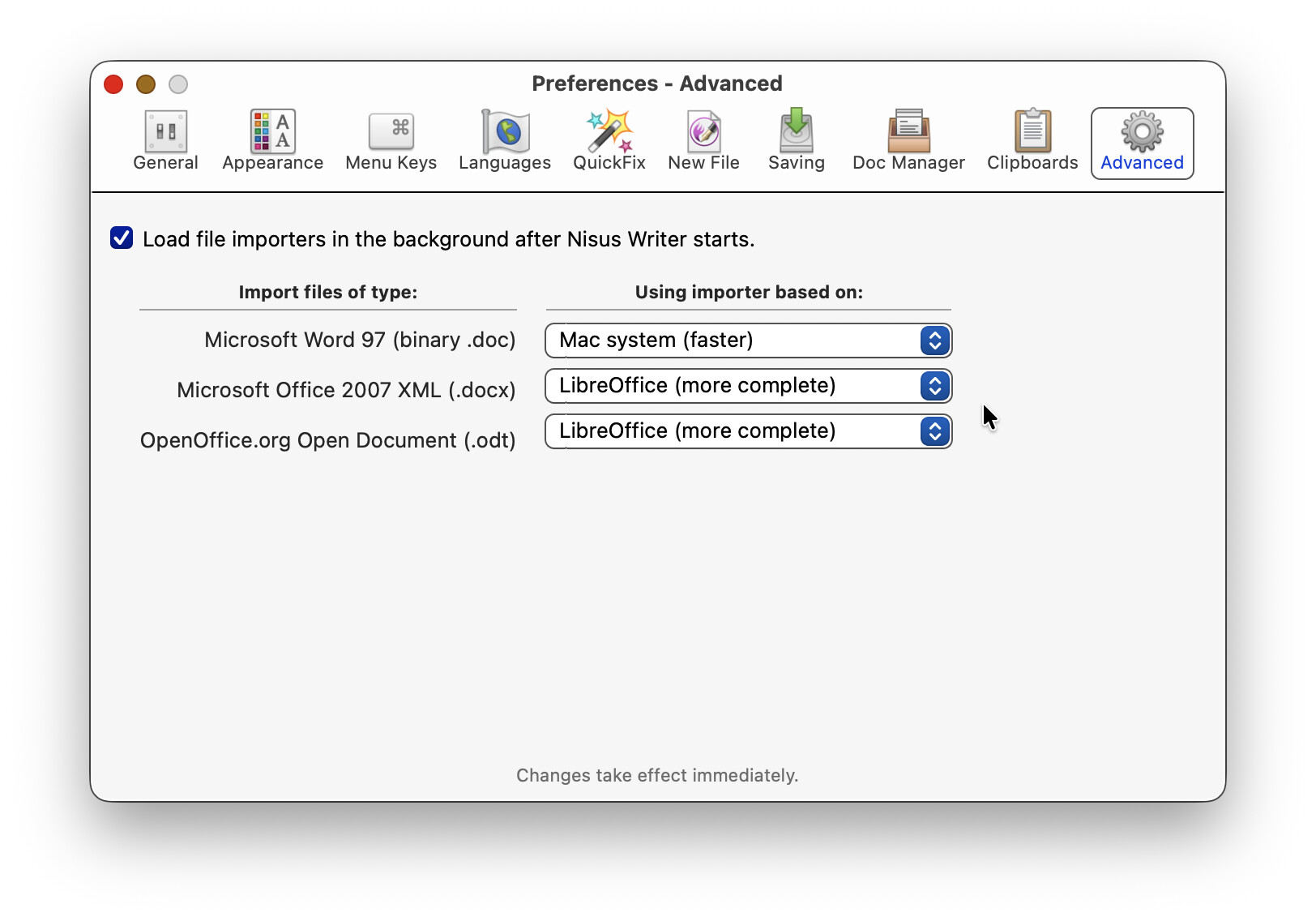
Mac system or LibreOffice importers can be used for .doc, .docx or .odt files. I guess this stuff still works. My use of Nisus Writer is much less these days, so I do not know for sure.
Such transparent access to so much power is typical of Nisus. Transparent access is a major asset, yet also may have contributed to Nisus’ downfall. Unobtrusive access to so many diverse features makes overlooking Nisus’ power a mistake which has been too easily made by reviewers.
I just checked and the nisus.com web site opens but seems to have very limited function. It may be time to start looking around seriously for a replacement.
Naively believing that NWP was finally moving ahead, I reacted to the update message and paid the USD 45. However, where my license key was supposed to be, it said “Internal error. Contact Customer Support.” Which I then did (two days ago), but with no reply yet. After reading the messages here, I then re-entered my old license key – and the watermark was removed.
Thank you, Joe, for your posting. I have been using Nisus forever, and I would have gladly paid an extra USD 45 several times over to continue grepping away — it just makes me sad to see this extremely useful piece of software fade away.
Barring an eleventh hour rescue by a new owner, Nisus Writer is going to break. It could be as soon as macOS La Jolla, but certainly within a year.
After testing all the replacements suggested here, I settled on Apple Pages as the optimal substitute for my use. It has a similar Table of Contents sidebar with bookmarked pages, sections and words.
Pages will faithfully open a complex Nisus Writer document. It will preserve all tables, inline images, and especially images within table cells, as long as that document was saved as .rtfd.
It’s unfortunate that conversion from .rtf to .rtfd must take place within Nisus Writer, one file at a time. I am playing with an AppleScript to automate the process somehow.
What I will miss most is the powerful macros tool. Pages has no macros at all. Is any third party utility capable of providing an equivalent? Keyboard Maestro, TextExpander, Automator, etc.?
I would use it more if they followed Nisus in the ability to create tables from tab delimited text. I use that function extensively for so many things and far prefer it from setting up a table and then having to copy and paste content. To me that is a game breaker. Also I really live the layout of predefined text items available with a simple click.
I cannot really see any good alternative to Nisus Writer that is fully suitable for my needs. Nisus allows me to focus on the writing, with shorter interruptions and far less time-consuming operations than found elsewhere. For instance, I need to constantly switch between character styles, languages and keyboard layouts and have one single keyboard shortcut for all of this at once. I benefit greatly from the automatic highlighting of substituted fonts, and the Glossaries feature is marvellous. I rely heavily on styles, and redefining them is far easier in Nisus than in any other word processor. The rtf files are also fairly compatible with Word and LibreOffice, though there are some quirks.
I switched to Nisus when Apple changed Pages in 2013. I do not trust that Apple won’t do this again. Mellel is nice, although it has a more challenging interface, but last time I tried, I had some problems importing or exporting character styles reliably (I can’t remember the details). LibreOffice has many interesting features and great cross-platform compatibility, but it is cumbersome and feels buggy.
Nisus Writer Pro has been of enormous help for me, and nothing can fully replace it.