Just got an email that my Microsoft 365 Family subscription will be going from $99 to $129 in a few days. I’m wondering if this is time to jump ship? I’m a regular (not power) user of Word and Excel, and a light user of PowerPoint. I’m interested in hearing from others who have made the switch to Pages, Numbers, and Keynote.
The “Family” in this case is limited to just my wife and I. We both have Macs. We do exchange the MS-app documents with others both on Macs and on PCs. None of our documents are what I would call “complicated,” and so far in limited testing the Mac apps seem to render the MS app created documents nearly perfectly.
So if we cancel our MS 365 subscription, what are some potential gotchas we should consider?
I moved almost completely to Pages and Numbers last year, when Microsoft made it clear that they were increasing the subscription cost, in part because they were adding co-pilot features that I don’t need. Numbers last year added a few useful functions that Excel had in Office 365 (UNIQUE, SORT, FILTER are the ones that I used) - before that I needed to do add some columns with complex formulas to replicate that. Numbers seems just as performative as Excel, it automatically saves files (Excel only seemed to support that when you stored files in OneDrive), and I think it’s more attractive. In addition, I can multiple tables on one sheet, I can make a table only a specific number of columns and rows - there are things I really like about Numbers.
I don’t use Pages quite so much, but I get by just nicely with it. I don’t use Keynote at all - I have no need for it.
I do still use an Office 365 subscription, but that’s only because I need it for a consulting client, who pays the annual fee. Anything personal, though, is in Numbers and Pages.
That said, my wife doesn’t use these apps at all, we have no need to share documents, so I don’t know how well that works.
You might want to check whether Microsoft’s trying to update you to the co-pilot version of Microsoft 365 Family — see below news article and Microsoft apology in New Zealand.
Thanks @Gobit . While I couldn’t see the pages at either of those links, the page names did prompt me to look more closely at the MS subscriptions site. Indeed, the “no fancy Copilot” option is now called “Microsoft 365 Famliy Classic," and retains the price I’m currently paying. So I switched my subscription over to that plan. Some pretty obtuse–some may say underhanded–marketing shenanigans from MS on this, but bottom line is I don’t need to jump ship. Yet…
Cancel your existing subscription (which is really just cancelling auto-renewal - see below)
Then you should be able to subscribe to the “classic” version.
The AI features will remain active until the expiration date of your existing subscription, even though you clicked “cancel”. They’ll go away after that, when it actually switches to the classic product.
But note:
Some countries can’t do this (Australia and New Zealand lost this ability on December 31, 2025).
I don’t have any recurring billing for my subscription (I’ve been renewing via a code purchased from Costco). If I click the button to enable recurring billing, it only lets me stick with my current tier (with AI).
I don’t know what “cancel” will do for me, so I’m not going to try. But I’ll see about it when my subscription runs out in July, since (for the moment, at least) Costco is not selling discounted subscriptions.
I think you need to have recurring billing enabled for the classic tier. I know you can’t buy a code for it. I don’t know what will happen if I subscribe to classic and immediately cancel.
There’s no guarantee it will be available in the future. AU and NZ users who haven’t already switched can’t switch today. Others may also lose the ability in the future.
I won’t comment on non-Microsoft alternatives because of insufficient depth of knowledge, but here are some Microsoft-specific issues to consider for the future:
If you allow a Microsoft 365 Family subscription to lapse, the obvious loss is the ability to use your Microsoft apps to create, modify, and print Office documents.
The next potential gotcha is the reduction in OneDrive storage. Even if you don’t think that you or your wife use OneDrive, you’ll want to sign in and check if you are using any storage. With a Family subscription, each user gets 1 TB of storage. With the free version of Office, you only get 5 GB on OneDrive. I don’t recall what happens if you are using more than 5 GB when your subscription ends, but you’ll want to verify and plan accordingly.
The free version of Microsoft Teams has a sixty minute time limit on group meetings, but the paid version allows for much longer meetings.
Two cheaper MS alternatives to the Family subscription:
Free, online versions of MS Office. IIRC, when a paid personal/family subscription expires, all affected Microsoft Accounts automatically convert to the free plan. I’m 99% sure that is correct, but you’ll want to verify that.
For ~$20/year per user or $2/month per user, you can convert to Microsoft 365 Basic, which gives you 100 GB of storage for each account.
Yes. The free tier is what you end up in when a subscription lapses.
Your installed desktop apps (on Macs and Windows PCs) become viewers - you can view and print, but not edit or save content. I’m not sure about the mobile apps. Your cloud storage drops to 5 GB.
But you can still use the web apps for editing. These are not as robust as the desktop versions, but might be OK for you).
The basic tier also lets you edit with the mobile apps. But not with the desktop apps.
If you’re going to move over to Pages/Numbers/Keynote, it might also be worthwhile to keep something like “OnlyOffice” around, as well. I don’t have MS Office on my Macs, but I’ve read from others who say that OnlyOffice is a decent “free” substitute. It opens quickly and seems to run well.
It appears that functionality is device-specific. Unfortunately, I closed the window, and I can’t find the link now, but editing is available on smaller devices, but not on larger devices. IIRC, you could edit on an iPad Mini, but not on a full-size iPad.
I have used many of the Office-type apps (LibreOffice, NeoOffice, FreeOffice, Pages, Growly Write, and probably others) but they all have problems with some of my Microsoft Word documents. That matters.
I ended up purchasing Office 2024 (perpetual). Single-machine license works for me. If you need multiple machines then 365 may be better.
I would guess it would depend on whether you manage that subscription, or the college does. If the former, then you could go through the process I did (documented well by @Shamino above) and change the sub from Microsoft 365 to Microsoft 365 Classic. I don’t think that turns off Copilot completely, just sort of hobbles it somewhat.
Thanks. I control when updates are installed; is that managing? As far as I know, the college does nothing except make it available to me. But the school does have some kind of umbrella license that covers me, so it’s not like I can cancel and install something different. In other words, I don’t see how to follow @Shamino’s instructions on my computer.
If you switch your subscription, the switch will only take effect after the date of the prior subscription’s expiration. Either at the end of the month or at the end of your annual renewal period, depending on how you were paying for the subscription.
It may not (probably won’t) delete the Copilot code from your installation, but if you don’t have any credits on your account, it won’t have permission to access the remote servers, which are pretty much required for it to do anything useful.
But what is the goal? To avoid paying for something you don’t want to use or some ideological desire to purge your computer of anything that smells of AI? If the former, who cares? You can disable Copilot in the app’s Setting page so you won’t see it, and you’re not paying for it.
If you have an aversion to the code existing on your computer, even if you’re not using it, then you’ll have no choice but to delete the apps completely. And you may as well completely cancel your subscription after that.
I think @fischej was referring to who pays for the subscription and if you have any choice in the selected tier if the college is paying.
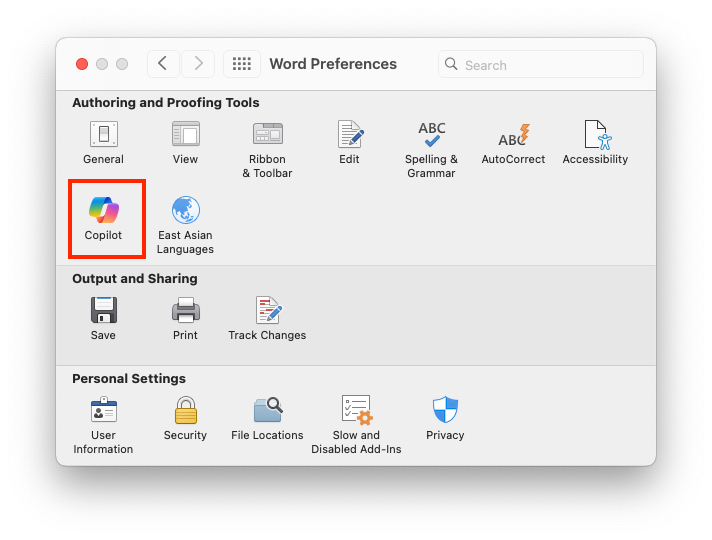
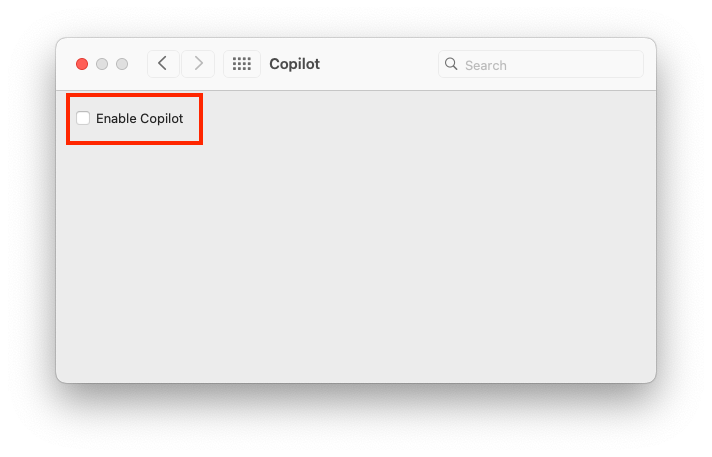
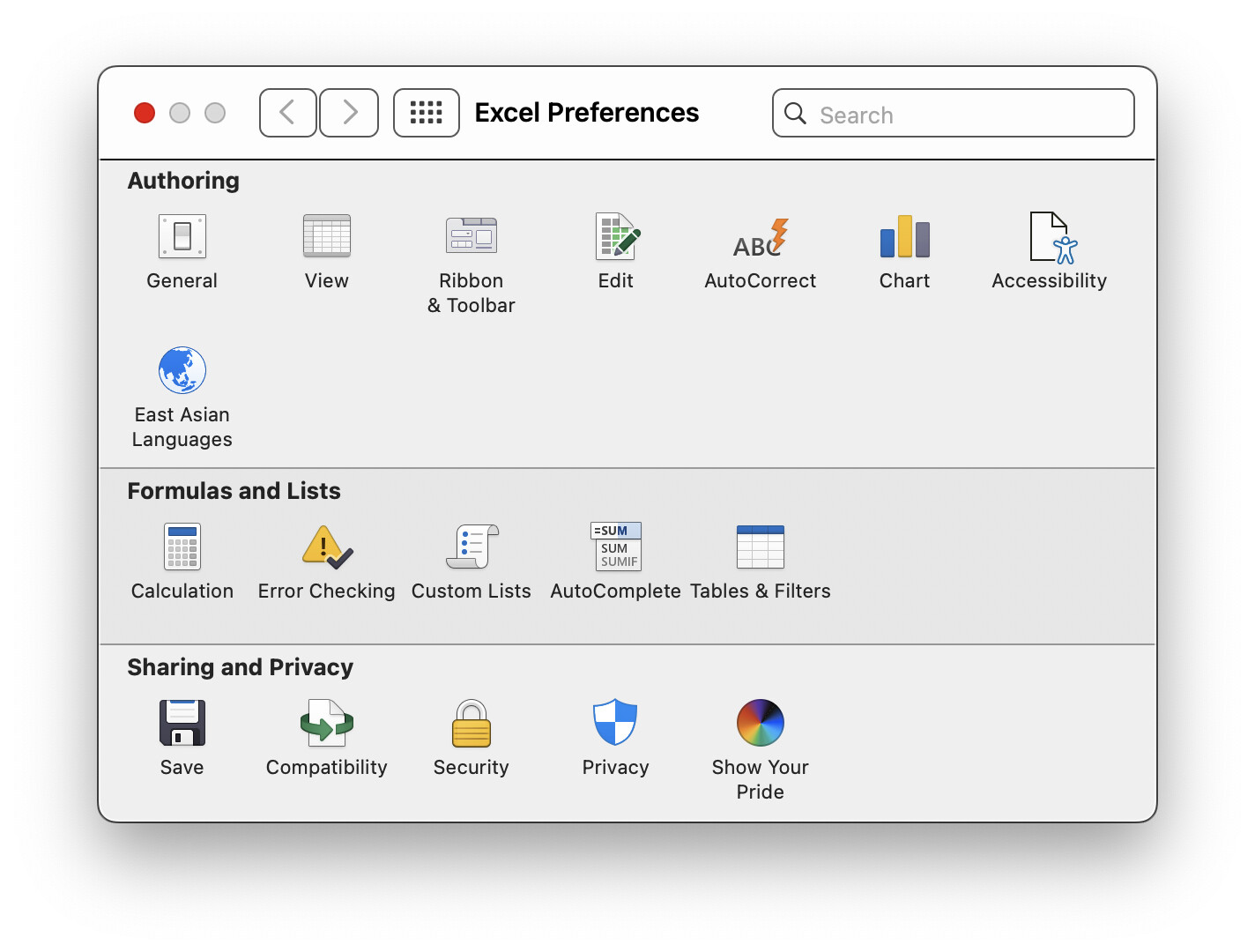
If the college is paying and you don’t have a choice, then the feature will be available, but you can disable it from your installation. Go to Preferences, and select Copilot:
If it’s through the college, it’s almost certainly some variety of Microsoft 365 Education. If so, there is no equivalent to the “classic” personal or family licenses. If the college has enabled Copilot AI features (they almost always do), you should be able to disable it in the Preferences section of each Office app, as @Shamino hilghlighted in his most recent comment in this thread.
One thing about the Family subscription, for what it’s worth: You can add 4 more people beyond your wife and you, and they don’t have to be in your family. I have my wife and I, our two adult kids, and two old friends on my sub, going on about 11 years now.
I was glad to see that recent versions of LibreOffice finally open my Microsoft Office documents properly. If our copies of the Microsoft software eventually stop working I’d probably switch to LibreOffice.
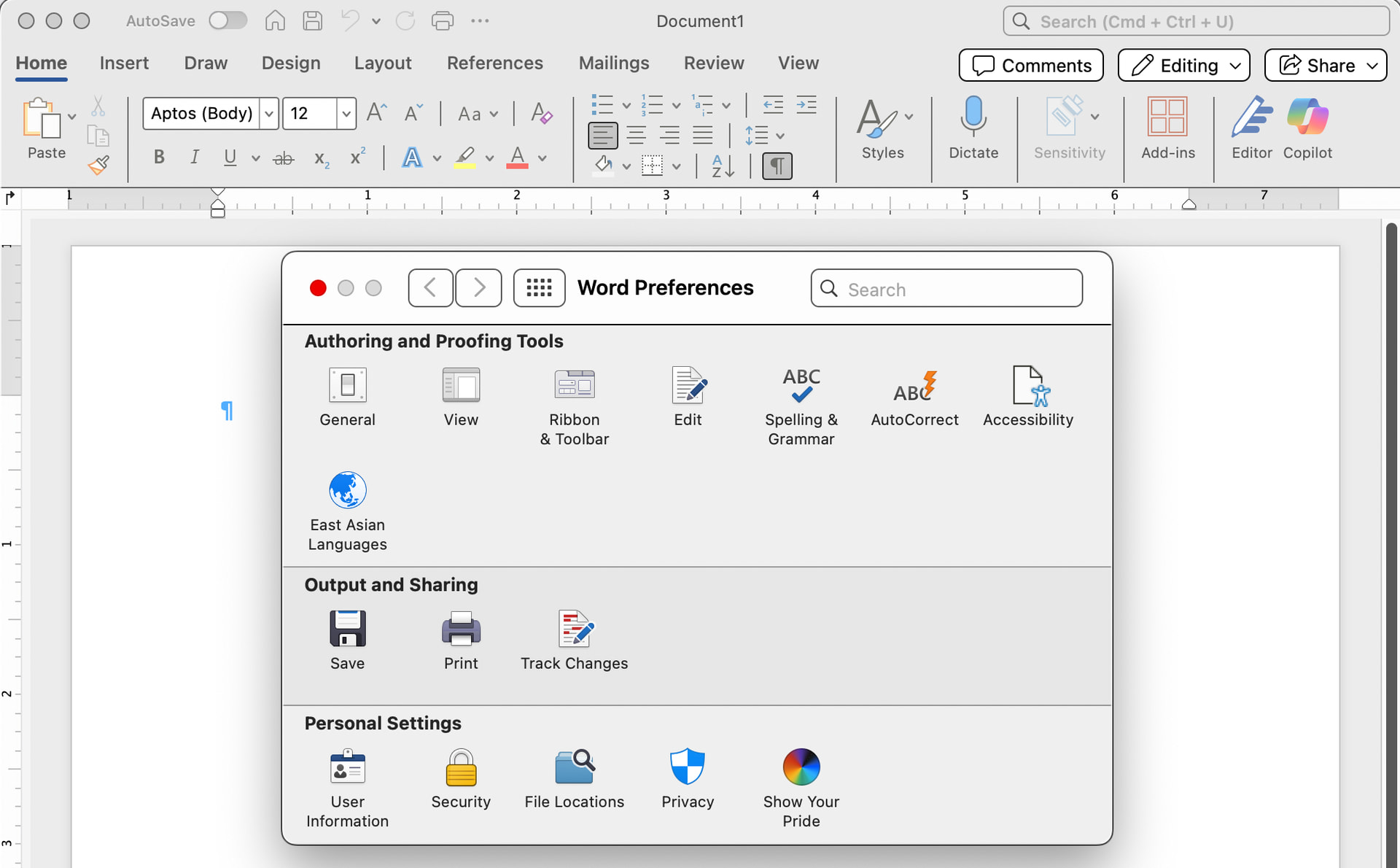
I asked the question because Copilot was in the Ribbon. I deleted it from there, but wanted to be sure it was off. Perhaps the site license does not allow turning it off?
Here’s a screenshot from Word showing the Ribbon with Copilot and Preferences without a Copilot icon.
I clicked on the Copilot icon in the Ribbon, and I was told to sign-in. (To what? There was no indication.) I declined. Perhaps Copilot does not appear in Preferences unless the user is signed in, and it does seem to be deactivated. Thanks for the pointers and help.
Copilot requires being logged in to a Microsoft account - either to verify your subscription or for accessing free-tier capabilities.
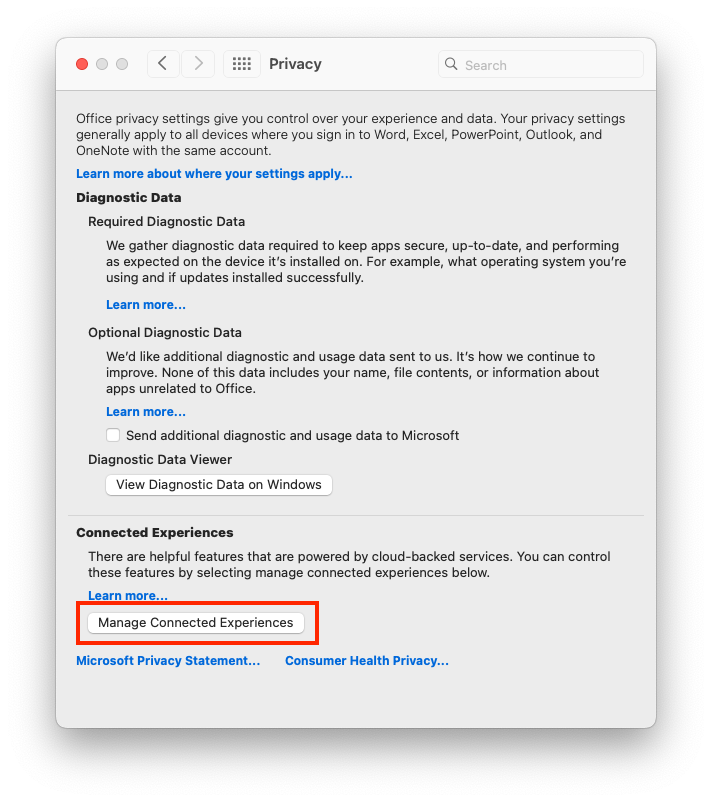
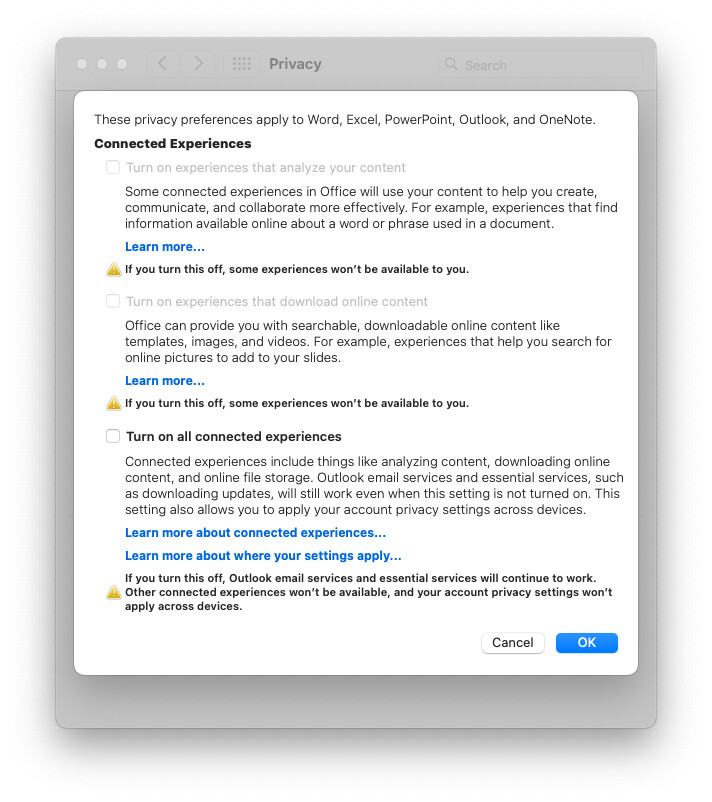
I found that if you had “Connected Experiences” disabled when Microsoft introduced Copilot, then its icons were not added to the app’s ribbon and settings. You can check them by going to Settings → Privacy, then click on “Manage Connected Experiences”:
But if you enable them, and then disable them again, the icons don’t go away.
I don’t know why you are seeing Copilot in the Ribbon, but not in the Settings dialog. I assume you have your Connected Experiences disabled, but some upgrade dropped the icon on your toolbar anyway.