How the Music App’s “Skip When Shuffling” Option Can Help (or Hinder) Holiday Playlists

Originally published at: How the Music App’s “Skip When Shuffling” Option Can Help (or Hinder) Holiday Playlists - TidBITS

Once Thanksgiving is over, Tonya and I like to play holiday music from an extensive playlist we’ve built up over the years. However, getting that playlist working this year proved intensely frustrating. Even though it contains over 300 songs, only a handful played when we asked Siri to shuffle the playlist on the HomePod. It made no sense—I could cause any song in the playlist to play on the HomePod from my iPhone, and the Music app had no problem continuing from one song to another as long as shuffle wasn’t turned on. Other playlists worked fine, but there was no apparent difference between them and the holiday playlist. Nor could I get the playlist to shuffle on my iPhone or Mac.

Finally, I rolled up my sleeves and started poking at the playlist in the Music app on my Mac. Thinking that the source of the songs might be related, I created a version of the playlist that included only Apple Music tracks, excluding those purchased from the iTunes Store. No change. I then tried creating new playlists from small subsets of the main playlist, but clicking Shuffle didn’t play anything from those playlists. Grasping at straws, I created a smart playlist that collected songs by genre and album title. Despite having 70 artists in the playlist, all the songs that appeared in the Up Next queue from shuffling came from fewer than 10. Then I remembered that the Music app has an option to ignore unchecked songs, so I turned on Music > Settings > General > Songs List Checkboxes, but it only showed everything as checked.

But wait! Isn’t there some other checkbox that might be related? I opened the Info window for one of the tracks that wouldn’t play and clicked through all the tabs. There it was in the Options tab: “Skip when shuffling.” I selected all the songs in the playlist, pressed Command-I to open an Info window that would apply to everything selected, and turned off “Skip when shuffling.” Voilà! My playlist started working correctly again.

Music app's Info window "Skip when shuffling" setting

Upon reflection, this was a self-inflicted problem. Much as we enjoy holiday music for a few weeks in December, it gets old by January, and it’s downright irritating to have it pop up randomly any other month of the year. “Winter Wonderland” isn’t amusing in August. So last year, in an effort to prevent holiday music from playing outside the holiday season, I enabled “Skip when shuffling” for the entire playlist. I likely stumbled upon and added a few promising songs and albums afterward, which would explain why a small number of tracks were unaffected. Had I merely left myself a reminder for December 1st to reverse the option, all would have been well.

But this raises a question. If you prefer to listen to holiday music only at the end of the year, how do you prevent it from playing at other times? I can imagine a range of approaches, including exclusionary playlists and separate music libraries, but they would require me to change how I interact with Apple Music for the rest of the year. Other techniques suffer from allowing holiday songs to be mixed in with other music. For instance, I want to listen to everything that Dave’s True Story has recorded throughout the year, apart from their Christmas album, but I don’t want to lose track of the fact that I like the Christmas album in December. Similarly, if I ask Siri to shuffle my entire Apple Music library in June, I don’t want any holiday music sneaking into the mix. What’s your solution?
1 Like

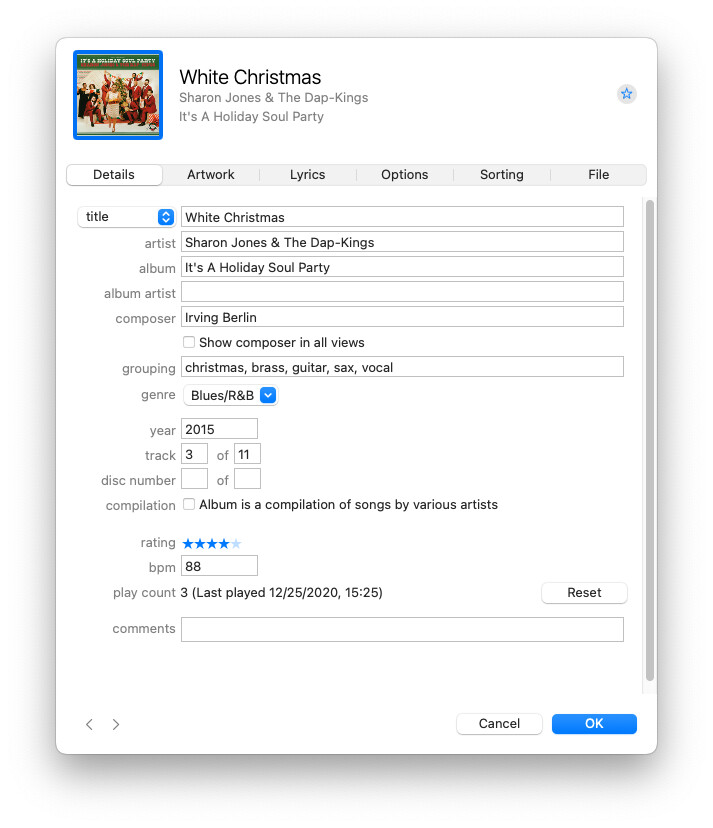
I have been using the (otherwise useless to me) “grouping” field to store a set of sub-genres, one of which is “christmas”:

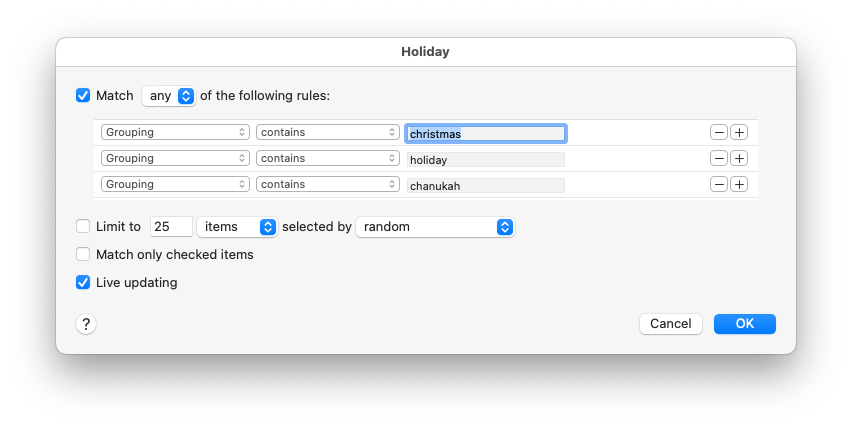
So I can use a smart playlist to collect holiday music:

And you can just as easily create a smart playlists containing songs that don’t contain these tags if you want to explicitly omit them at other times.

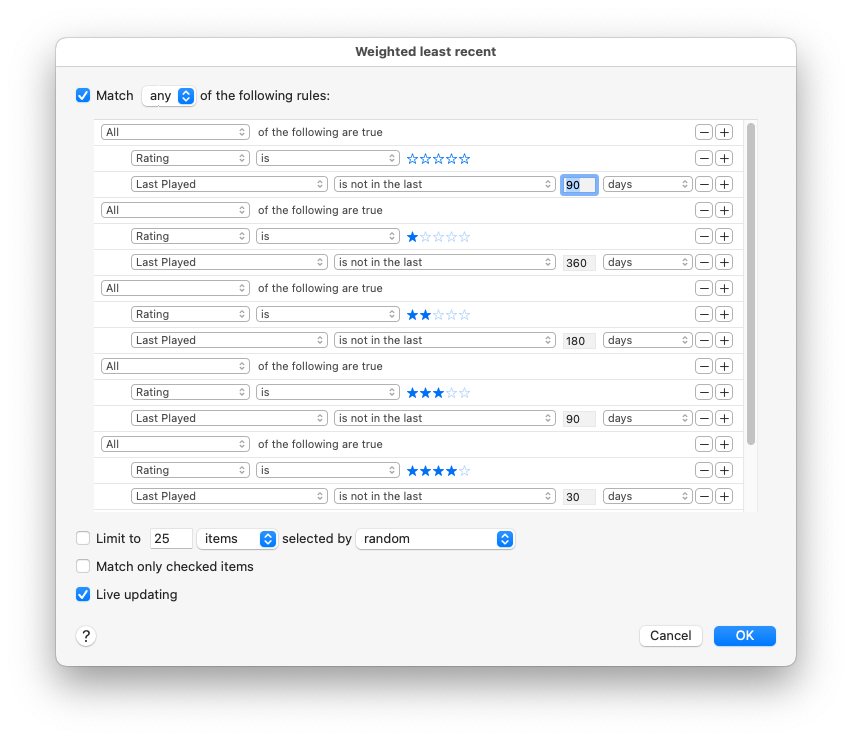
Any just in case you might find it useful, I use a smart playlist that presents my least-recently-played tracks, allowing higher-rated songs to be played more often. I often shuffle that playlist in order to listen to things I haven’t heard in a while:

(There is one final row off the bottom of the window that selects 5-star songs not played in the last 10 day).

4 Likes

I had an old computer that I fired up iTunes on that only had Xmas music. Somehow, some still played at times when I was listening to random music. I fund the “don’t play on shuffle” a pretty good solution and plan to try it.

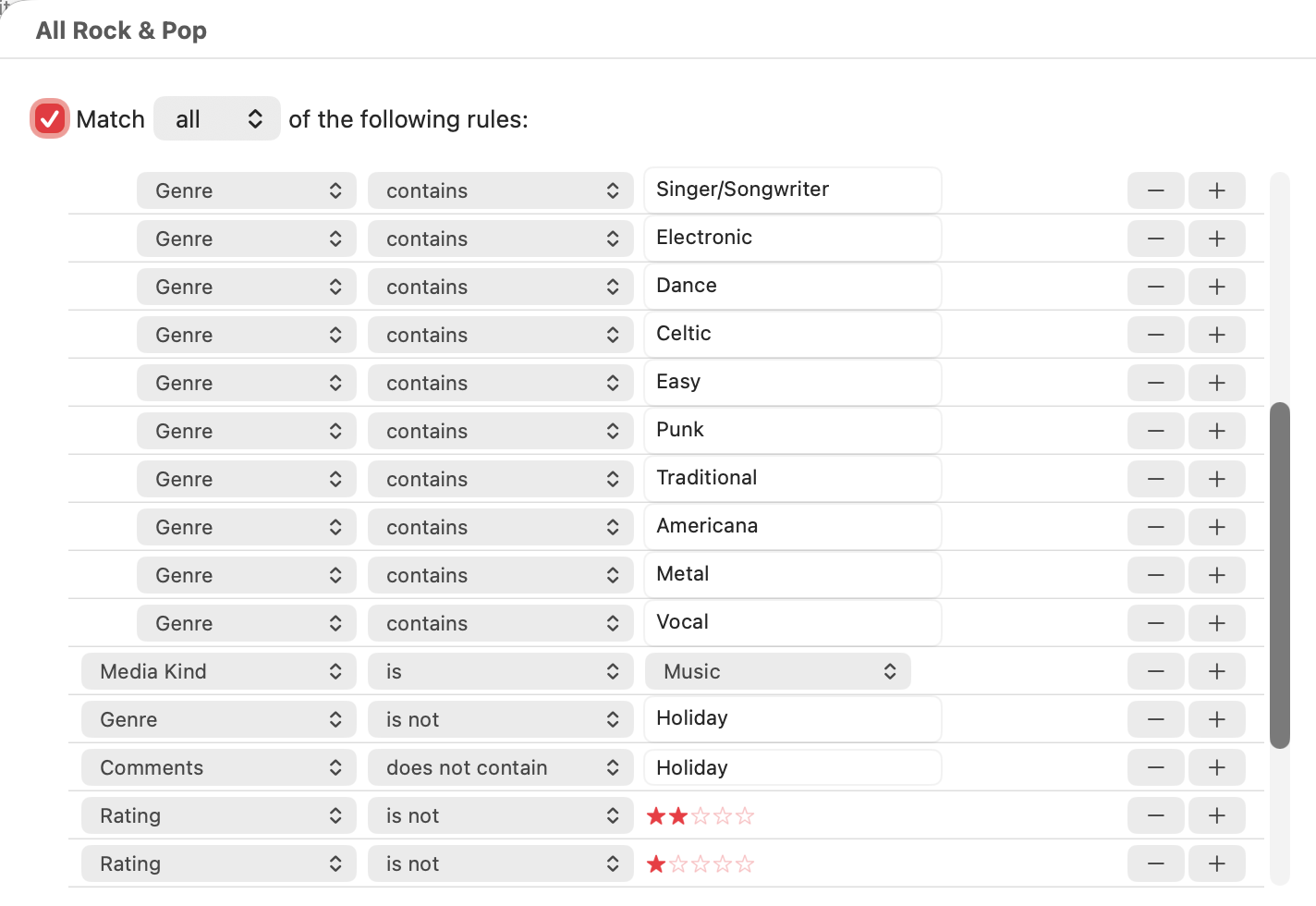
All of our Christmas music is either marked with the genre “Holiday” or it has a comment “Holiday”. I then have a smart playlist (which I call “Rock & Pop”) that has the following rule (it can’t show on one screen):

And that’s the playlist that we play most of the year.

For there second half of December, we play a playlist “All Good Holiday Music” that is rated three stars or higher, is the genre “Holiday”, or has “Holiday” in the comments. That is a total of 371 songs at the moment.

For the first two weeks after Thanksgiving, we have a playlist called “Good Holiday Mix” that contains those 371 songs plus 350 songs chosen randomly from the All Rock & Pop playlist that are rated four stars or higher.

We don’t use HomePods - we use Sonos speakers/devices - and the Sonos app can’t seem to see smart playlists from Apple Music, so I have regular non-smart playlists that I maintain from the smart playlists. They are called “Sonos Good Holiday Music”, “Sonos All Rock & Pop”, etc., to make them easier to tell when we are playing music from our devices, such as when we use CarPlay.

Finally, we also have some classical music playlists that we don’t play randomly, but instead sequentially, so that we can have them arranged by album in the order they appear on the album - though we don’t listen to those very much.

[edit] I’ll add that occasionally a song will play that one of us doesn’t like and we’ll skip to the next one. Back before we used Sonos and instead used iTunes for playing music, I would look at skip counts to pull a song out of the playlists - usually by rating it one or two stars (most of our songs are unrated, by the way) or by unchecking them, but leaving them in the library, in case we ever want to play a full album. Because Sonos does not communicate the number of times that a track is played or the number of times that it is skipped, I now have a Reminders list called “iTunes Changes” where I will create a reminder to deal with a particular song/track later.

2 Likes

I simply sort by genre (“holiday”) on my Mac, then select all, then check/uncheck once a year, and sync to my iPhone. (Somewhere I think there’s a “sync only checked songs” option.) Works like a charm.

1 Like

Like someone else said, I use Grouping along with Smart Playlists. Holiday songs sit off-season with the “Holiday” grouping which the Smart Playlist will not pull from. Come the day after Thanksgiving, the holiday songs grouping is changed to make them eligible (I don’t make them all eligible as I don’t want to overwhelm the playlist on day 1 - after an initial large group, I add about ten more everyday until all are eligible. The specific grouping name controls how often any song can be played. At the end of the season, they’ll all be switched back to “Holiday” (easy to select since the Genre is also “Holiday” and I don’t otherwise use Genre).

I have 3 smart playlists: Christmas with 425 songs (23 hours), German Christmas with 122 songs (4.33 hours), and Christmas Humor with 45 songs (2.5 hours). I haven’t ever shuffled them, just let them play through however I just went and checked but that option was unchecked.

For me, it’s kind of the reverse situation; my music library has around 55,000 tracks in it, and an awful lot of that is stuff I only want to listen to occasionally. (Children’s music, Broadway musicals, Gilbert & Sullivan, etc.)

So I’ve got one ‘general shuffle’ smart playlist that draws from several genre-based ‘fodder’ playlists, and currently has about 7,800 songs. New additions (I pick up a lot of CDs at garage/estate/library sales if they look somewhat interesting, at a couple of dollars a CD I’m not risking much) go into an ‘Auditions’ playlist that also feeds into the master playlist, and I cull from that if an album/artist isn’t interesting on repeat. (My latest chance pickup that sounds promising is Pink Martini.)

So when Christmas season comes, I just start playing the Xmas Fodder playlist if I want the full immersion, or add it to the master playlist for the duration of the season.

What’s your solution?

Not my solution, but my suggestion, ask Apple to make the option make sense. I see no reason why the option should work as it does. It should understand that the mandate not to play when shuffling does not apply when part of a playlist. Isnt that obvious? Or am I wrong?

We love Pink Martini! Seen them more than a few times and their multilingual Christmas Album is fantastic (as are most of their albums). You may have heard their single hit “Hey Eugene”.

I am perusing this question as I would like it when I randomly tap my ipod, to hear a variety of music, but almost never Christmas or spoken word, and want to figure out how to do that without relying on streaming.

Great stuff, everyone, and I love seeing the various options. Personally, I do like to be able to shuffle all my music (such as when I have no sense of what I want to hear) and I also do a lot of HomePod playing where I ask Siri to play an artists. Since many artists also have Christmas albums that I don’t want to hear, I’m thinking that @gib’s approach of toggling the song checkbox for all the holiday music off in January and back on in December may make the most sense. And clearly I need to leave myself reminders about this!

1 Like

If your Christmas albums are labeled as Holiday, then you would just have two smart playlists: one Main one that has everything except Holiday items as excluded and a Holiday playlist that contains only those items labeled as Holiday. This way, you don’t have to go unchecking and rechecking. Smart playlists update as you add more music so no issue there when you get more discs etc.

Right, but if I tell the HomePod to play Dave’s True Story, I’m not using either of those playlists and it very well might play their Christmas album.

Good point. I listen mostly using my phone or computers and no HomePod so not sure how that affects your situation.

All my Xmas music gets relegated to its own playlist. I only shuffle within that.
All my shuffle-able music (i.e. pop, rock) gets put into its own pop-rock playlist and I shuffle within that.
All my jazz and classical I listen to by album or collection. Never shuffle.
I think the only time I ever used checkboxes is when I purchased something for somebody else that I didn’t want to listen to myself.

My solution has to do with the fact that I’ve been relegating my ~30K tracks to just seven genres, of which Christmas is one. Then I create all my Christmas playlists from that genre. Pretty simple, really.

The fact that iTunes/Music always offered hundreds of genres has made no sense to me, but then again, my musical tastes aren’t terribly sophisticated. Anyway, simplifying my genre options has worked very well for me over the years…

Negative filters (“except Holiday”) are something Siri struggles with.
Complex multi-part commands (“entire library” + “exclude genre” + “shuffle”) are where Siri frequently simplifies or ignores part of the request.

My most reliable option has been to create a Smart Playlist:

  • Rule: Genre is not Holiday
  • Set it to live-update

Then say “Siri, shuffle the non-holiday playlist.”
Other rules (e.g. Genre is not Children’s music) can be added.

This works for me because:

  1. all my holiday music is tagged with Holiday as the genre
  2. the negative filter is in the playlist, not the request to Siri

I have delegated this task to my eldest… works great. :blush:

1 Like

I have been using the (otherwise useless to me) “grouping” field to store a set of sub-genres, one of which is “christmas”:

Well, as a classical guy, “grouping” -should be- how tracks get grouped together as the composer intended, so the 3 movements of a symphony, 3 separate (adjacent) tracks, get ‘grouped’ into “Symphony #3” Unfortunately, most of the metadata for classical music doesn’t use “grouping”. Some ignore the problem, others add the entire work description, “Symphony #3, 1st Movement Allegro” to the track name.

I use “genre” for more resolution with music identity, with a genre of 'Holiday’ I also have my (large) classical collection broken down into “Medieval”, “Renaissance”, “Baroque”, “Classical-19th Century”, “Romantic” and “20th Century”. It’s feasible for me to update a CD with this Genre detail, than to go back and edit each track to ‘fix’ Grouping.

And speaking of ‘metadata mess’: Why the expletive deleted does Music.app think that the Album Name is the text of the Name field AND the text of the Artist field? As an example, the last movement of Beethoven’s 9th Symphony has vocal soloists. “Shuffle by Album” will treat “Beethoven - Symphony #9” as 2 separate albums if the Artist data for the last movement adds the soloist names.

All this dates back to the mess of iTunes original metadata definitions.

There’s a much better way to do that.

In the Info panel, in the Title field, “Title” is a pop-up. Change Title to Work Name. New fields will appear for Movement number and name. You can play a Work as a a single piece, or you can still access the individual movements.

2 Likes