For an arbitrary audio file? Not likely. I suppose some pattern-matching service like Shazam might be able to do it, but that’s all I can think of.
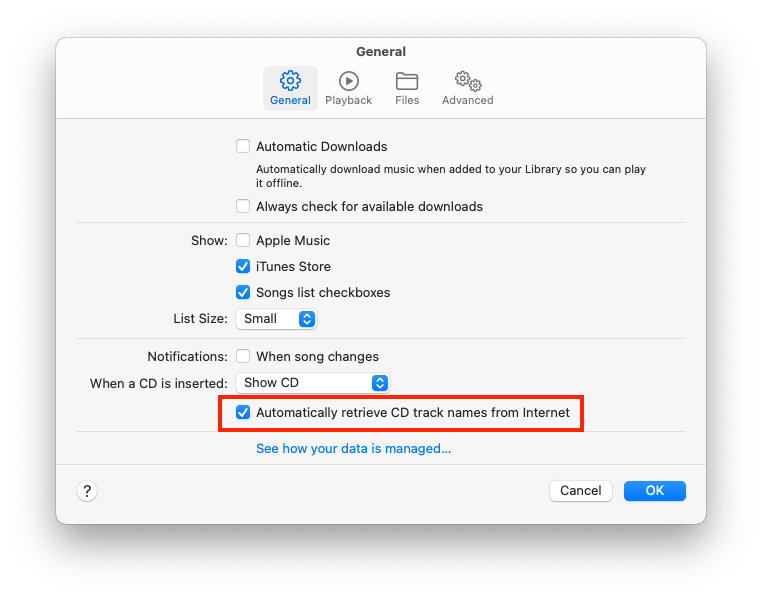
When you rip a CD with Music, it sends the disc’s table of contents (the length of each track) to the CDDB server, in order to get information about that disc, which includes genre among the other data. Music will save that information in the tracks it rips from that disc.
But once a track has already been ripped, you’ve only got the metadata stored within that file (the ID3 tags). If it has the information, then apps can access it. But if the information is missing or wrong, there’s not a whole lot you can do, other than manually editing it.
But that having been said, you probably want to review/update genres on your own. People disagree in many cases, and the set of choices presented by servers like CDDB don’t always fit well.
Interesting! does that on its own, or is there a way to turn that off? But it might be useful as long as it keeps this CDDB data just within its own database/management system.
Then again, I’m not likely to drag heavy boxes of hundreds of CDs up from the basement to rip them again. Some of the previous rippings would possibly have that metadata though. Hm. Can the ID tags be viewed somehow, in Finder, Get Info etc?
Thanks for helping me think through this. I need to look again, and maybe sketch out on paper, how I consume the music and want to in future. Things like, when I was buying CDs and listening, I had racks that showed the spine, and a small enough collection I could remember what they were, select up to 5 and insert them in a carousel player to listen in sequence or random.
Then I went to a flip holder from Ikea, where the covers were showing and one could better use depth of shelf space, so I would remember the cover art and make selections that way.
With no ‘hifi’ gear now, and only a rather jumbled digital files mess (possibly got that way partially by bad online lookups/iTunes handling), I usually only listen from an iPod Touch, to which most if not all of the music is synced.
These days, I think I would tend to choose based on genre and do a random selection within it, or even random within entire collection. So maybe I need to also create a folder level in Finder with genres.
I wonder how Music an other music management apps would handle Finder Tags or aliases. For instance, assign a Tag to a genre, or if a particular artist has albums in different genres, could I put an alias to the album in another folder and Music (or other) app would understand.
I know I do need to develop a “holiday playlist”, as the ones we have now on the iPod are fairly messed up (might be my fault, I vaguely recall setting multiple genres on some music way back, so they could appear in multiple playlists) so I always get in trouble at not being able to find my family’s favorites and then they burn up internet traffic with YTube music streams…
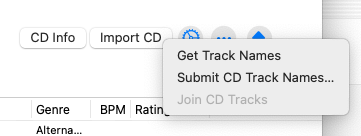
You can also manually request retrieval, either because you disabled automatic retrieval, or if you just want to blow away the current data and replace it with data from CDDB. With a disc inserted, click on the gear icon in the upper-right corner of the window and click on “Get Track Names”:
You can also submit your metadata to the CDDB from that menu.
After retrieving the data, it is stored locally, associated with the CD’s table of contents. The file is ~/Library/Preferences/CD Info.cidb. If you delete it, macOS will forget about every audio CD it has ever read. If you copy it to a new Mac or a new account’s Library, it will copy the metadata to that account.
Unfortunately, this file format is proprietary and undocumented. I know of no way to merge two such database files together.
iTunes/Music has never supported multiple genres on a single track. Which is a shame, because I’d also like that capability.
For myself, I use the “Grouping” tag. I created my own schema, where this field is a comma-separated list of keywords. I can then make smart playlists with criteria of the form “Grouping contains …”. I manually create these. It has taken me several years to tag everything I own, but now that it’s (mostly) done, I only have to do new songs when I purchase/rip them.
The keywords I usually use are:
Decade (e.g., 1960’s, 1970’s, 2010’s, etc.)
Although this is usually based on the recording date (the “Year” field), it doesn’t always. A recent recording of an old song may have the decade of the original song, if it still sounds like it comes from that decade. A new song written to sound like an earlier decade may also use the earlier decade.
The goal is the sound, not the recording date. I have the “Year” field for when I want the date.
I don’t use this keyword for genres like Classical and Folk, because the concept of a decade doesn’t make a lot of sense there.
List of instruments that feature prominently (e.g., guitar, synth, brass, sax).
I keep it high level (e.g., trumpet, trombone and tuba are all “brass”.
I will also base this on what it sounds like, not the actual instrument (e.g., a synthesizer that’s playing a string section will probably be “strings”, unless it sounds electronic to me).
“vocal” or “instrumental”
The language, if not English
The country, especially for folk and classical music
But again, it’s based on the sound, not the recording data. So a New York performance of something by Tchaikovsky will be tagged “russia”, and an American band writing original music in the style of an Irish folk song will be tagged “celtic”.
Any special classification that I think might be useful (e.g., holiday, comedy, faire (for renaissance faire music), etc.)
I restrict the actual “Genre” tag to just those high-level genres that you might find in a record store (back when such stores existed). “Pop/Rock”, “Classical”, “Blues/R&B”, “Folk”, “New Age”, etc. I don’t get more specific than that because the goal is to have a convenient grouping, not create an academic classification database.
I also have tapped-out the BPM for most tracks (this is an ongoing project). I use an app called Turnover for this. But since that app is Intel only (no update in 5 years), I may be forced to replace it with something else in the future, as I’ve had to do twice before.
So… with these tags in place, I can do quite a lot with smart playlists.
For example, to make a playlist of holiday music, I can make one with a single rule (Grouping contains “holiday”). Or I can get fancier (e.g., Grouping contains “piano” and Grouping contains “instrumental” and BPM is less than 150).
I need to look more in detail on your post and reply more later but wanted to get that Thank You out there.
(I’m fairly sure I put multiple genres on a bunch of tracks or maybe albums but I need to dig out my previous laptop and poke around, that might be later this week sometime.)
I did this when I created 3 distinctive playlists for Christmas. I basically just created a distinctive genre for the songs I wanted in each list like “Christmas”, “German Christmas”, and “Christmas Humor” then named each playlist the same and used rules to define which genre went to the correct playlist.
Just as a historical note – when the original CDDB database was put together, “Genre” was used as the top level of the hierarchy. That was not a particularly good choice, but it explains why “Genre” persists, and why it’s impossible to have multiple genres within a single album.
Golly, there’s more to this topic than I realized! Thanks for the post and ideas @romad !
I think what I did back then was making playlists based on genre without troubling too much to look at the individual tracks. So when I play say, ‘holiday’ genre randomly there can be classics and then cheesy rubbish by pop stars and so on.
Need to find my Curator Hat and get on it, summer is 1/3 over and next you know I’ll need this playlist!
Not quite. Although CDDBv1 no longer exists, it (mostly) lives on via the gnudb.org community-server. Looking over its API, I see the following commands:
List all available genres.
Search database for matching entries. It appears you can search for any set of fields, and will get back a string containing genre, disc ID, artist and album title
Search for cover art. You provide artist and album and get back links to images on coverartarchive.org.
Search for disc. Provide table-of-contents (TOC) information (number of tracks, offsets and lengths for each) and get back a list of discs (ID, title, artist)
Read full entry. Provide disc ID, get back full information. Disc ID, title, year, genre, list of titles, and extended information (like year).
So yes, the system only provides Genre on a per-disc basis, but it’s not a key to the database. The key is the disc ID, which is generated from the TOC.
The modern Gracenote GMDv2 API is much more complex. It still appears to associate genre with a disc (not a track), but it can return an array of genres for a disc.
Within the CDDB database, yes. But note that this is not the case for iTunes/Music. Apple’s app focuses entirely on tracks, each of which has its own Genre field. Albums are objects constructed from the track data, without any independent existence.
So, when you tell Music to look up CDDB data, you will get one genre for the entire disc. But you can then edit it all you want in Music, before or after you rip the disc. Your per-track edits will be saved, either in the CD Info.cidb file (for the disc) or in the ripped tracks.
I checked finally, and on iTunes on my Mac running Sierra, if I Get Info for a track or an album, it is possible to pick a genre from a popup list as well as enter the field and type whatever you want, so multiples are possible, and I have some. I even have some completely unrelated text in the popup list, like file names of files elsewhere on the Mac etc.
Maybe at some point I was making playlists from genres and wanted a given album to be available in more than one or something.

 out there.
 and get on it, summer is 1/3 over and next you know I’ll need this playlist!