'Find My' Self askew ;-)

Disconcertedly befuddled by Find My!

(I was going to detail why but the notes got too long and after two hours I didn’t find a solution, so I’ll just say I’m ok if this Topic is deleted, or leave it for my later follow up if that’s of use to anyone).

IIRC (not a sure bet), back when Find My Mac/iPhone came out, it was like one or two switches to put into use. Devices would be found by wifi router locations, cellular connection points, GPS. That was it, nice and simple, a bit dodgy that wifi routers were being mapped without owners knowing, but it was simple and sorta local and worked so I turned it on and didn’t pay much more attention.

In 2026, I’m considering using Tag items for the first time and have read relevant parts of the latest Take Control book twice (my concentration is not what it used to be).
MBAir, 26.2, has been on same wifi router for over 5 years with Find My Mac on but can’t be found by its Find My.app;
iPhone, 26.2, has been on same wifi router and phone/data provider for over 5 years with Find My iPhone on, but can’t be found on MBAirs Find My.app;
iPads, 26.2, have been on same wifi router for over 5 years, Find My iPad on, and both show up correctly with last wifi connection time shown;
House is in the same place for over 60 years ;-), end of a side street with neighbor houses within 50 meters on 3 sides, all with wifi routers.

Find My App on the MBAir:
People tab shows ‘Me’ at my house, location provided by iPad Air (which won’t let me turn off it being ‘my location’; iPhone is also set as my location), and…
Devices tab, last night showed iPad Air could not be located (although it was locating ‘Me’ in People tab). Today, lists the two iPads correctly located and most recent wifi connection times, plus an old iPod and a MBAir, neither of which can be located by Find My. iPod has been in Airplane mode for years, so ok, but the Mac I use daily on the same wifi router as the iPads… is not found! My iPhone 13 Mini, daily on cellular mostly, occasionally and many times over couple of years on the same wifi, and presumably has GPS… is not found!
Items tab correctly shows nothing, as I have no other items…

I spent a good two hours with my devices and Apps and Apple site trying to figure out how to get my important items to show up, but they wouldn’t. Tips and Apple site seem to assume some unlisted Settings are on or something.

So… I admire those of you who have the ability to keep up with this App/feature, but I give up. This Find My stuff has become too complex, duplicated, overlinked, overlapping and inconsistent. I’m turning it off on every device until I get the third party tracker Item I ordered and then might give it a whirl from the get go if I can find the patience. I’m going to have to sharpen my concentration to keep track of gadgets, keys, wallets etc. and minimize the data gadgets hold in case of loss.

I’ll update the Topic for anyone interested, if it’s still posted.
1 Like

It sounds like you may have been expecting immediate map updates. Only UltraWide Band devices support realtime discoverability. Otherwise, FindMy data is updated indeterminately.

Thanks for writing, @bb1 , it’s more than that. I was expecting to turn on ‘Find My (xyz)’ in Location services, and… have it work.

I don’t know how long I thought my Mac and iPhone were findable but actually weren’t, or what assumed settings need to be on for Devices to be found. I followed Apple’s current meager instructions and it just didn’t work as advertised. For years maybe. Since I thought it was on and working, I didn’t look at Find My.app for a very long time.

They’re all turned off now, I’ll let the digits settle. Even in turning off, I had to go to multiple settings pages, and a change in one did not affect the other. Scrolling past a turned off setting turned it back on. In the process I found a bunch of apps’ iCloud functionality had been turned on, though I had turned them off after updating to 26.2.

Too frustrated now to do any more.

1 Like

When you look for yourself, it uses the computer’s location services to generate a location. And as you say, this could be based on GPS, IP address, nearby cell towers, nearby Wi-Fi routers and other things. Depending on what is available for macOS to use.

FWIW, I have found that my Mac mini (connected via Ethernet) can only find itself accurately when Wi-Fi is turned on, even though I’m not connected to any wireless network. I assume this is because it can get the addresses of dozens of nearby Wi-Fi access points (including my own) when the radio is enabled, but can only use my IP address (which is behind a NAT-enabled router) when the radio is disabled.

Devices report their locations in a fashion similar to Air Tags:

  • Find My must be enabled on the device or they won’t even try to report a location.
  • They need to be logged in to your Apple account for you to access the location data.
  • They will periodically report their location whenever they are turned on and connected to the Internet. If your device is turned off or doesn’t have network access, it won’t report any location.
  • When it does report its location, that report will depend on what data is available at the time - like what your laptop does.
  • Devices that don’t have Internet connectivity (no Ethernet or Wi-Fi, like Air Tags or Air Pods) will periodically broadcast a location via Bluetooth, but there will need to be a powered-on Apple device nearby that can receive the broadcast and relay the data to the Find My network.

In all cases, when you check the location, you will see the last-reported location. Which might be current or might be old.

I’ve found that some devices (like family members that that have shared their locations with me) will initially report an old location, but will soon update to a current location. I assume that, since their phones have cellular connectivity, the network will ask them for a current location when I’m actively looking, but uses much more infrequent updates when nobody is looking.

If you turn it off on your devices, then you won’t be able to track those devices’ locations at all. They won’t transmit their locations, Apple won’t track anything, and you won’t see any location data if you try to look for them.

Third-party tracker tags won’t affect this. They will transmit their locations to their respective networks using their own mechanisms. And you’ll use their apps to read those locations.

I think you’re massively overthinking this.

Thanks for the helpful info @Shamino !

I was doing everything listed in your bullet points, yet the most important items, Mac and iPhone, could not be found by Find My.app, despite being in daily use connected to the same wifi and cell towers as they had been for years. Two iPads, connected to same router, were found shortly after connecting.

There must be more to the story of what needs to be on and connected to Apple. They make it sound so simple on the web and in Tips App, but they are assuming some things. At some point when calmer I’ll research what those things are and report back.

I realize none of the Devices are trackable now and will thus be even more protective of and tuned in to them if they leave the house. I’m also deleting unused Apps, backing up more frequently, and cleaning out personal data as much as I can in case of theft.

On your phone, I’d check Settings / Privacy & Security / Location Services. Make sure that it’s turned on, then tap “Share My Location”, make sure that the option “Share My Location” is turned on. If “My Location” does not say “This Device”, you should have the option to tap it to make the iPhone the device the one that sets your location. This is probably what most people want - most of us leave the house and office carrying our iPhones, and most rarely move around always with an iPad or a Mac.

Tap “Find My iPhone” at the top and make sure that it is turned on.

If these don’t fix it, there are two options:

  1. Call Apple Support (or go to an Apple Store Genius Bar appt) and get them to help you fix it. That said, these days calling doesn’t always seem to help, based on other people’s anecdotes.
  2. In case you’ve altered some internal setting that affects Find My, you can try Settings / General / Transfer or Reset iPhone / Reset (at thew bottom), and from the dialog that pops up, choose “Reset All Settings”. That should reset everything to factory defaults, which includes notification alerts, location alerts, etc., so you’ll start getting a lot of prompts to set those.

Excellent tips @ddmiller !

In troubleshooting to turn of the iPad being my location, I think I did try turning on Share My Location just to see if it had any effect, and was still not able to tell it not to be my location.

I don’t share my location in the first place, so am not sure how iPad got set to that! Maybe I was fiddling around with settings when I got it several years ago.

Anyway, I’m sort of in ‘hide me’ mode now with everything turned off, letting the digital dust settle and then when the tags I ordered arrive, take it step by step.

Both iPads (air 4 and mini 6) were went thru ‘erase all content and settings’ and ‘set up as new’. Although it was somehow not successful at the ‘erase all’ part, these are the only two devices that appeared in Find My so 2. might be right about that.

Thank you for the kind suggestions. For now my 4 main Devices are minimized in personal content, relaxing in anonymity, unfindable, and I’m using enhanced physical procedures to keep them safe.

I rarely lose anything for long so haven’t used Find My much since it first came out, other than thinking I had it turned on and Devices findable. The recent Topic on new AirTags and losing track of car keys for about 15 minutes got me thinking it might be useful to have one, and things went downhill from there.

My iPhone and keys and wallets travel mostly in velcro’d/zippered pockets and are physically checked often so are fairly safe in my modest lifestyle for now.

Has your AppleID changed over the period (eg going from .mac to .icloud)? If so, this might confuse Find My. Not sure how this could be fixed.

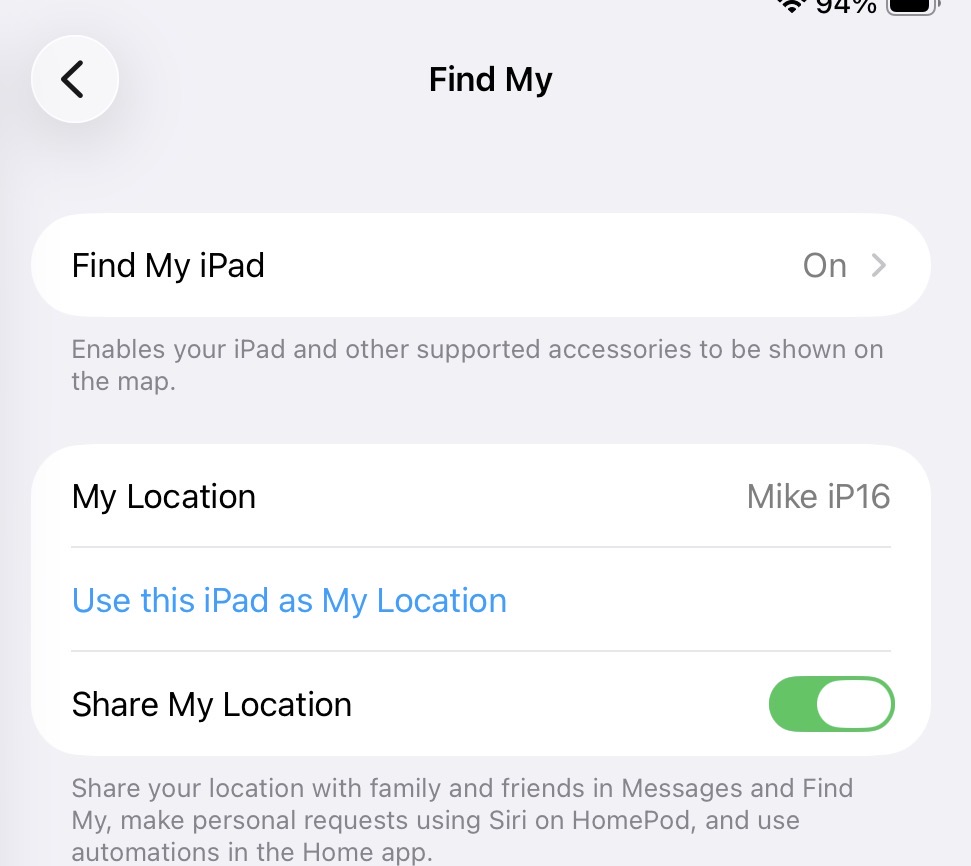
Regarding the iPad, when you go to Settings/iCloud/Find My does it show another device as your location (see screenshot)?

Thanks @mpainesyd , kind of you to offer these ideas.

No change of AppleID, no. The Devices have always been on the same IDs.

It showed itself as my location. I don’t recall ever setting it to that though. It was weird that 2 Devices were set to be my location, neither sharing its location, and one showed correct location yet could not be found (until the next day), and the other not sharing and not found at all.

So I give up for now and let the digits settle til my third party trackers are on hand, then I’ll start slowly experimenting step by step. Apple must be assuming that certain settings/features are on, but so far I haven’t found a clear list of every setting required for this to work. It seems Find My has changed significantly from its early days when I started happily using it.

Brief Update 4 Feb for those interested:

Rec’d Chipolo trackers, added them to iPhone quite easily. The ‘left behind’ feature and sharing don’t work yet. I’ve been over an hour and more than 1 km from them and receive no notification they were left behind. They showed shared with another Apple Account but hours later in that account only the MBAir has found them. So far haven’t found anything specific on Chipolo or Apple sites.

Realized a conceptual/complexity issue, the iPhone is on a US based Apple Account, the MBAir and 2 iPads are on an EU Apple Account. I have to twist my head around having two “me” locations but I’m getting there slowly. Been going thru sharing locations of all back and forth and approving indefinite sharing. iPhone and iPads have found each other but MBA is not finding the iPhone. Oddly I shared by the main Apple ID email and an alias of it shows in Find My People.

Finally, the MBAir refuses to be found. I have followed the Apple page for how to turn on FMMac. Didn’t work. Backed out of the steps, logged out and in again, followed steps again, switches are showing on but the thing refuses to be found. Additionally, in Apple Account > (MBAir) it says Find My Mac is off, though I’ve turned it on and off now multiple times. Haven’t found out how to fix that yet. Had a few Apple location related connections blocked in Little Snitch but turned them on, still hasn’t helped.

That’s all for now, will update as I find solutions.

I’ve had this problem with my MBP 16" since I bought it. ChatGPT says it’s something corrupted in the OS and I need to reinstall, which I haven’t bothered to do. Apparently it’s a known issue. You might as it or another chatbot about it and see what info it turns up if you’re curious. Since I don’t travel with the big laptop it’s not a huge issue for me, but it sure is weird.

You probably should have mentioned this sooner. All of my responses are assuming someone using a single Apple account. I’ve not shared any of my AirTags with another person, yet, so I don’t know how that works.

Thanks @xdev , good to know I’m not the only one. It makes me wonder which indication is correct, though, the on switches and dialogs or the Apple Account one.

Workaround for now will be anytime the MBA leaves the house, to have one of the tracking chips in the rucksack with it and enhanced physical control. Am interested to find out if the chips are found by the Find My Network. They would ordinarily get location from the iPhone they’re friends with, I think, so if I turn off bluetooth on that and wander around a supermarket or somewhere with a bunch of people, they should get found by crowdsource members.

Sorry about that @ddmiller , :pensive_face: I only realized it when trying to fix the ‘Me’ location source last night. I have been possibly guilty of writing too soon on ah, more than this occasion.
Luckily it occurred suprisingly quickly to me that I could just share location back and forth, which has sort of worked.

The Item sharing has been easy and partially successful.

Some years ago I considered ‘Family Sharing’ my two accounts but at that time, and maybe still, a US based and abroad based Apple Account cannot be in the same ‘Family’. Something to do with rights and payment to apps, music, books, etc. iirc.

Brief progress report: turned off BT on iPhone, was only on cellular. Carried the new tag (which only has BT as I understand) to grocery shopping. After only maybe 20 min shopping, the tag location was correct in Find My App on iPhone, and it showed the tag Item as With Me.

So it seems the thing was bluetoothing out and Find My Network devices relayed it, and since Find My App is allowed to use location and cellular data, it heard from the Network where the chip was, compared it to iPhone’s GPS/cellular reported location and determined we were together.

If I understand correctly and had iPhone BT on, the chip would have not needed the Network but Find My App would have sensed and located it relative to iPhone. And had I needed to find it I could have sent a chirping command over BT.

1 Like

Probably, but since we don’t know the details of the guts of the protocol, your phone might still need to relay your tag’s location to Apple’s cloud server before your phone can read the location.

I’m sure someone with more time and equipment than me could run some tests to figure this out, but (for me at least), this is just a matter of curiosity.

I’m still struggling to get Find My Mac working again. It’s the only, and perhaps most important, of my Devices that is not being found. I turn on Location and the various Find My switches, yet going to Apple Account and scrolling down to this Mac, it says FMMac is off.

Tonight I tried all the steps in a, ah, perhaps not well known but not dodgy-feeling site. After multiple logins and outs of Apple Account, Mac Accounts, settings on-off, deleting prefs and caches, emptying trash, restarts, etc. the Settings > Apple Account > Device listing resolutely shows FMMac is off.

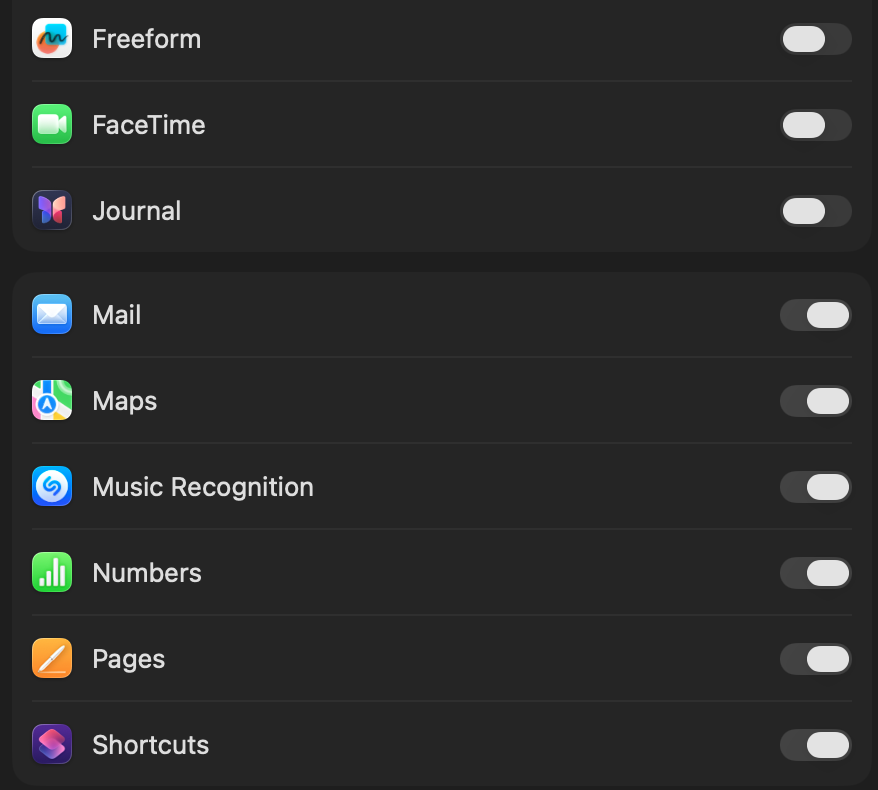
Additionally, in the process of logging out of the Apple Account and back in, it of course turned on a bunch of ‘Saved to iCloud’ things I’d turned off, and didn’t even properly show the switch ‘on’ color for items at the bottom of the list:

pretty much had it for today, will update in future when I make progress, for those who are interested.

FWIW I have been travelling overseas and having “issues” with all sorts of internet functions - particularly Find My and data roaming, It seems like there are random errors creeping into internet packets/the ether. I am very cautious about hacking and other vulnerabilities so don’t think the problems are at my end.

1 Like