Apple Account Locked -- again and again and again

I’m a 40-year Mac user, but have recently run into a problem I can’t get out of.

I have an m4 Mac Mini and an m1pro MacBook Pro.
The Mini runs OS Sequoia and the MBP runs Sonoma.
I “like where these are” and am not interested in upgrading the OS’s at this time.

I’m a “Mac only” guy.
I don’t own an iPhone (don’t want one, or any other smartphone).
I don’t own any iOS devices.
If I’m going to do something, it’s “on the Mac”.

I don’t use iCloud at all, with one exception:
I use the “Messages” app to keep in touch with a family member (who uses her iPhone for this).
But, aside from that, I use NO iCloud services. Is “Messages” even part of iCloud?

I stay away (in most instances) from “two-factor” authentication.
I don’t need or want it.

Lately, I keep getting “locked out” of my Apple Account. When I go to use the Messages app, this will appear:
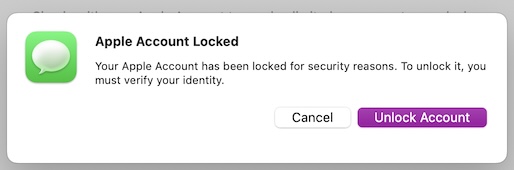
So I click “unlock account” and get this:
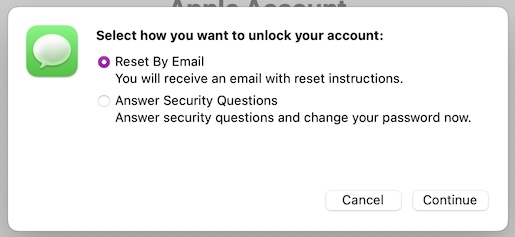
So I fulfill the requirements it’s asking (I’ve tried both options).

If I use email, it sends me an email with a link to click to unlock the account. I enter my password, and – things look ok. For the moment.

Sometimes I’ll get a warning that I must login to use Apple Media Services. I don’t use such services at all, not ever (unless Messages is a part of that, is it?). I just click “later” to dismiss this one.

For a while, sometimes a day, sometimes only a few hours, things may work.

But then, out-of-the-blue, I’m locked out again. Can also happen if I switch from the Mini to the MBP.

I’ve tried going to system settings, to the Apple Account, and going through every choice/option there. But that doesn’t seem to help. I unlock the account, and after a [unspecific amount of] time, I’m locked out again.

What do I have to do to prove to Apple that this… is me…?

One other question: are there any 3rd party messaging apps that will send/rcv text messages to someone else’s iPhone?

2 Likes

I have been getting these security messages for a few years – and have even posted about it here. By turning on/off various features on the iPhone and/or Mac I have determined the problem was in Messages. Furthermore, I think this is a bug if you have single authentication.

A few weeks ago I finally upgraded to two-factor authentication and, lo and behold, no more security messages. The multiple-times-per-week notifications ended.

It has been suggested that I was getting these notifications because someone was trying to hack my Apple account and failed the password. A check of the Have I Been Pwned site indicates that the email address I use for Apple does not appear. Further, if it was hacking, then I would be getting notifications on my now-Trusted multiple devices that someone was trying to access the account. No such messages appear.

So, again, I think it is a bug (or “feature”) of having one-factor authorization.

2 Likes

An elderly friend who uses Messages a lot sent me this message this morning:-

“Today so far I have had to sign in 3 times not always at start up, but each time I have to give all the details, DOB, questions which I know, make of first car , where did my parents meet etc etc. They then tell me my account was locked for security reasons which is why I have to answer the questions I presume. Giving the Apple ID each time. I don’t think it matters if I have put the mac on Sleep mode, or just left it to close down on its own. Sorry to bore you with this, but I just have no idea what to do???”

She says it’s been happening since she got her new iMac (April time) but it never happened on her previous iMac. She has to go through the same hoops as the OP.

She might be 80+ years but she’s not thick and knows what she is doing, a Mac user for 20+ years.

We’ve chatted through various options but nothing has worked.

I’ll see if I can get over to see her (she has a swimming pool and it’s rather hot here in London!) and then we’ll call Apple support.

I would get a prompt on my iPhone/iPad to enter my password. Upon successful entry, another message would pop up telling me the account was locked. I was given an option to unlock via email. The email would take me to the Apple “iForgot” site and I would enter my password. If successful it would announce that the account was unlocked. It would also prompt me to log in to the site which then asked for my security questions. I learned that this second step was not necessary and could avoid the questions. After all, it had indicated the account was now unlocked.

Are you sure it was necessary to answer the security questions? Or was providing the password to the Apple site sufficient?

It’s not necessarily that someone was trying to hack your account. It could have been someone cluelessly thinking your account was theirs. A friend’s daughter has an iCloud account that gets locked regularly. From the emails she has received at that address, it seems at least three other people around the world seem to think her account is theirs. Some attempt to log in to “their” account repeatedly, probably wondering why they’re not getting expected emails, and it ends up getting locked.

You won’t get a notification unless someone manages to enter the correct password.

4 Likes

I have an email address at a major provider that is short (similar to abcd@bigISP.com . It picks up a lot of “random” use. My least nefarious explanation is people who don’t want to give out their real address for retailer coupons, free downloads, discount codes that require signing up for a mailing list, and other single time promotions type a few characters at random and pick the first domain name that pops into their head. These are annoying but are more of a nuisance than a threat to my mind.

There is one indivdual, though, who used the address for hotel reservations for some reason. I wouldn’t be surprised if they triggered some account verification messages. Fortunately, neither they nor anybody else has tried to get into the account so many times that it caused a lock (yet?).

Reminds me of what I used to use on newgroups when I wanted to post anonymously. I’d use qqqq@invalid.com. The invalid.com domain is, by standard, never to be used by any site. The NNTP system never rejected my use of it. It might be interesting to see how many sites today would accept it.

2 Likes

Yep, same here. It seems like Apple doesn’t care and willy nilly logs people out of their accounts and locks them. It then makes them verify multiple times before reluctantly letting them back in to their accounts - for a few hours or days. Then it is lather, rinse, repeat ad nauseum.

As I mentioned in the original post of the thread, I’m a long-time Mac guy, but I don’t use any iOS devices at all.

With that said, I’m wondering if I could even use 2-factor authentication…?

I don’t have a smartphone.

I DO have a “flip” cell phone, it can rcv/snd simple text messages, can’t run any apps. I [almost] NEVER use it – it’s always turned off and put away, except in rare instances. I’d rather not have to drag it out and keep turning it on, then putting it away again. That’s more work then going through Apple’s “unlock process”.

I have an old Samsung Galaxy 2 tablet, but it runs an old version of Android that can no longer be upgraded. Not sure if that would work with Apple in any case.

How do you do 2-factor authentication with Apple, with ONLY the Mac in front of you?

I keep my Apple OS’s current so I don’t have any direct experience with “alternative” ways to do 2FA on Apple hardware. It is possible, though, on many of my non-Apple accounts to have 2FA codes spoken over a voice telephone call or sent in an email. Perhaps Apple has ways to authenticate accounts when a user doesn’t have access to iMessage/SMS or their trusted devices. Probably worth a search engine query.

When you try to log into your iCloud account using a password, a notification will appear on your Mac saying someone is trying to use your account and telling you from what location. If you okay the attempt, you’ll be shown the code, which is generated on your Mac, to be used as the second factor.

If you use a passkey to log in to your account, you avoid the second-factor nonsense.

I think the difficulty you will likely run into is getting a code if you’re not already logged into your Apple ID on your Mac. I seem to recall there’s a way to do that, but it’s been so long since I had to deal with that situation that I don’t remember the details.

One could read into the text on the Apple site “Use two-factor authentication for Apple Account security on your Mac” for Sonoma and Sequoia, maybe a flip phone would work, as they refer to ‘your phone’ so would appear anything SMS capable could work, but I’m no expert on that.

You could also use a physical security key instead of a phone. Last I checked maybe a year ago Apple require 2 of such keys. I have one I use occasionally with other sites, works fine and cost like $60 at the time or so.

Keep in mind there is a statement at the end of the 2FA page saying that once you turn it on you cannot turn it off.

Anyway, those links might be a start in answering the ?

IIRC, creating a passkey requires an iPhone…?

Yes. You should turn 2FA on. You don’t need a cell phone.

The two factors in Apple’s 2FA are your password and a trusted device. Once you have established your Mac as a trusted device, 2FA is completely frictionless. You will rarely, if ever, notice any difference. I used Apple 2FA for several years before I obtained my first cell phone.

Apple had an earlier security protocol which I think was called Two-Step Authentication. The two steps were your password and a code sent to your cell phone. 2SA was replaced by 2FA. I imagine confusion with 2SA causes the mistaken belief many people have that a cell phone is required to use Apple’s Two-Factor Authentication. No SMS is involved.

When I set up 2FA, I used my land line as the first trusted “device”. Then when I logged in on the Mac, I got a phone call that read a 6-digit code to enter in the Mac. I then established the Mac as a trusted device and I have never needed the telephone again.

Apple’s 2FA is so easy to use that I am hard pressed to think of any excuse not to use it. I can’t say for sure, but I suspect 2FA will solve the problem this thread is about.

As far as I can tell, Apple doesn’t log your established connections out just because it locks the account. I think there’s another bug where the system keeps requesting you log in repeatedly. I used to see that pretty frequently, though my account has never been locked.

I get why Apple locks an account after repeated failed log-in attempts, but it is also annoying to have to keep unlocking an account because of the clueless. It would be nice if Apple implemented the ability to disable using email addresses for the user name and to set an alternate user name for an account, one that’s unlikely to be accidentally used.

If you enable two-factor, be sure to do it on both your computers. There are some situations, like when you need to restore your Mac, when that makes it easier.

In most situations, it is a very smooth experience using Apple two-factor, and it makes it way more secure using your Mac. Since you use Messages, a message from a nefarious source might trip you.

No, it doesn’t require an iPhone. I set up most of my passkeys on my Macs.

Apple doesn’t even ask you to set up a passkey. The system does it automatically and stores it in your keychain.

For me it does if I use a web browser to connect to iCloud. HOWEVER, my Mail.app stays logged into iCloud unless I log out. Weird.

How? None of my Macs have Touch or Face ID capability.

Good point - the use of an email address as an Apple Account user name could well have caused the OP’s issues. Others could type that email accidentally or maliciously, when logging in - resulting in a locked account.

The original AppleID system (early 2000s?) did use a plain user name and that did not need to be exposed publicly in the way that emails eventually do. I was annoyed when Apple changed that by adding @mac.com to the user name and forcing me to use that email with its Mail app.

Am I correct in understanding (seems like a reply above mentions this) that – once you enable 2-factor authentication – you can’t DISABLE it at some point?

In that case, I’m probably not interested.

If I can’t sign on (and stay signed in) using my Mac, and ONLY my Mac… I’ll just stay where I am now. It’s probably not much different that 2-factor auth. is, anyway.

EIther way, I’m still being required to “do something more” than just enter a username and password…

EDIT:
Some further searching and I’ve discovered that once 2-factor authentication is turned on, there is a “grace period” of 14 days within which one can turn it off again. After that, however, you CAN’T turn it off.

So the short answer is:
I won’t be enabling 2-factor authentication.
EVER. I don’t care for such one-way streets.

Thanks to all who replied.