Does anyone know of a way to connect the scanner on my Brother printer to a new iMac with Tahoe installed? Adding the printer was no problem but it uses the generic PCL printer driver. Printing works but features are probably limited. However, the printer’s scanner is not recognized and I was wondering if there was a way to do that? Or would that require a driver from Brother?
My first suggestion for scanner support is to see if VueScan would work.
1 Like
Thanks. I was investigating the software earlier, but it’s expensive, about $90 for a license. That’s another added expense in addition to all the other software updates. Brother’s Web site wasn’t much help. My printer isn’t listed on their Tahoe page and their Contact page was down for rebuilding or something.
Downloading the Brother Print & Scan app from the AppStore should easily take care of that
When Brother stopped supporting our scanner, I went with VueScan and have been very happy with it. It works on both my wife’s computer and my computer. We have since been given another old printer/scanner and it also works fine with it. I believe it was a worthwhile investment (I bought the one-time standard edition).
Does Image Capture see the scanner? Vuescan works with everything I’ve thrown at it.
1 Like
No. Nothing shows up in the device list on Image Capture.
And this works with Tahoe?
Tried it just now. The app says “Device not supported.”
I would try to download the ICA (Image Capture Architecture) drivers from the Brother website. They date back to 2019, but they still appear to install on Tahoe. If they work, they will enable you to print using the Image Capture app as suggested in earlier messages.
To download them, go your country’s Brother support page for the DCP-8080DN (USA support link) and click on Downloads. Under Step 1, you’ll see a link titled “Cannot see your OS family? Click here.” Follow the link, and choose “macOS 10.15.x” from the menu. Options to download a Printer Driver and a “Scanner Driver (ICA)” should appear. Choose the latter, accept the prompts to download the file, double-click on the file, and run through the installation steps.
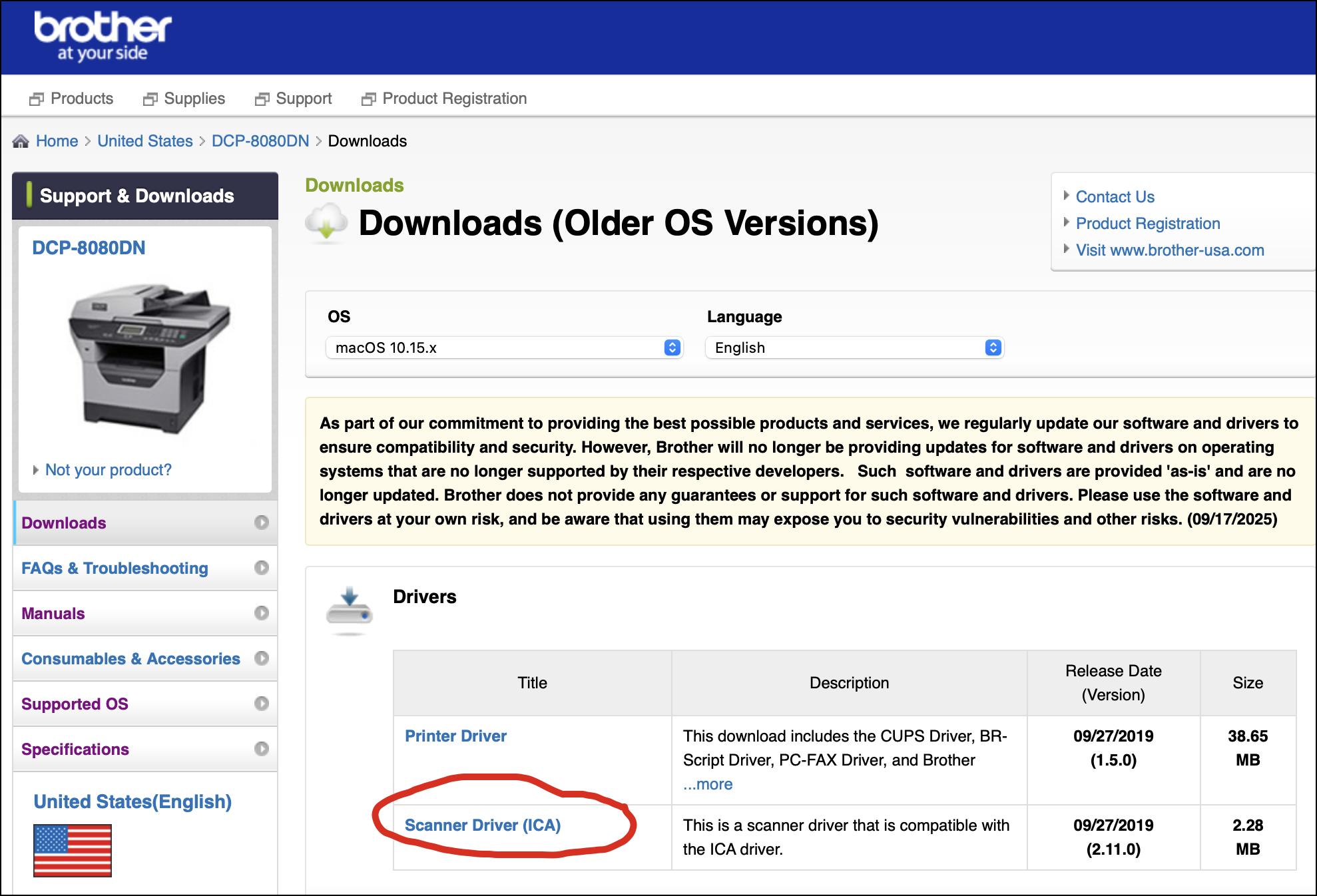
I don’t think you’ll need to restart the computer, but it’s not a bad idea. You may need to add the printer/scanner via System Settings. Connect the DCP-8080DN, and if the driver works, the scanning unit should be available when you open the Image Capture app or any other app that supports ICA.
4 Likes
Thanks. I’ll try it later. I was just on the Brother support page for the printer but didn’t check the downloads page. They provided drivers through the Catalina version of MacOS, at which point they stopped. If this works, it will save me some money.
Just wanted to report back that after updating Tahoe, I installed the ICA driver and Image Capture did recognize the scanner. Scanning works, both flatbed and feeder. So far, it seems to be a lot like the interface I was used to on Catalina but I haven’t done much exploration. However, the basic features appear to be there. Thanks for pointing this out. Oh, Apple kindly informed me that Intel-based software like this probably will not work in future versions of the OS.
3 Likes
Intel code will work in macOS 27, but you may have to manually reinstall Rosetta. It will not work in macOS 28.
Are you sure the ICA driver is Intel-only? It may be, since it was designed for macOS 10.15 (the first Apple Silicon macOS was 11, “Big Sur”)), but it may be worth looking anyway.
You can find the driver in /Library/Image Capture/Devices. Do a “get info” on it. If it’s Universal, then you’re good to go. If it’s Intel, then it will break when Rosetta goes away.
1 Like
VueScan appears to work with @rbononno s model. I thought there was a trial version but I don’t see it now. Maybe it operates in a limited mode until you pay.
I purchased it after finding it to work with multiple scanners in the house under Tahoe and previous, when our Fujitsu ScanSnap software stopped working. It’s not as slick an interface and takes some patience to work through the voluminous options and user manual but now it’s my main software for the ScanSnap and a Brother mfd we got a year ago.
Well, that’s the notification that Tahoe popped up after opening Image Capture using the ICA driver. I recall installing it on Catalina when notified that there was an update, which happened to be for my Brother printer. I think that was the last and most recent update to that system for me.
I believe VueScan works with this printer model. There may be a trial version, which I may try. However, I have a couple of other software purchases I also need to make. So it can wait for the time being as long as I have a functional scanner.
I suspect it is Intel-only, but it’s worth a look. (I updated my comment to include the location where the driver is installed: /Library/Image Capture/Devices).
FWIW, I looked and found that the driver for my Epson scanner was also Intel, dated from 2019. It looks like Apple never updated it as the driver was migrated from my older Mac. In my case, Epson has a more recent driver from 2023, which is Universal. I updated it today.
1 Like
Yes, the Brother ICA driver from the DCP-8080DN support page is Intel-only. Running the “file” command on it yields:
Mach-O 64-bit executable x86_64
I’d stick with that until you upgrade to a future version of macOS that no longer supports Intel drivers. Maybe it will be macOS 28.
When that bridge needs to be crossed, you might try installing a more recent version of the Brother ICA driver, though it is not clear to me that a newer version will actually work with the DCP-8080DN.
In the worst case, VueScan would be a workable option.
2 Likes
I’d say that’s better than the worst case.
My experience is that Apple’s Image Capture app, even with a functional ICA driver, is not very good.
With my scanner (an Epson Perfection 4870), it is much slower than SilverFast. It also doesn’t offer nearly as many features - like IR-based scratch removal, and a database of color curves for negative film.
SilverFast isn’t free, but it’s not too expensive. At least for my scanner. For the 4870, the basic “SE” edition has an MSRP of $50, and the “SE+” edition costs $100. (There are two higher-priced editions, but you probably don’t need them unless you’re using the scanner professionally. And the price is higher for some models of scanner.)
These prices are comparable to VueScan, which costs $100 for the standard edition. And is actually less expensive if you need to scan transparencies, film and slides, which requires VueScan’s professional edition, costing $200.
The only real downside to SilverFast is that they support only a limited number of scanners - mostly professional and prosumer models, and your license is for only one make/model, so it can cost a lot more if you have multiple scanners of different models at your location.
But I think it’s not a difficult argument to show how either VueScan or SilverFast is far better than what Apple bundles with macOS.
2 Likes
I’m considering. For now, I will probably stick with the ICA software given that my scanning needs are mostly black & white text, and a few basic images. The Brother scanner itself doesn’t really warrant expensive software. But I’m considering VueScan for the future since it works with this scanner model. I still need some professional software to buy and an additional external drive for backups (I’ll probably get a Samsung T7). But that’s for another thread.