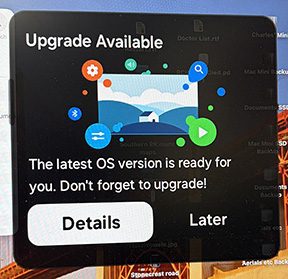
I see this appear on my display at random, which disappears after a minute or so. I’m thinking clicking in it would be a bad idea. Wondering what it is.
1 Like
I think it is trying to make you click on it. It this a website or a program?
The popup doesn’t match the wording, visual style, format, or placement usualy used by Apple, so I wouldn’t say it’s a macOS/iPadOS/iOS/TVOS popup.
Looking at the graphic, I think you might want to search the Support area of the maker of your monitor, assuming you use an external, non-Apple monitor. Or upload your screen shot into Google Images or an AI-assisted search engine and see what comes up.
2 Likes
Clicking that would be a bad idea.
The goal must be to find out what’s triggering it and then deleting every last bit of it. Is this a browser popup (“notification”) or is it being thrown up outside of browsing (eg. by an app or background process)?
2 Likes
I agree. Doesn’t look like Apple. Don’t go there. Did you check Activity Monitor for a suspicious process?
1 Like
Malware. Clear you Web browser cache and cookies in case it’s hijacking a Web notification.
3 Likes
A popup that doesn’t seem to come from anything might be a notification from your web browser. Go check your browser configuration for configured notifications and disable notifications from any site you don’t actually want sending them to you.
- Safari: Settings… → Websites → Notifications
- Firefox: Settings… → Permissions and Data → Notifications
- Chromium: Settings… → Privacy and security → Site settings → Notifications
- Microsoft Edge: Settings… → Privacy, search, and services → All Permissions → Notifications
Other browsers should have similar configurations somewhere in their settings.
1 Like
Perhaps it’s a firmware update for your display. It’s not coming from Apple.
Yes, I have been thinking along those lines also. I should have mentioned that it is a Samsung M80D, which has its own OS with apps. Will check that. Thanks for all the responses.
My research wasn’t definitive, but it also suggested it could be a Samsung monitor.
1 Like