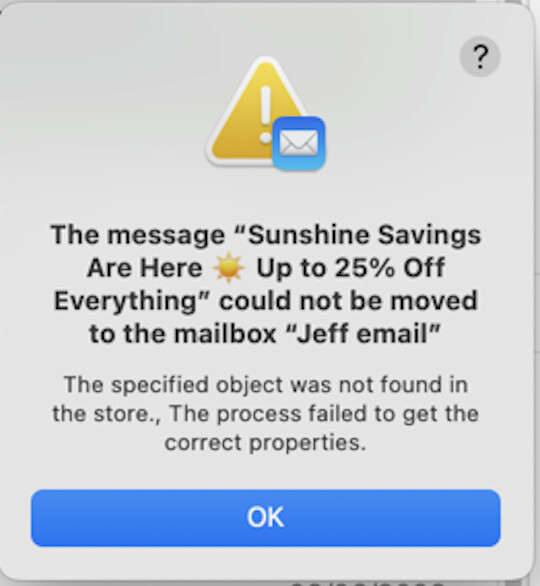
On deleting an unwanted email (genuine advertising) I see this message.
When we click OK the message is still visible in the normal INBOX and can be read/opened. Yes I googled, but no answer, not a single one. The account is an MS Exchange account (MS 365).
The error message “The specified object was not found in the store” is a Mail database corruption or sync error. A few likely causes:
The “Jeff email” mailbox is corrupted or out of sync — Mail’s local database lost track of that folder, even though it may still appear in the sidebar
An IMAP sync issue — if “Jeff email” is a folder on an IMAP server (iCloud, Gmail, etc.), Mail may have temporarily lost its connection to it, or the folder was renamed/deleted on the server side
Mail’s database needs rebuilding — this is common when Mail’s envelope index gets corrupted (which, given your Spotlight issues on the Mac mini, wouldn’t be surprising)
Things to try:
Quit and relaunch Mail, then try moving the message again
Rebuild the mailbox — select “Jeff email” in the sidebar, then go to Mailbox → Rebuild
Rebuild Mail’s entire database — hold Option while opening Mail, which prompts a rebuild
If it’s an IMAP folder, check that it still exists on the server (via webmail)
As a last resort: Mailbox → Take All Accounts Offline, wait 30 seconds, then Take All Accounts Online
I think that option 2 (rebuild) is likely to work. Sometimes Apple Mail can get out of sync with Exchange.
If you try accessing your mail via webmail or using an Outlook client, I would not be surprised to find the misbehaving message has already been moved or deleted on the server.
I have had luck (meaning helpful guidance to resolve issues) with taking screen shots of such messages and using the prompt “what does this mean?” in Claude.
Given that experience and being in a hurry while also wishing to be helpful I simply posted the Claude response. My bad.
Now that I actually read the Claude response I see the last paragraph “This is almost certainly related to the same underlying Mail database issues you’ve been dealing with — the Spotlight fix (once you do the Recovery Mode repair) may help stabilize things overall” it clearly refers to an Spotlight issue I had been dealing with corespotlightd tying up my MiniM4Pro.
My Mail weirdness is I want all mail stored on my desktop and I have a lot of addresses. I only get one of them on my mobile devices. I generally trash them there as I have no need to have them on 2 devices. Works fine EXCEPT if I’d a select all on the phone and try and delete, I get a message saying it’s going to delete them on ALL MY DEVICES. So I have to do them individually. Such wonderful software we get from the wormy fruit.
As a reminder, please don’t paste responses in from AI chatbots. There’s no way to know what the prompt might have been, what memory it might have of previous interactions, what the system instructions are, and so on. Anyone can do this on their own, and they might get different results.