Originally published at: Taming Email Overload: Google’s CC Daily Briefing Agent - TidBITS
Do you feel as though you’re suffering from email overload? I suspect that’s true for many people, and I long ago dispensed with the illusion that I could somehow catch up on my email and reach some fictional Inbox Zero, however briefly.
I receive and read roughly 90 legitimate messages per day between personal mail, mailing lists, and newsletters. That’s apparently high for average office workers, but rather moderate for a tech journalist—being less well known has its perks. I filter important automated messages out of sight and file away transactional emails about orders. (I detest the multiple messages from online retailers providing regular updates on the status of some shipment.) I’ve culled my mail to this point by being ruthless about cutting off anything I don’t want that includes an Unsubscribe link.
I can keep up with this level of email volume because I read very quickly, and I’ve become even faster at scanning unknown message content to see if it warrants a closer read. I also try to reply to direct personal emails or deal with important administrative messages right away to avoid losing track of them. Admittedly, I sometimes misunderstand a message and reply unhelpfully because I read it too quickly and form an erroneous impression. So it goes…
My feeling of email overload stems from my strategy for dealing with messages that contain information I might want to revisit, ideas for articles, or action items. Most email triage techniques recommend moving such messages to a task manager or at least tagging them, but I’ve learned that if I do, I’ll never see them again—it’s the kiss of death. In contrast, if I mark messages to keep frontmost as unread, there’s at least a chance that I’ll get to them later. This strategy may not be ideal, but it largely works for me.
Nevertheless, the hundreds of unread messages mocking me from my inbox push me towards experimentation with alternative email systems that promise to solve all my problems. Surely AI is the answer, given that AI is the answer to everything these days! I’ve been experimenting with AI-powered email assistants recently, and while none have made a difference for me, your mileage may vary. If you’ve run across a similar app that has made it into your everyday email use, be sure to share details in the comments.
Google Labs CC
The first of these tools I want to cover is a Google Labs experiment called CC, which Google describes as “a new AI productivity agent that connects your Gmail, Calendar and Drive to deliver a personalized briefing every morning.” What CC actually does is send you an email every morning with three sections: top-of-mind topics, a recap of your calendar events for the day, and an FYI section that surfaces events and facts from your email. I’ve been receiving daily briefings from CC since the beginning of March.

For the most part, CC was good at identifying important items in my email and calendar. As you can see above, it recently noted that I had to verify my phone number and (new) carrier for several bank accounts, reminded me to check in for a medical visit, collected administrative tasks I had discussed via email, and more. Events on my calendar usually—but not universally—appeared in the briefing.
However, as you can imagine, Google’s AI also identifies a lot of utterly irrelevant things, so I’ve had to teach it my preferences. You do that in natural language, by replying to CC’s email, and it’s a rather satisfying process, given how amenable AIs generally are.
For instance, it wanted to tell me about connection requests from LinkedIn, reminders of upcoming deliveries and subscription renewals, and announcements of races that I have no connection with or interest in participating in. To train it, I replied to a message and, under each section I didn’t like, told CC to ignore future items in that category, getting back this reply.
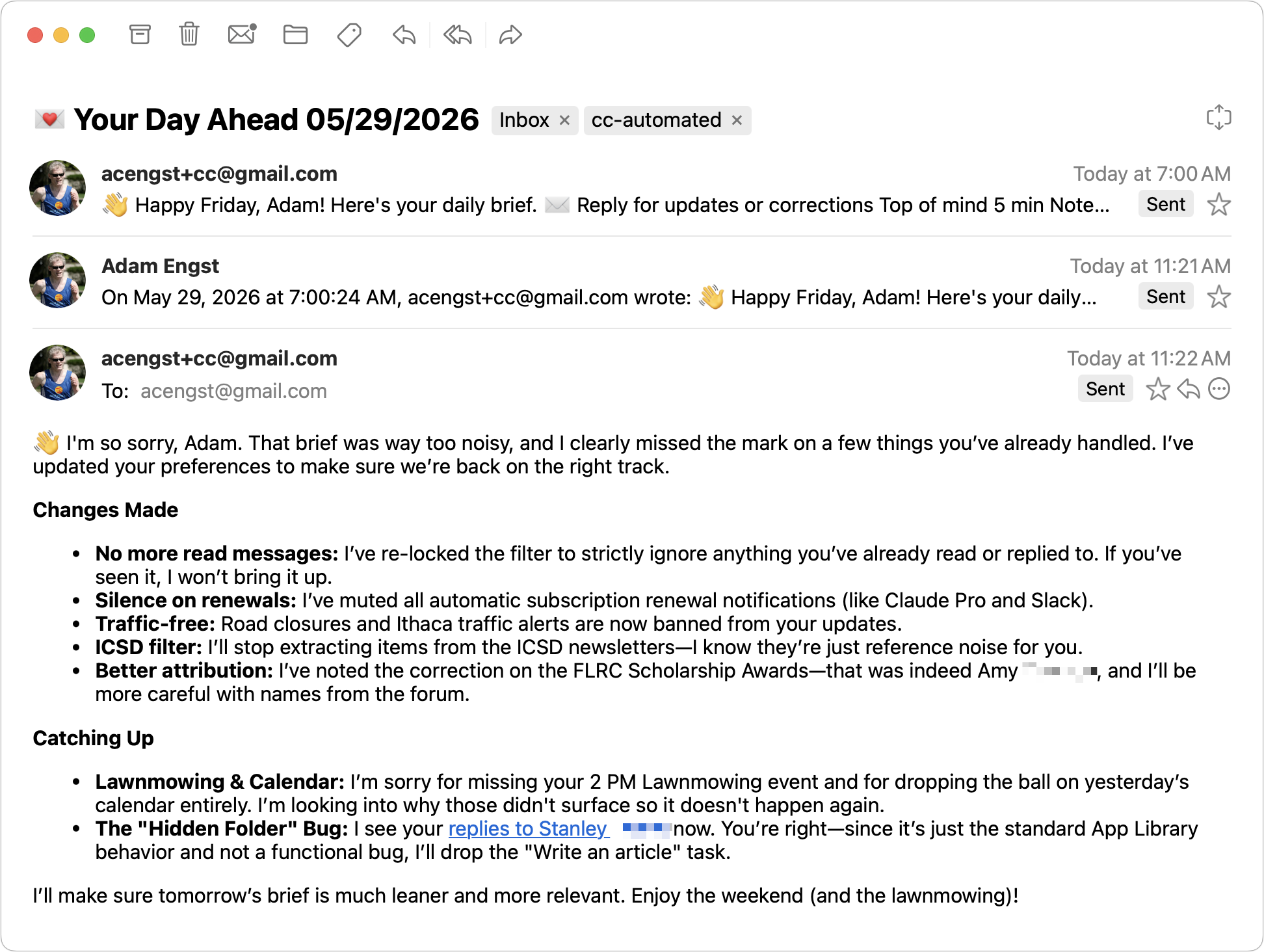
Nevertheless, I continually encountered problems that didn’t seem to respond to my feedback:
- CC frequently swapped names in messages from the Finger Lakes Runners Club Discourse forum, presumably because the messages lacked email addresses that matched the posters’ identities. Since I had already read the messages, I knew who had sent them and was annoyed by the mistake.
- The CC calendar section enthusiastically told me about events that appeared in my email—but that weren’t on my calendar—with no awareness of whether or not the event had any meaning to me at all. Just because I received the Ithaca City School District newsletter doesn’t mean I’m going to the middle school concert mentioned in it.
- The FYI section was particularly random, covering how Amazon is discontinuing store and library access for Kindle devices older than 2012, an upcoming bank holiday, Zoom Docs being renamed Zoom Canvas, and local road maintenance affecting travel. Since items in this section are random, they’re hard to train away.
Why CC Didn’t Work for Me
But the main problem I encountered was that I could never train CC out of its insistence on telling me about messages I had already read and sometimes even replied to. My memory is far from perfect, but if I’ve read a message and left it marked read, I consider it closed. Seeing those messages appear in the next morning’s briefing made me question whether I had actually seen and processed them.
Beyond the specifics of how well it works, there’s a deeper problem with CC for me. Ultimately, it didn’t provide any value because it is inherently duplicative. Even if I could get it to stop reminding me about messages I’ve already read, it’s not a help to be told about messages I haven’t yet read, because I’ll still need to read them to understand what they’re saying. Similarly, I don’t need to be told about events on my calendar—the fact that I’ve put them there and that they’ll remind me at the relevant time is more than sufficient.
Your experience could differ, however. If you lead an incredibly busy, highly scheduled life where you stand no chance of reading all your email, CC might be worth trying. Right now, CC’s waitlist is open only to Gmail users in the US and Canada who are over 18 and have a consumer Google account. If you decide to stop using CC, you can clear your data by disconnecting from the service on Google’s Linked Apps page.
Alternatively, consider hiring a human assistant.