Web Browser Suggestion for MacOS 10.13.6 High Sierra

My Mid-2011iMac is maxxed out at High Sierra but many sites including this one demand the most modern browsers to work. Right now I’m having to use a cobbled version of Firefox 143 to access this site as it refuses to do so on the last versions of Safari, Brave, Firefox (regular & esr versions), or Vivaldi that run on High Sierra.

The only valid web browser that I can find is Chromium Legacy but I’m hesitant about it from a security standpoint. Does anyone here use it? If so, is it with High Sierra?

On my old 2011 Mac (running Sierra), I’m using Firefox Dynasty. This is the latest version of Firefox, patched to run on old versions of macOS.

Here’s the download link: Releases · i3roly/firefox-dynasty · GitHub

The downsides:

  • The developer doesn’t sign the builds. So you have to trust him and GitHub, and tell your Mac to accept every new version. I’m OK with it, but you might not be.
  • There is no auto-update. He hasn’t patched the updater, which always looks at the Mozilla server, fails to find anything compatible, and does nothing. So you need to check on your own.
1 Like

Have you looked into SeaMonkey or Pale Moon?

1 Like

Yes, that is the cobbled together version of Firefox that I’m using to come here. However it has major flaws as several BASIC browser actions don’t work so it is very frustrating.

I’ll look at them. Does TidBITS Talk work on them?

When I checked using a default SeaMonkey installation, it did not work.

An add-on extension is needed for Pale Moon to get it to work with Discourse-based sites, and you would have to trust the extension developer and the regular expression imported/added to the extension. Regular expressions applied by the extension are termed “filters.”

https://forum.palemoon.org/viewtopic.php?f=71&t=32889

Add-on installation and configuration is not as straightfoward as other extensions.
https://forum.palemoon.org/viewtopic.php?p=262318#p262318
https://forum.palemoon.org/viewtopic.php?p=267606#p267606

Filter code text for Discourse-based sites can be found at
https://forum.palemoon.org/viewtopic.php?p=257247#p257247

2 Likes

What are some examples of the flaws? I plan on trying Dynasty with an older Mini running High Sierra but it’s mostly for playing music.

1 Like

OK here are a few off the top of my head: 1. Can’t open a new tab by either clicking the “+” in the Tab Bar or selecting Cmd-T. You’re limited to either File>New Tab or Cntrl-clicking the “+”. 2. When trying to download something, the drop down menu appears but the “Save” & “Cancel” buttons are inoperative. 3. Can’t quit using File>Quit, I either have to quit via the Dock icon or Force Quit.

I’ll try to make a list as I run into other problems.

OK, 4. Clicking the Reload icon does not work but Cmd-R still does.
1 Like

What “+”? I’ve never seen that in Firefox. (I see it there if I enable vertical tabs in the sidebar, where it works as you described.)

As for opening tabs with CMD-T, that works just fine for me.

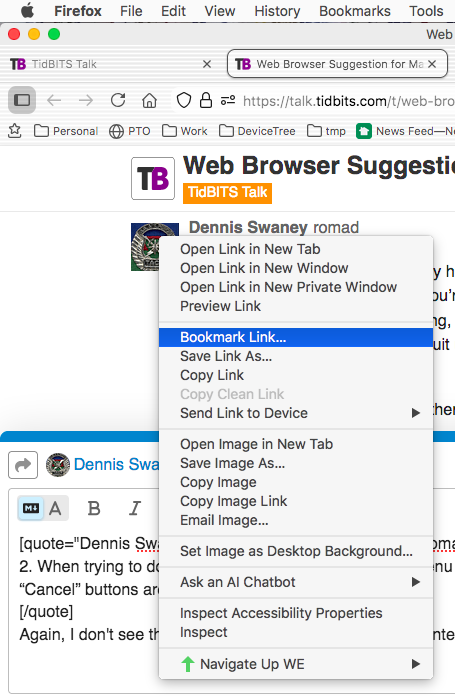
Again, I don’t see that. I save content all the time from context menus:

Or are you describing some other operation?

Again, I do that all the time.

It sounds like you’ve got a corrupt installation.

Are you running Firefox Dynasty or just plain Firefox? I’m running the former on High Sierra.

Edit: I just downloaded Firefox Dynasty 146.0 to see if it works better than 143.0.3

I use both. Firefox on my M4 running macOS 15. And Dynasty on my 2011 Air running macOS 10.12.

Both work identically for me, although Dynasty on the Air is slower.

1 Like

Doing the same with High Sierra and whatever OS is booted on the two M1s. I never saw any of those weird behaviors with tabs, etc. running Dynasty.

Well, Firefox-Dynasty 143 decided to start playing nice the last couple of days as the problems I was having apparently corrected themselves!

2 Likes