I want to use the internal DVD drive on an 2012 intel MacBook Pro running Catalina as external drive on an 2024 M4 MacMini running latest Tahoe. Is it even possible? The alternative is to buy an external USB DVD drive for about 40 dollars for the M4 MacMini.
I just went to amazon, typed in “usb dvd burner”, and ended up with a bunch of choices, one as low as $18.
For this kind of $$$, not worth struggling to get the MacBook DVD working (unless someone in the forum has a very easy solution)…
1 Like
It’s probably possible, but a compatible enclosure may well end up costing more than buying a new external drive.
According to an iFixit guide describing how to replace the optical drive with a second hard drive, we can see that the Apple drive has a standard SATA connector. So a generic USB-SATA adapter cable should let you do what you need.
But that is a pretty ugly solution. You will probably want an enclosure. Some web searching shows that they cost between $20 and $50. But they’re designed for tray-type drives, not slot-loaders. So you’d have to run it without a face-plate, making the result ugly unless you have the skills to 3D print a custom faceplate.
Personally, I don’t think it’s worth the effort.
1 Like
I just experimented with a 2017 iMac running Mojave and with an external DVD drive. I inserted a DVD with photos and added the DVD to the sharing list on the iMac. I could then access the files from an M2 Macbook Air. So yes, it can be done. But the “sharing” step pointing to the name of the DVD was needed.
Is the purpose simple? Any reason not to just screen share or file share over your home network?
Not 100% sure what you mean by that, “as an external drive”… like, to play DVD content on a display attached to the Mini? or to burn or read files on/from CD/DVD from Mini to MBP etc?
Your topic reminded me of something from way back, I think when MBAirs first came out, they had limited physical ports and plenty of software was distributed on CD/DVD. There was a way to connect to a CD/DVD in another machine, iirc…
A bit of searching led me to the keyword “Remote Disc” and an apparent System Setting/Preference in Sharing on the device with the DVD drive. I think it used to als be a display checkbox for the Finder Sidebar. After about 10 minutes I’ve only found one site, alas not at Apple, and I can’t vouch for the site, never heard of it til now, and it might be out of date, but “How to play DVDs and CDs on a Mac that doesn’t have a built-in optical drive” might be what you’re after.
Hope that’s useful.
1 Like
This “Remote Disc” is exactly what I was looking for. I now recall reading about it some MacOS iterations ago. Thank you for the link to the article on how to accomplish it. I will definitely check if it works with my old 2012 Mac Book Pro.
The last macOS to support Remote Disc was macOS 10.14 Mojave. Later releases may still allow for sharing, but the client side can’t access it from Catalina on.
1 Like
I think that just shares it as a data volume. Which may be fine for a software installation or retrieving some archived files, but obviously wouldn’t work for playing a movie.
d’Oh! I assumed you wanted to physically remove the drive and use it as a USB drive on a new Mac. My answer must have seemed irrelevant to you, if you were looking for a network-sharing solution.
Sadly, it appears that macOS 10.15 (Catalina) removed this feature. So it’s not going to be an option for you. While you could, in theory, downgrade the MBP to an older macOS in order to share its optical drive, a modern Mac would not be able to mount it.
I didn’t notice the checkbox for sharing DVDs when I experimented with the iMac running Mojave the other day. Here it is
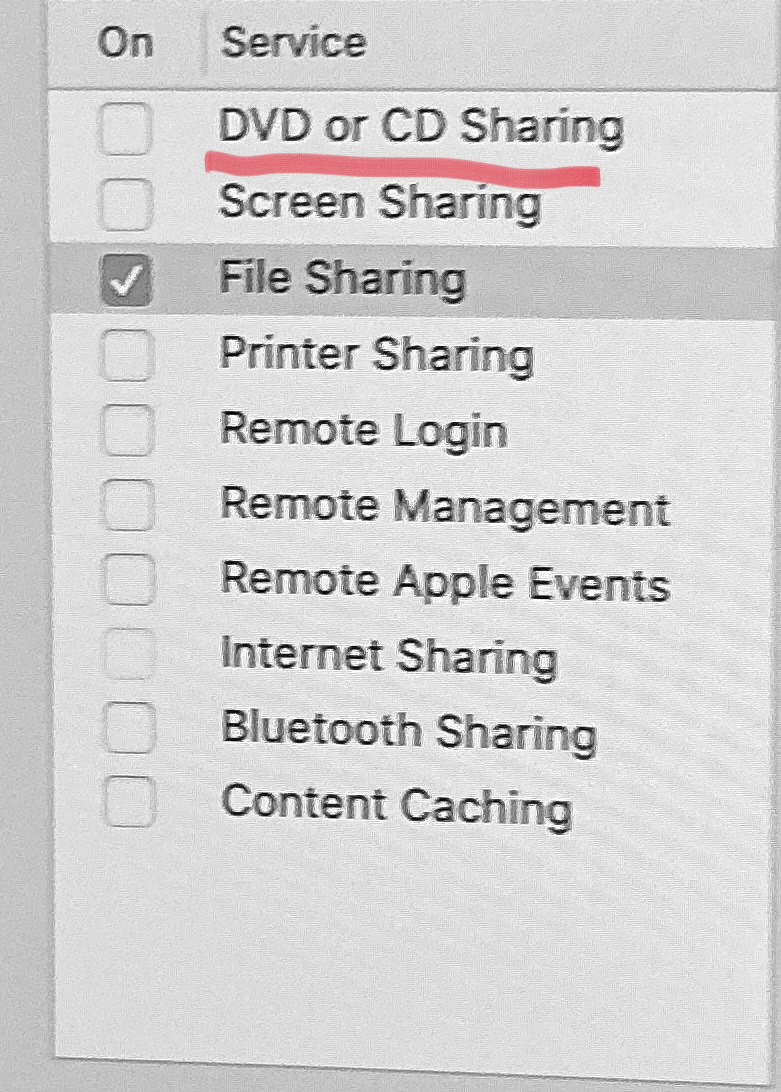
I don’t expect it to work with sharing to my MBA.
Update: I was correct - no shared DVD drive showing up in Sequoia.
Ah, I thought you wanted to remove the optical drive from your MacBook Pro and find a way to connect it to your M4 mini.
You definitely can use file sharing to share the contents of the optical drive in your MacBook Pro, but if the disc needs to be persistently available (or just available after either machine goes to sleep), getting a new drive and physically attaching it to the M4 will be far simpler and more reliable.
If it’s just for occasional use, file sharing is fine.
Note that the Sharing preferences panel in Catalina is broken. It does not reliably show sharing status, and toggling it on/off is also broken. You can work around the bug by manually enabling/disabling file sharing using the terminal command line. Since the target machine is running a current version of macOS, use SMB file sharing to serve media from the Catalina machine:
sudo launchctl load -w /System/Library/LaunchDaemons/com.apple.smbd.plist
Once SMB sharing is on, the preferences panel works fine for setting up sharing permissions.
To turn it off:
sudo launchctl unload -w /System/Library/LaunchDaemons/com.apple.smbd.plist
Since sharing over Apple Filing Protocol is deprecated in later operating systems and removed in macOS 27, I don’t recommend using AFP. For completeness, however, the applicable commands to toggle AFP sharing on the Catalina machine are:
sudo launchctl load -w /System/Library/LaunchDaemons/com.apple.AppleFileServer.plist
and
sudo launchctl unload -w /System/Library/LaunchDaemons/com.apple.AppleFileServer.plist
Ignore any line wrapping on the above commands. Both commands are single lines.
Edited for clarity about the source machine vs the target machine.
@josehill
You definitely can use file sharing to share the contents of the optical drive, but if the disc needs to be persistently available (or just available after either machine goes to sleep), getting a new drive and physically attaching it to the M4 will be far simpler and more reliable.
I thank you all for responding! The simplest way is obviously to connect an external DVD drive to the Mac mini. Reuse has its limits.
I bought this burner a couple of years ago, based on a review from Wirecutter. I use it to rip and burn CDs and DVDs, listen to CDs, and watch DVDs. I would buy it again.
See also this discussion (my preference is Bluray writers - you can still buy 50Gb disks online)
drat! That would explain why the Apple site was inconclusive. Sad. They keep getting rid of useful stuff.