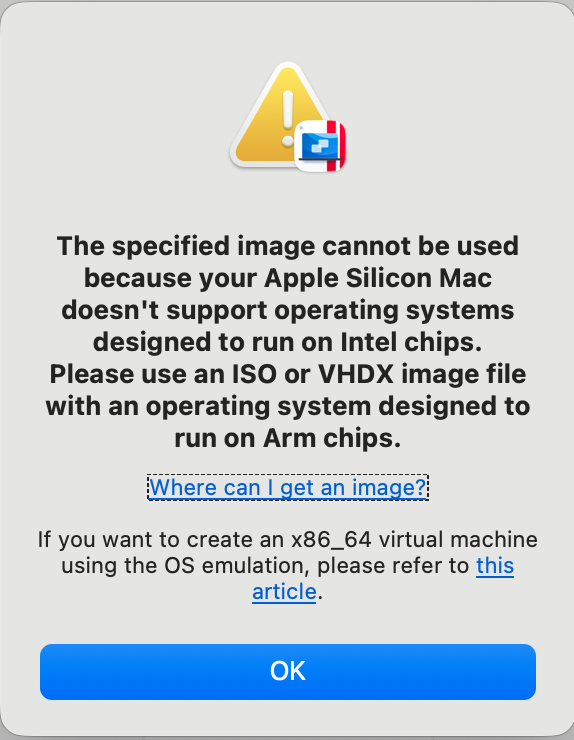
I am trying to run an audio program (Capstan) to fix some wow and flutter on old audio files from a small reel to reel tape. When I contacted the company, they said their program would only run up to Catalina. I have a Mac Studio and thought I could use Parallels, but it will not install the dmg version of Catalina as it will not run on Apple Silicon.
So now looking for another program that can fix wow and flutter on a modern mac, or somehow install catalina on a virtual machine on my M1 Studio.
Parallels, like all VM systems, can not emulate a different CPU architecture. So if you run it on Apple Silicon, you can only run Apple Silicon operating systems.
But you may be able to use UTM. UTM is based on QEMU, which can emulate other processors.
UTM officially only supports macOS guests via Apple virtualization, which means macOS 12 and later. But maybe you can create an emulated system via the QEMU layer that can boot an Intel macOS release.
I’ve never done this, so I can’t say how much work this might be, but if you have the time, it might be worth a try.
I also see that Parallels’ error dialog has a link to an article about using OS emulation. I don’t know where that link points but maybe it will help. I did a web search, but I only found articles about running Intel versions of Linux and Windows:
Parallels doesn’t emulate an Intel processor chipset on Apple Silicon Macs so that’s why the error message is being displayed. Catalina is Intel-only. Parallels only virtualizes ARM architecture operating systems (Linux arm64/aarch64, Windows 11 ARM, and macOS versions from Monterey onward).
Have you tried to run the program under Rosetta on your M1 Studio to see if it works?
You could try using UTM (which is a user-friendly skin on top of the open-source QEMU system) which does emulate an Intel processor. That theoretically might allow you to install Catalina. It’s a science project though, akin to building a Hackintosh. And even if you get Catalina installed, there’s no guarantee how well it or your software will perform since we’re dealing with emulation of an Intel chipset.
I leave it to others to offer an alternative software package that runs on Apple Silicon.
Too bad about Capstan. It’s the sort of tool that if you want it, the chances are that you really want it. If you don’t have a Catalina machine handy, I guess it shouldn’t be too hard to find a Windows 10 machine for next to nothing.
I don’t have any Capstan alternatives to suggest, though I’ve seen a few mentions of a “RX 12 wow and flutter module” that runs on current versions of macOS as a plugin for a range of “pro” audio platforms. One comment I saw suggested that it used the same underlying algorithm as Capstan.
I wonder if this is one of those things that AI might be able to address in the not too distant future.
Looking up which mac would last take Catalina and found it was Mac Mini 2012. I thought abput buying one on eBay, but then my brain kicked in because I remember that I used one of these at work in the past. Went into my storage area and found a box labeled “Mac Mini x 2 and old Mac Discs” and sure enough, there was just the Mac I was looking for. Now I will have to set it up and hook it up to my Studio Monitor (I hope that’s possible) and give it a go.
I looked around for various current software that would do the same thing, but came up dry. Even Audacity does not mention this. Surprisingly, there are programs that can add Wow and Flutter to audio for “effects” but not many that remove it.
Ray, I may have misunderstood your target in being able to run Catalina (10.15), but it runs on most of the final Intel macs such as the 2018 mini and 2020 iMac, as well as the M1 mini, I believe. Check the list at Everymac:
Meanwhile, back to the Capstan / Celemony issue, as both are available on Windows 7-10, I wonder if it would work with CrossOver on a recent Mac (ie. M4 or M5). The CrossOver “compatibility” search tool has no result for Capstan (no surprise). However, if your license provides for either/both macOS and Windows install, you could try the CrossOver 14-day trial and see if it works.
I have no idea which “bottle” would work best (Win 7, 8 or 10) nor what dependencies Capstan and iLok might have on Windows. If you do try this mad experiment and it runs, I would suggest test-processing an audio file on both configurations the same way to compare the results in case there is some unintended effect from the Rosetta2 conversion.
Hmm, maybe someone at Celemony or in their community have tried something similar?
They had a very quick response to my email inquiry
“Thank you for your email. We’re sorry to say, but the development of Capstan was already ended a few years ago. The last macOS this software was compatible with was macOS 10.15 Catalina. It is not compatible with any current macOS anymore, which explains the issue you ran into.”
AWS offers virtual Intel Macs via EC2. Not sure if they support Catalina though. (2019 was a long time ago.) But in general for a one-off task like this, the Mac-in-cloud option might be your most viable approach.
I thought Rogue Amoeba might have one, but from what I could find it does not. However, I did run across a reference to Audacity’s “Wow & Flutter” effect. I have Audacity, but I could not see any reference to such a capability in the app (either for fixing or adding). But there’s a possible lead for you for further research.
I may have to look into another option. I did manage to run it on an old Mac mini that I have, but it’s taking forever to process even a small amount and as the purchase price is only for a certain amount of time, I may not have enough time to do all my files.
These are old small reel tapes that my dad made when we were younger (in the 60s ) and I had them transferred to digital, but the distortion makes it difficult to listen to. I was hoping to clean it up a little bit, but may have to look at other options.