When my wife sends me a text message, I don’t get any sound. Years ago, I made a ringtone from part of a Simon and Garfunkel song that I have on my iPhone. It worked fine for years. Now I get no sound on my iPhone 17. Any hints on fixing the issue?
It could be that something got corrupt. What happens if you change the ringtone and then change it back?
If the audio file itself got corrupt, it’s not too hard to re-make it, if you don’t have a copy:
- Select the song you want in Music/iTunes
- Using the “get info” page, enter the start/end times for the clip. The total duration must be 30s or less.
- Using the menu-bar, do a “convert to AAC” on that track. It will create a new track in your library which contains the clip.
- Drag/drop the clip to your desktop or a folder.
- Rename that audio clip file’s extension from
.m4ato.m4r, which indicates that it is a ring-tone
Now, with your phone connected via USB, you should be able to drag/drop the .m4r file to the phone (in the Finder or iTunes, as applicable). iOS, upon seeing this file, should install it as a ringtone, which you can then select in the phone’s settings.
At least that’s how it worked the last time I tried it (many years ago).
3 Likes
Hi David,
Thanks for the ideas. I changed the text tone for my wife in my phone (tried several) and sent 6 messages from her iPad and several from her computer. Messages arrive but no sound, so I had my friend send me a text message: sound, loud and clear. No wonder my wife has been wondering why I don’t respond. I will give AppleCare a try. :-)
Ack! that’s way easier than the 10 or so steps I went thru about a year ago, with several steps in GarageBand, to get a sound recorded on iPhone in VoiceMemos to be usable as an Alarm sound on the same iPhone.
Thanks!
Oh and btw I wanted to help troubleshoot this for the OP but couldn’t find where to set a sound for a given Message sender… is it done in Contacts App? I have specific sounds set for Signal message senders, set in the App itself. But Messages App shows very few options for Message senders on my iPhone on 26.3.
1 Like
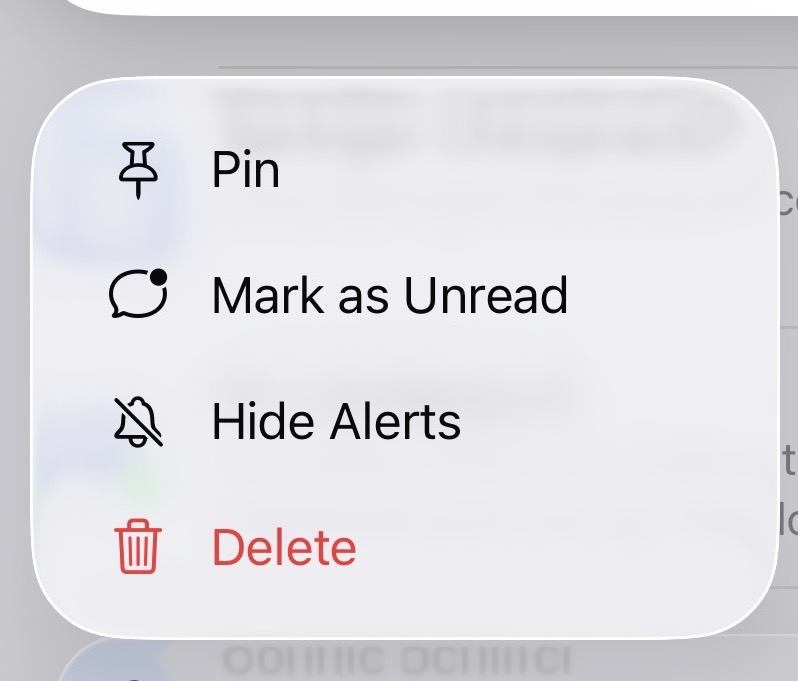
Lol…The Applecare representative found that I had somehow managed to mute my wife but no one else. If I press and hold on her name in the list of people sending me messages, this popup appears with the option to hide alerts. Live and learn.
6 Likes
Thanks for that! I didn’t even know that popup existed!
1 Like
An Apple ringtone is just an AAC audio file (up to 30s) with an .m4r file extension. There’s nothing more special than that. You can make one with any audio editing software capable of generating AAC files. I find iTunes/Music is most convenient for making them from songs in my music library, but you can use anything you like.
Yes. If you edit a contact, you’ll see options for “Ringtone” and “Text Tone”. Set them to something other than default. They will affect incoming calls (including FaceTime calls) and Messages (SMS and iMessage).
1 Like
Ack! I was wrong, it’s 12 steps, an no mention of the obvious use of VoiceMemos recordings:
other than step 5, bullet 1. I had already moved the recording to my Mac I think and tried converting it to .m4r or just changing the extension, then putting the recording in Files App but there was no way from there to add it directly to the list of Ringtones available across apps.
The Apple page on ‘use ringtones on iphone’ alas only lists pre-installed and buying options. It’s obvious what they’d prefer users to do.
For the OP and others though, should the problem of sudden lack of assigned ringtone result from a corrupted custom sound file, the other steps, including Garageband, should do it.
Ack 2! I use Contacts so rarely, I forgot to put it in Edit mode when looking for the Text and Ringtones, Thanks To You for that!!
1 Like
That Apple article is massive overkill.
Just drag/drop the M4R file to the phone. Don’t put it into Files. Just drop it on the phone’s icon in the Finder’s sidebar (or in iTunes, if you’re using that).
Sorry. That advice was wrong. I wrote it while away from my Mac, so I couldn’t test it.
See below for two ways that do work (I just tried them and they worked for me).
With macOS 15 (not sure about other versions), you’re still dragging/dropping the M4R file to the phone, but you want to drop it on the phone’s Music track list. Either in the Finder (via the Music sync tab) or in the Music app (after selecting the phone in the sidebar).
1 Like
This was so forehead-slapping elegant and obvious, I was eager to try it!
Changed the extension on an aiff and an m4a to m4r, dragged from Finder to iPhone icon, and the first time the iPhone icon in the sidebar pulsed and when I checked, the file was in Files app, but renamed. Subsequent tries with the other file, the icon only pulsed and the file was not copied to iPhone.
Renamed the copied to iphone file again, in Files App on iPhone, from .m4a to .m4r, appeared as such and played when tapped on. Doesn’t appear in Settings > Sounds & Haptics > Ringtones.
Ah well, maybe I’ll try again in both month and OS 26.4.
I was away from my desk over the weekend. I just got home and tried it myself. On my Mac (Mini M4 running macOS 15.7.4) and iPhone (13 mini, iOS 26.4), I did it this way:
- Connect the phone to the Mac via a USB cable
- Open Music (1.5.6.11 on my mac)
- Select the phone in the Music sidebar
- Drag/drop the M4R file to the phone’s window (which only shows the music tracks sync’ed to the phone).
On the phone, i saw the new ringtone on the list available via Settings → Sounds & Haptics → Ringtone (and the other categories on that page, like Text Tone, New Voicemail, etc.)
Of course, it it’s a sound you want for an alert like texts or reminders, you probably want something very short - no longer than 2 seconds. A 30 second music clip whenever you receive a text would get annoying really quickly.
The track never appeared in Files. (If you want to delete a ringtone, you can swipe-left from the list of ringtones on any Settings page where you are able to select one.)
Update
I also did it from the Finder. I selected the phone in the sidebar, then picked the Music tab (where you can configure music sync), and dragged the M4R to that screen. It also added the sound to the set of ringtones.
4 Likes
Excellent! @Shamino thank you thank you!!
I haven’t used the Music App in ages, so it didn’t occur to me to use it, or its tab in Finder > iPhone. Doh!

1 Like
Did you mean M4? 
1 Like
Oops. Typo. I’ll go fix it.
The first two Mac mini models had PowerPC G4 processors, but that’s not what I’m using…
1 Like