Yes, but maybe there’s a workaround.
The backups (at least on my system) are each folders stored in ~/Library/Application Support/MobileSync/Backup. Each folder has a almost meaningless numbered filename and contains a lot of similarly-meaningless numbered files.
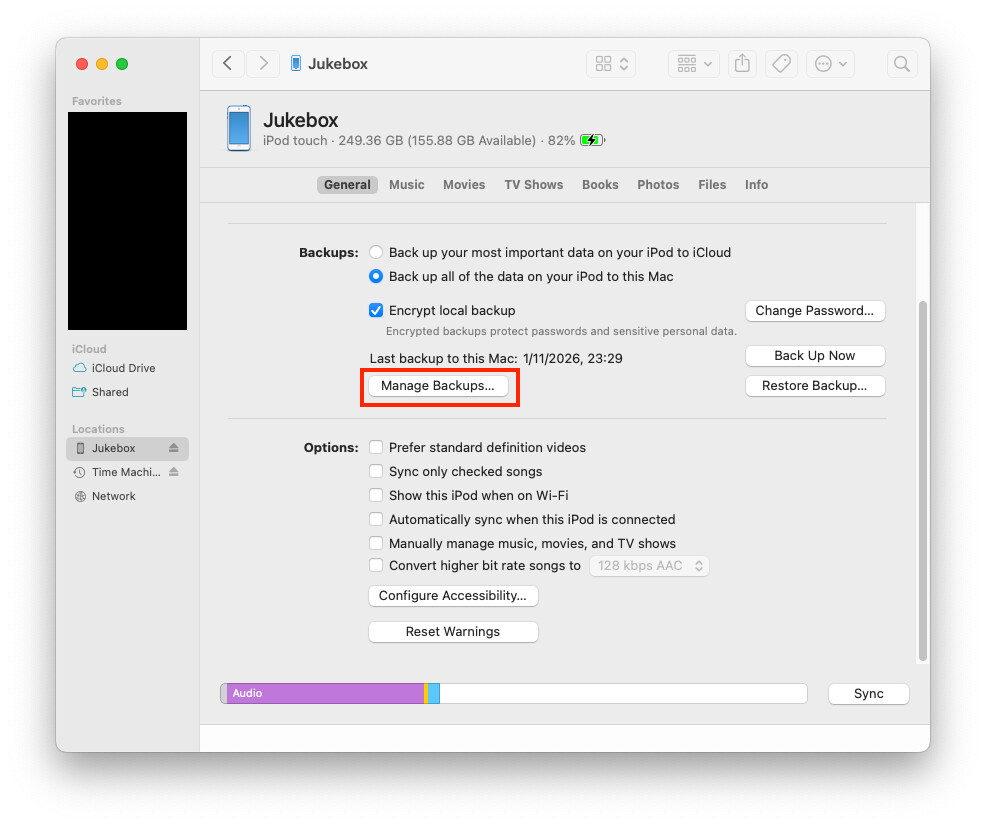
I’m not sure if there’s any easy way to tell at a glance which is which, but if you pull up the list of backups (connect a device by USB, select it in the Finder, go to the General tab, and click “Manage Backups”:
You’ll get a list of backups stored on your Mac. If you right-click on one and select “Show in Finder”:
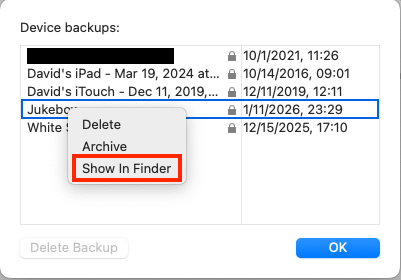
You will be brought to that backup’s location.
Two things you might want to try (I don’t know if either will work):
-
If you move one of these backups to another location (e.g., external storage), I assume it will no longer be accessible from the Finder. But if you do, and later move it back, maybe it will reappear and be restorable.
Even if it isn’t restorable via the Finder, iMazing might still be able to access it and let you work with the contents.
-
If you replace that
MobileSync/Backupfolder with a symlink to external storage, maybe the Finder will start saving backups there.