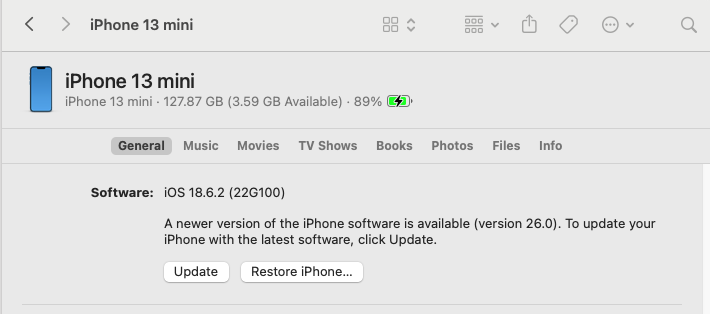
When I plug my 13 Mini into the M4 Mini, I see what used to look like what I saw in the old iTunes. Tabes with General, Music, Movies etc.
I don’t think this phone has ever synced to a Mac since it’s so much newer than my iTunes machine (2011 iMac running Sierra), I’ve been using Waltr to move things over as needed and of course, when I bought the phone, everything synced from the old phone.
I’m trying to update the phone to 18.7 and there isn’t enough room. I recently updated it to 18.6.2 using the M4 Mini Finder which worked great but now when I look at my updates under the General tab, I am only offered 26.0
Which leads me to believe I can only do it on the phone now?
I would be willing to dump my music and resync it if I can do it all within the finder.
When I open the Music app there are only about 20 songs in there and I guess no way to update the phone in there… I see hitting Sync now brings me back to the Finder so that makes a little more sense.
I guess my main question is, can I remove the music from the phone via the M4 Mini, do the update to 18.7 and then get it back on the phone without messing anything else up. It would give me a chance to clean up the phone music a bit too I think.
The iMac will no longer see the phone either, it won’t download that little update it always wants to. Says it’s no longer available.
First I used iMazing to back up my music. Probably not necessary since it’s all in iTunes anyway.
Then I opened a copy of my library file on the M4 Mini. That brought in all my data - well, most of it. I am missing over 50 items and I’m not sure I care enough to find them. The actual music is still stored on an external drive hanging off the iMac so nothing works unless the machines are connected, which is fine as I have no intention at this time of playing music off the Mini.
Then I removed my biggest chunks of music from the phone and freed up enough space for the 18.7 update.
Once that was done, I created a new playlist and dropped some songs in it to sync back to the phone. Success!
I’m still confused as to why there were only a couple dozen songs showing in my Music library from iCloud - there should have been about 300 I’ve purchased. That’s what my other machines and the iPad have shown for years since I never synced my already-owned music to them.
Is the phone logged into the iTunes Music Store with the same account used to purchase the music? If you’re not, then it may not see your purchases. Note that this is a separate login from the system Apple ID/iCloud login.
Purchased from a different account? Some of my music was purchased from my wife’s iTunes account. It doesn’t show up on the list of purchases when I’m logged in to my account.
And I occasionally need to re-authenticate (with her password) when playing one of those tracks (they’re old enough to be DRM-wrapped).
There’s no accounting for taste. But I’m not one to complain. I happen to really like the bushed metal/LCD look of the iTunes versions 1 through 10.
I imported nearly 200 songs off CDs October 2002 and made my first iTunes purchases April 2003 - I’ve had this file a long time!
I am pretty sure I’ve only had the one account
I finally googled the red and saw people were complaining about it a few years ago. It doesn’t matter much I guess as I won’t be using it except for ease of getting songs on the phone. If that, since I can’t put a CD into the Mini :-/ But wow it’s ugly!
I never even opened music on the 2014 Mini I’ve been using for a few years.
You can connect any USB optical drive you like to the Mini. They should all “just work”, including CD audio and DVD movie playback.
The only thing you can’t do without third-party software is play a Blu-Ray Disc movie. Apple has never bundled the software support necessary for that. (Blu-Ray data discs, however, work just fine if you have a Blu-Ray drive.)
So if you want to read/burn/rip CDs and DVDs, you can just go buy any old cheap drive (e.g. this one). If its bundled cable doesn’t have a USB-C connector, there should be no problem using an adapter or a powered hub.
This is a very useful and relevant discussion for me.
I am using a ~2015 iMac running Mojave as my main media server and, like the OP, am using iTunes to manage content on my iPhone 16. The other week I updated the phone to 18.7. I was prompted to temporarily offload apps/data to proceed with the update. This went ahead successfully so my phone is now running iOS 18.7.
I just did a successful manual backup to the iMac and iTunes reported that the iOS was up-to-date but (not unexpected) there was no offer to “Upgrade to iOS 26” (like the phone offers in General/Software Update)
I am concerned that 26 will break the link to iTunes on the Mac running Mojave. I suppose it will happen one day but would like to delay as much as possible. As the OP mentioned, the end might come when Apple no longer supports the handshaking software that iTunes sometimes downloads for iPhone synchronisation.
I have always used iTunes for music syncing to an iPhone and it still works under iOS26. In my case, I’m using iTunes 12.8.2.3 under High Sierra as I have with my previous iPhone 7 Plus and now I have an iPhone 16 Pro Max running iOS26. I decided to update my music files yesterday. Since I have already synced before with iOS18, the phone was already recognized but did require a software download to continue.
The only issue I had is that even though I have enough memory on the phone (512GB) and my music files were around 300GB, it said there was not enough space but the first time I synced when the phone was new, I selected the specific playlists choice rather than the whole music library. So I just deleted the whole music library on the phone and then resynced and it worked fine but took a bit over an hour being that it is a large library.
Also, when I tried to play some tracks using the Music app on the phone, it kept saying “loading” and was sluggish yet using my main player, Onkyo HF Music Player, there was no problem so I think there was other indexing going on in the background with the Music app. Today, it’s working fine. All of my files are from CD rips, digitized records etc. with no purchases through iTunes/Music store. I would think that Mojave should not be an issue since my High Sierra partition is older and still syncs fine.
Jinxed myself! The iMac died yesterday+ - maybe it didn’t like 40 celsius in my home office on a hot day in Sydney. I have ordered a refurbished 2019 IMac to replace it and hopefully Migration Assistant will work for me.
This experience does make me realise the risk of depending on backups with a legacy computer system. It is not easy to restore those backups if the system has a catastrophic failure and suitable hardware/software is no longer available. My main issue with using my latest Macbook Air for these backups is its woeful storage (500Gb compared with 1Tb for the dead iMac). However I have found a way to automatically save those backups to an external SSD. These tips are useful:
.+ I have tried safe boot, recovery mode etc. On trying to boot up I get the chime then the progress bar that takes ages to (nearly) complete then a symbol or a web URL to Apple Support!
 symbol or a web URL to Apple Support!