I have been using these backups for my MBP 2021 M1 with 2 TB internal SSD. I’m running MacOS 27.0.1.
Over half the internal storage is used by my huge Photos library. And currently I have under 200 GB of free space. Gotta free up some space somehow.
Anyway, my backups are:
Time Machine to a 5 TB WD external drive. I recently reformatted that to start fresh, and hourly backups have been working ok.
iCloud, where I have a 2 TB subscription and am using a little over have that space.
BackBlaze, which says I’m up-to-date as of a couple of hours ago, and it does continual backups. I think about 1.4 TB of files are stored there. I’ve never actually tried to recover anything from there, and I’ve been using them for years.
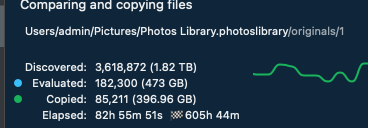
Then there is CCC (Carbon Copy Cloner), which I’m having problems with lately. I think Mike from Bombich, who is very friendly, believes it’s a problem with my WD 2 TB external hard drive. Disk Utility doesn’t see any problems though. I reformatted and tried again, but as you can see from the attached image, it’s really not making much progress, even after several days. It used to do daily updated in about 90 minutes.
What I’m wondering is if I really need CCC at this point? Should I bother buying a new drive to see if it works better? Or are my other backups sufficient and maybe I shouldn’t worry about using CCC any more? What do other people use for their Mac backups.
I’d say a lot depends on what you store on your computer and how it is used, as well as the age and condition of your machine. For example, somebody whose small business depends on their computer should have multiple backups, some cloud, some physical drives. But, say, for a laptop that is used by a retired person when they go on cruises to do email and Zoom calls, Time Machine and one other method would be an extremely safe setup.
Two key factors, I think, when it comes to redundancy are what would happen if there is a total failure and the difficulty of recovering from the failure. There’s a reason why airplanes have at least two of everything but most of us don’t have two stoves.
My small business depends on my computer and its contents. And I keep my MBP under monthly AppleCare+ warranty.
So currently, with CCC not working well, I have Time Machine, iCloud, and BackBlaze. I should be able to recover from those, shouldn’t I?
When I upgraded to my current MBP in 2021 (from my old MBP 2013, which still works, but I don’t use it) I believe I used Time Machine to bring over the contents.
If I were facing a similar situation, I probably would want at least one additional, non-Time Machine, physical backup. So in your case, you could either buy a new drive and see if your CCC problems resolve (if not, there are plenty of alternatives such as SuperDuper) or try out the free trial of another backup program on your existing CCC drive (at the cost of having to overwrite your existing backup).
I use Time Machine, SuperDuper!, and Arq to MEGA, with multiple copies and rotation of drives offsite.
If you are not excluding anything from Time Machine, and you don’t care about CCC bootable backups, then Time Machine is as useful as CCC as a full restore migration source. In that case I’d say that you don’t need CCC.
Given that you are running a small business, I would suggest that you should keep CCC or something similar for nightly duplicates. Time Machine is good for versioned backups, Backblaze is good for offsite backups, and iCloud isn’t a backup at all because changes you make on one machine will immediately be synchronized to the cloud. Multiple backups are never essential until they are.
Good point about iCloud. Maybe I should try to get a new 2 TB backup drive and try CCC again. I wish I knew if the cause was just the external drive though.
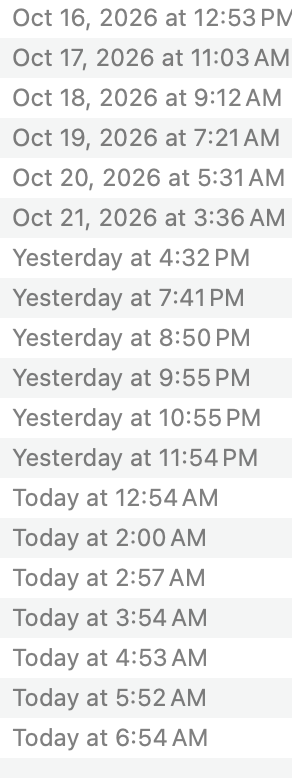
It looks like my latest Time Machine backup is from 10/21/2026. None have been completed since then. I think there is something else wrong besides my external drives for CCC and Time Machine. No idea what though.
“should” - you should be testing that you can recover.
Running a small business on one computer - you should have done a risk analysis. Depending on how you want to manage technology risk you should consider getting a second computer which you keep in sync with the first, or ready to use the latest backup from your main computer.
Bombich recommends against bootable backups but does describe (on the support pages) how you can create them, maintain them and use them. Basically they are for business continuity rather than backup.
Did you try copying files to that external disk with something else? Is the disk just that slow? If a Finder test produces the same slow performance, then there’s your answer.
I agree with Adam’s advice here (and I’d add that CCC is “good for versioned backups” too). Right now, it kind of seems like you don’t have any viable backup. Storage is crazy expensive right now, but if your business depends on this Mac, you should at least replace the CCC backup disk (and I’m going to go out on a limb on this one and bet that this isn’t a CCC issue, it looks like slow storage).
Did you buy the WD drive as an external? I don’t have a lot of confidence in externals from the likes of Seagate and WD. It could easily be a problem with the enclosure or the cable. See if a different cable makes a difference. If it doesn’t, it wouldn’t hurt to try the drive in a different enclosure, although you might end up destroying the current one to get the drive out.
We had several Seagate externals here that became unreliable, and the drives themselves turned out to be OK once they were iinstalled in different enclosures.
Get a new 2tb drive. Make it an SSD this time (yes, I realize they cost more).
Buy at least something that is USB3.1 gen2 (10gb speeds, or close).
Or, spend a bit more and get USB4 and nvme.
You’ll probably want to buy a USB4 enclosure separately. There are also USB4 docking stations.
Get an nvme blade SSD. Doesn’t have to be super fast, just fast enough.
Looks like an NVMe version of the SATA docks (e.g. Vantec NST-D158C3) that are popular for people who need to work with a large quantity of drives.
I, personally, would not recommend a device like this unless you expect to be working with a lot of NVMe sticks. If you only have a few, I think you’d be better off buying a separate enclosure for each one.
First, I’m happy to say that since I simply restarted my MBP that Time Machine is working again, and it looks like I have hourly backups since yesterday. Whew. So at least I have that backup.
I mentioned earlier that when I upgraded to my MBP M1 in 2021 that I moved everything over from Time Machine for the most part - plus brought in my huge Photos library from an external drive. So I tend to find Time Machine very useful. And sometimes (rarely) I will retrieve a previous file version from Time Machine.
I do understand Adam’s point about iCloud not being a backup, per se, but rather a synching system. However, if files were not accidentally deleted, but a device just broke or disappeared, in that situation you can restore from iCloud, right? So can’t it sort of be thought of as backup - but without versions?
And isn’t that also true of CCC? You have one up-to-date backup of your complete system. But if something was deleted, the next CCC backup will also have that deleted. Or am I misunderstanding that point?
There is also BackBlaze, which keep on running. I need to check the contents of that more.
in answer to one question, both my WD drives are externals. I always thought WDs were very dependable. If Seagate and WD aren’t, what might be a good replacement to try?
I’m assuming that since Time Machine ran ok again after restarting my MBP that maybe something on the internal drive got stuck. Maybe I should try CCC again. Disk Utility reformatted both the Time Machine drive and CCC drive ok.
Anyway, I feel a bit reassured that at least Time Machine seems up-to-date now. I’ve attached a screenshot showing the Time Machine backups.
Of course the item is deleted from the “current” backup (what you see in the Finder, what you’d do a “recovery” or Migration from), but CCC usually has backup versioning enabled by default. My CCC backups have snapshots dating back a couple years at this point. It’s comparable to Time Machine (by default): hourly snapshots for a day, daily backups for a month, weekly backups as long as free space permits. CCC offers some customization around snapshot “retention”, you can really fine-tune the granularity of versioning, how much space versioning takes up, etc.
So generally, no, that isn’t true of CCC. If you delete something, you can still recover it from the backup.
When deciding on what backups I need I like to come up with the various disaster scenarios I want to protect against. These typically include hardware and software failures, loss to theft, fire, or other calamity. My off-site BackBlaze backup guards against the very bad situation of my house burning to the ground. I have needed whole backup once when an OS upgrade failed and hosed my Mac. Was able to easily restore from my CCC backup. My main computer is an iMac so it’s no problem to keep drives attached all the time. Lastly, all backups require regular testing to be sure you can recover the data when needed.
Well, I probably need a larger CCC backup drive then. I’ve been using a 5 TB drive for Time Machine specifically because of version backups. But I’ve been using a 2 TB drive for CCC because I always assumed it’s just making a backup of the latest contents of the internal 2 TB drive.