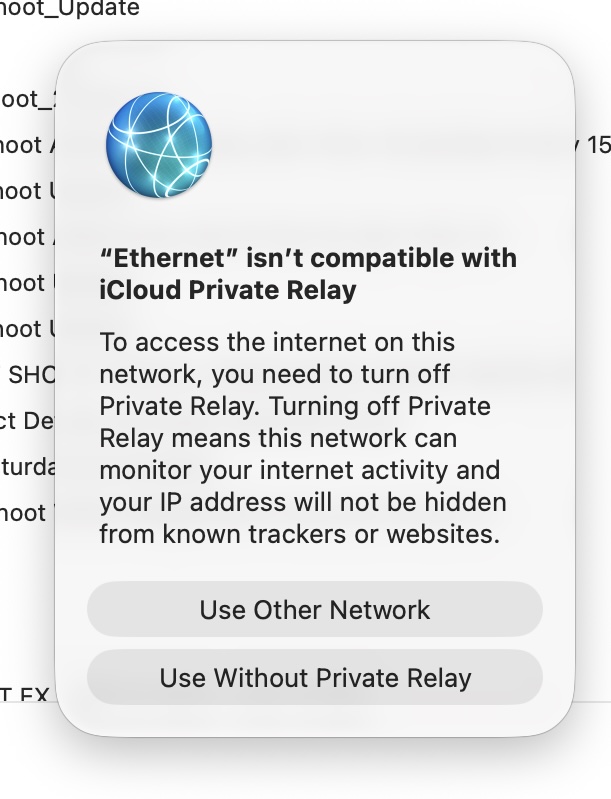
…looking, to me, not a little dodgy. I held back from clicking either option and tried to work out which app had cause it to launch so, one by one, I forced all open apps to quit. Still it remained up - after which I restarted my Mac. Lo and behold, it didn’t reopen. Could it be some malware? Looking forward to ideas…
Many thanks for that - I hope indeed it’s not some malware but CalDigit and AdGuard are new names for me and I’ve no knowledge of them running on my Mac…
Is it actually incompatible with Ethernet interfaces, or is it having a problem with this specific Ethernet network?
The Reddit post linked by @adieb seems to indicate that (at least for him), this is an issue with an ad-blocking application. Others have reported issues with PiHole.
Without knowing anything more, I would guess that this error actually means that traffic is being forwarded to a proxy of some kind, and therefore can’t also be sent to Apple’s proxy.
But if that’s actually the case, the error message needs to be rewritten, because the current text is pretty confusing.
Thanks for that question about Ethernet difficulties! So far as I can tell, all was working properly - my Mac relying on Ethernet. The message as shown earlier opened unexpectedly and didn’t disappear as I went through all my open apps, one by one, force quitting them. Having done that and with the window still on the screen, I restarted the Mac and have seen no problems since.
I’ve seen that error pop up occasionally on my home WiFi network, sometimes on Mac, sometimes on iOS and iPadOS. I’ve always assumed it’s a temporary issue reaching the private relay servers. Usually just toggling private IP off and on fixes it for me.
I have some doubts that the discussion about AdGuard (and similar) is relevant in your case, because your error message is specific to the Ethernet. Here is advice from Apple Manage iCloud Private Relay which includes sections about specific networks.
To give focussed advice we need to know a bit more about what you were doing when the message popped up and about the network configuration of the Mac. What is the “oot_Update” in the background.