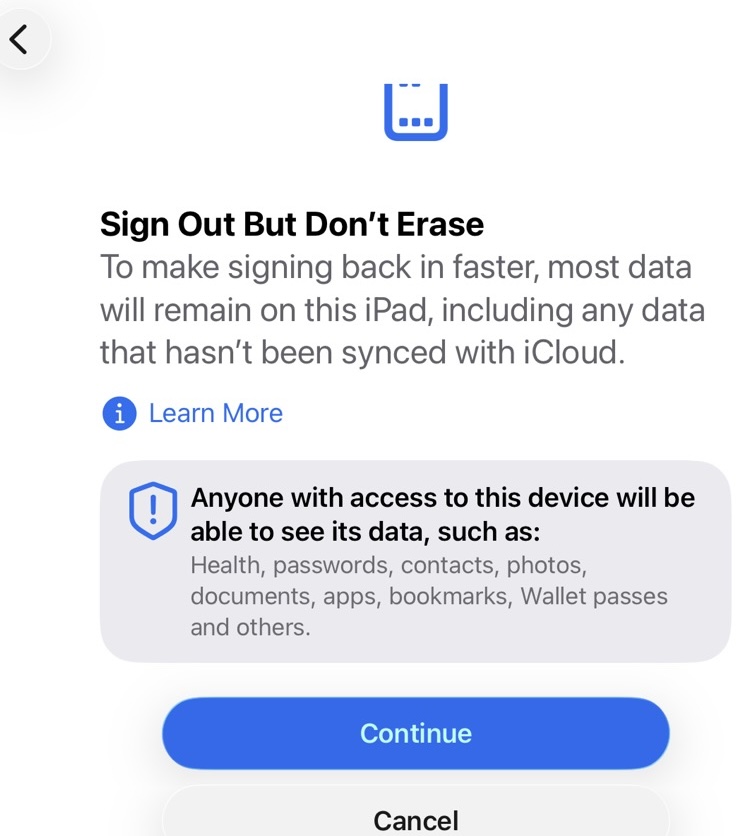
In my troubleshooting (listed in another Topic) of Find My Mac, I wanted to try logging out of my Apple Account on iPad and was startled by this not-previously-seen, ah, is it a warning, a threat, or what have things come to:
I can’t fathom a, uh, good reason for this drastic nearly-screen-covering message. I wasn’t in Erase My iPad, I was in my Apple Account page.
I found this so disturbing I canceled out of it until I could post this and back up the device, just in case iPad decided I had hit the erase button or something went wrong. I have fairly routinely done this in the past without such a message.
Somehow I missed the memo that signing out of an Account would be treated as a wish to erase the device. Wow.
I think it’s just that a common use case of signing out of your account is because you’re getting rid of the device so would want to erase it. It used to be (and presumably still can be) 1) Navigate to sign out of your account and sign out, and 2) Navigate to where erase is and erase. Now it can all be done with just step 1. If someone almost always does some step b after doing a step a, it makes some sense to offer to do them both at once (with the ability to only do step a in those cases that’s all your want).
And the text seems to describe what’s going on pretty well. You’re keeping the device, so just sign out without erasing.
My guess is that Apple knows that a vast majority of people logging out of their Apple Account are doing so just prior to erasing their iPad for resale, tradein, etc. This saves a step.
People (or AI?) at Apple obviously can’t contemplate anyone using an iPad without being
logged into their Apple Account. I agree the splash screen is unnecessarily alarming. You are wise to backup the iPad before proceeding.
It seems in many ways Apple is being more aggressive (iWork update for example) with users to employ Apple hardware and software the way Apple wants, and using tactics that are imho unfriendly and borderline deceptive.
I never realized it was such common practice to be always logged in, and simply logging out would be considered to be taking a drastic step. It’s their technique to train us to be always connected, I suppose. Times change. Hm.
I never realized it was such common practice to be always logged in, and simply logging out would be considered to be taking a drastic step
I hadn’t realised that some people routinely logged in and out of their account . I regard signing out as pretty drastic troubleshooting step when iCloud is me behaving.
But I haven’t seen your screenshot so wonder if that is new. I can see the rationale but think the default should not be to erase this device. That sounds like a poo trap for those who click through the defaults without reading the words, which are clear enough.
A goodly portion of my gig in retirement helping clients “of a certain age” is unlocking their Apple ID accounts, and trying to decipher exactly what it is iCloud wants. Not easy given the obscure prompts.
My favorite is the one when you try to turn off iCloud Drive:
The “Keep a copy” is fairly new, your only options used to be “Remove” and “Cancel”. If you didn’t make a copy of your files in a folder that was NOT Documents or Desktop, your stuff was pretty much toast.
That is not my experience or understanding. “Remove from mac” did just that, but left what is on iCloud alone. So my normal practice is to “remove from mac” and then when you sign in again a fresh copy is downloaded. “Keep a copy” used to result in duplicates in calendar and contacts sometimes as what was on Mac was merged with what is on iCloud.
@mikebhm the screenshot is above. I don’t use iCloud or Apple services much; am starting to dabble in Find My and Family accounts but so far they seem more trouble than they are worth.
I grew up with computing on stand-alone devices so this always-on/dependence on connection to Apple is… uncomfortable. I frequently sign out the iPads as they’re not used for much in the way of Apple services.
I guess if Apple thinks signing out is an indication that most users want to get rid of their device, it makes sense. But I would have found it more polite and ‘Apple-like’ to put in the window a brief explanation and a link to the Erase module of Settings or something like that. Their window takes up enough screen space to explain the whole process.
Must be hard for them to decide what most users are in any case, with a couple of billion of them in various cultures and mindsets around the world.
Right on about the default. Like we’re reading about so many who have done the iWork 15 update without even reading a short bit of text. Sigh.
I am close to being in your client group @TonyTownsend and on a good day still have my wits about me enough to try to decipher such messages. My default reaction, luckily, is to seek out the “Cancel” button or “X” symbol when in doubt. Reinforced with minimal use of Apple sticky spider web of services in the first place. Recent experience makes me want to back out of the small usage I am doing now.
And then there’s iPad Files App, where you can Edit > switch off iCloud Drive, only to find it returning on next launch of Files…
It’s been a while since I’ve taken a device to an Apple store, but as I recall if they’re going to do anything with it, they make you sign out, both to keep employees out and for the protection of the employees in case someone alleges an employee did something. But in that case you just use Sign Out and Don’t Erase.
I suppose I do this almost every mid-winter, but I’m reflecting on gadget use again. It’s uncomfortable for me to be tied to internet for device/software functionality. My computing needs are less and less as time goes by and I’m happy working with local/independent devices, paper calendars and notes etc.
Regarding this Topic I’ll be trying to figure out what I am tied to with the Apple Account and see if I find a reasonably (for me) way to do without it. For now all that comes to mind are:
Find My Stuff/App
seem to be usable only logged in to AA and iCloud
Family Account
seem to be usable only logged in to AA and iCloud
App Store
third party apps refuse to launch after some time not logged in to AA
iTunes purchases (music, movies, ebooks)
older Macs can’t be authorized to play or burn to CD content legitimately ‘purchased’ on the same Mac, if iTunes can’t connect to Apple, which at least one of mine can’t
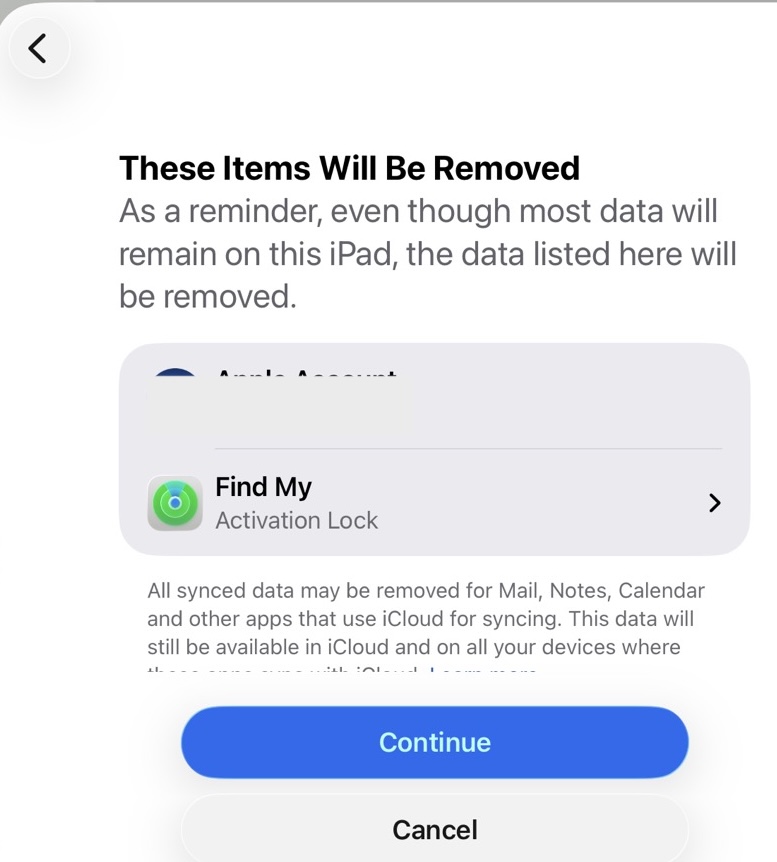
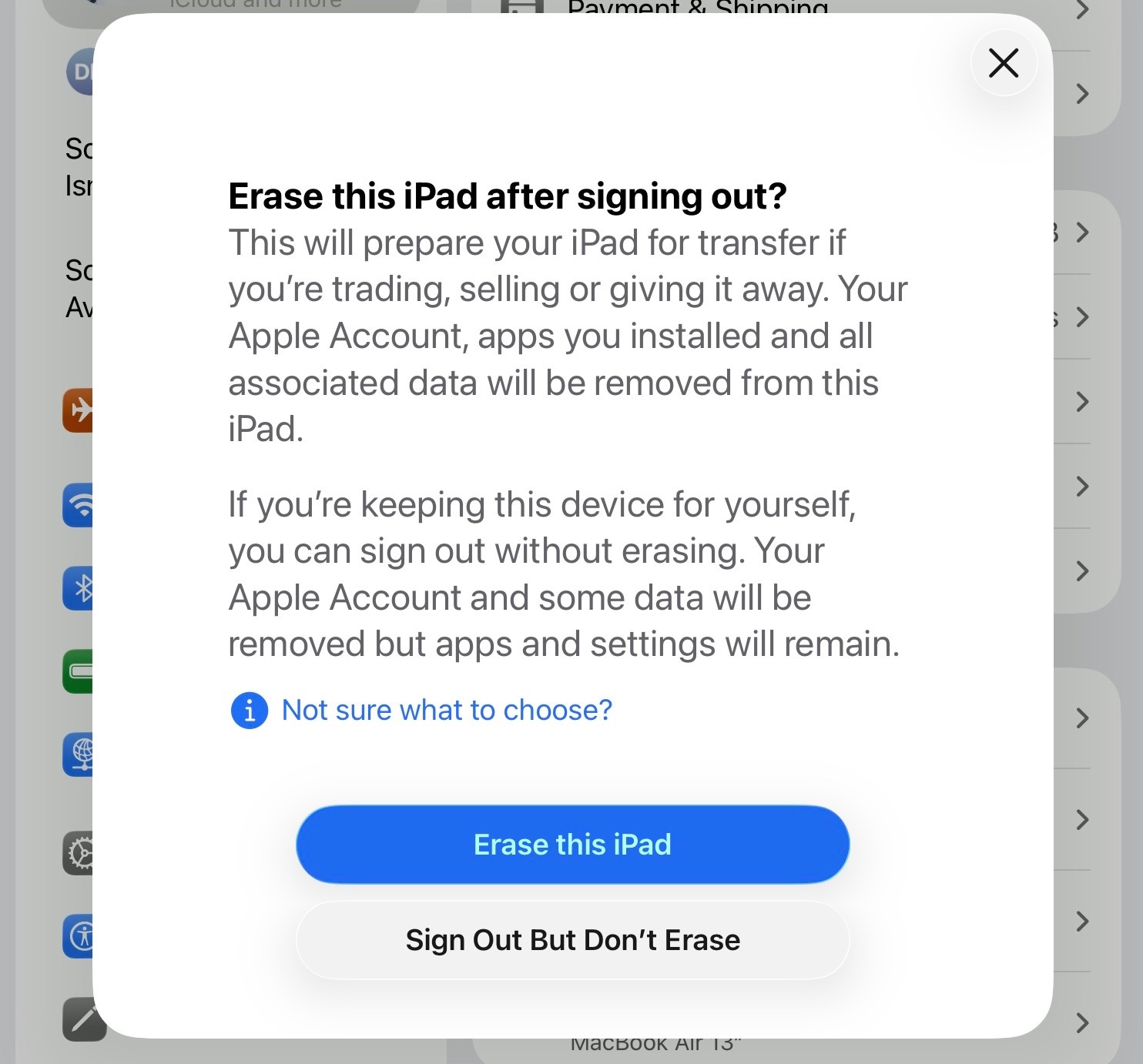
Back on the original Topic , I did click to sign out without erasing and had the joy of discovering three more steps, two of which Apple uses to scare people into not signing out:
“Most data”? Ack! ‘“Learn More”! Apple knows well that possibly lots of users will not click that to be better informed and uses that knowledge to induce more fear of signing out. (On my next iPad sign out I’ll see what’s there, see if they explain which data, but need to dash to some appointments now).
“Anyone with access…” Also the sign of raised eyebrow. If the device is using a good strong password, or Apple’s favored privacy-protecting-encrypted-unbreakable-user-protecting Face or fingerprint ID, how would that be true? Logging out of an AA doesn’t disable the device password.
So, I’m not sure what ‘data’ my AA or FM Activation lock hold, but they would be reinstated upon signing in again, or not?
And a load of waffle under that, designed to confuse and induce fear of signing out. I didn’t notice when Apple started using these tactics but it is a sign of (to me unfavorable) change.
Third step was quite innocuous, providing password to the AA being signed out of.
I’ll try using this iPad signed out of AA for a while and see if I miss anything. Seems Books App content is still there.
Of course you know that Activation lock prevents another user from factory-resetting your iPad and then setting it up for themselves. This suggests to me that logging out of an Apple Account will also remove the activation lock - that seems very risky to me; I can’t see the benefit of using an iPad without an Apple Account. At this point if it’s true that activation lock is disabled, if you lose your iPad and somebody else finds it, without activation lock they will be able to factory reset it by putting into recovery mode and using a computer to factory reset it.
It’s been a long time since I signed out and back in to my Apple Account on an iPad, so I don’t know if you are prompted to turn on Find My (activation lock) or if you must do so manually. I guess you will find out.
IIRC that was the procedure. They had me sign out of my Apple account at the store before they replaced the battery, Of course I had backed it up the night before.
 . I regard signing out as pretty drastic troubleshooting step when iCloud is me behaving.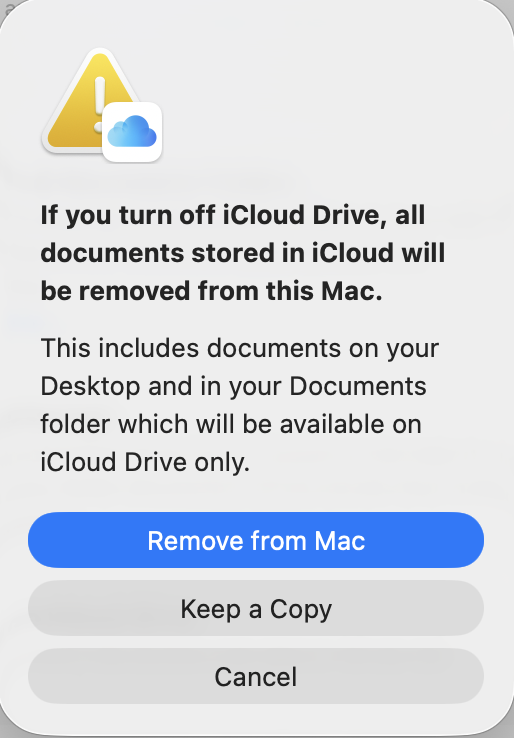
 and on a good day still have my wits about me enough to try to decipher such messages. My default reaction, luckily, is to seek out the “Cancel” button or “X” symbol when in doubt. Reinforced with minimal use of Apple sticky spider web of services in the first place. Recent experience makes me want to back out of the small usage I am doing now.
 , I did click to sign out without erasing and had the joy of discovering three more steps, two of which Apple uses to scare people into not signing out: