The latest iteration of Zoom Workspace (I think it’s 6.7.7) has become a total mess and I’m finding it impossible to do simple things like opening a recording to get a transcript of a discussion. When I asked questions to the Support System, it offered different answers. The support system is on the Zoom app I run on my Mac, but the answers are different pages in Zoom on the web, which deliver different answers. Does anybody know how to get back the clean and easy-to-use Zoom from the early 2020s? Maybe I’m just having a very bad day, right now Zoom just feels like AI slop.
1 Like
I can’t disagree that Zoom has become harder to navigate, but I think you can attribute it to competitive slop, not AI slop. Basically, Zoom did very well in the videoconferencing field, but there’s only so much that can be done there. So if they wanted to grow revenues, they had to expand into other areas. Hence Zoom Workplace, which has a boatload of features that almost everyone already has from other apps.
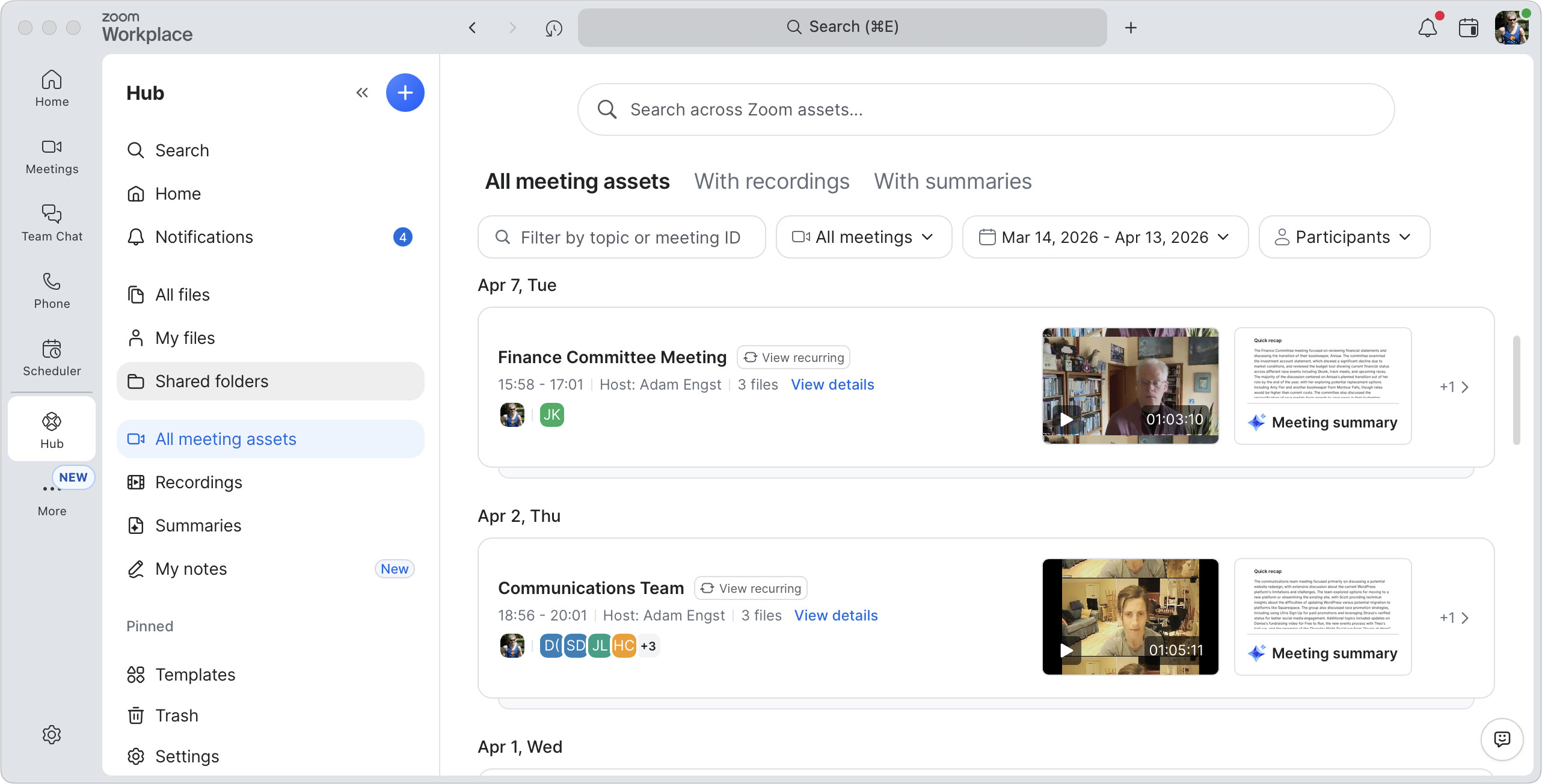
Short answer: click Hub in the leftmost sidebar, and then All Meeting Assets in the next sidebar. You may have to click More to see Hub, after which you can Control-click it to pin it to the toolbar.
All that said, I don’t actually see the transcript; just the summaries and other files. Transcripts may only be available on the website in Recordings & Transcripts.
As far as getting that “clean and easy-to-use Zoom”, note that Zoom enforces a minimum client version, and the current minimum version for the Mac is 6.0.2 according to this article: Zoom Software Quarterly Lifecycle Policy
Whether 6.0.2 gets you to that “clean and easy-to-use” Zoom is left to be determined. Then there’s the whole pesky ideas of “is it compatible with the macOS version I’m running”, and “what bugs and security vulnerabilities am I opening myself up to by running that old version”.
It seems lately that adding “AI” to software is being driven more out of a marketing and “keeping up with the Joneses” (or as a source of additional revenue) rather than delivering actual value (cough.. Microsoft… cough…).
Anyone have experience with Protons new-ish video conferencing option - Proton Meet?
At first glance it looks like a return to simplicity. Zoom has become unwieldy for my wife and I to use with our online classes. We stream a lot of video with audio during them too and concerned about laggy behaviour. Our Zoom accounts renew for next September and we are seeking to sort something out.
2 Likes
I’d love to get just a new client or front-end to Zoom. Their client has become a bloated mess. I want a simple, fast, and minimal client. If a 3rd party created something like that, that I could use instead of the Zoom client for Zoom meetings (both hosting and watching), I’d happily pay for it.
2 Likes
I find myself (shockingly) recommending Microsoft Teams to clients rather than Zoom.
While even teams has a ton of bloated crud that I (or anyone I know) don’t use, none of it is in your face to the point where you can’t simply hit a button to start/join a meeting. The controls are much simpler in my opinion.
I had not thought of going back in Zoom, but it may be worth trying.
I have never heard of Proton Meet. Do both parties have to be using it? Right now, my impression is that Zoom is the most widely used video meeting service, with the possible exception of Teams in the corporate world.
I found Teams shockingly bad and often unusable. That may because Microsoft took over my university alumni account and made it unusable. I’ll be interested in other suggestions.
Thanks for the help. The worst problem I have been with Zoom lately is that their support pages seem to be filled with debris from earlier versions of Zoom with no way to tell which instructions go with which version. I would welcome more suggestions.
Proton Meet doesn’t require it. Can use in a browser without an account. Very privacy driven.
Zoom is the most widely used, and probably the highest quality stream… but doesn’t have good privacy and the primary client has become difficult to enjoy or use.
Teams doesn’t do the job for us.
3 Likes