Safari 26.0 was released on 15 Sept 25
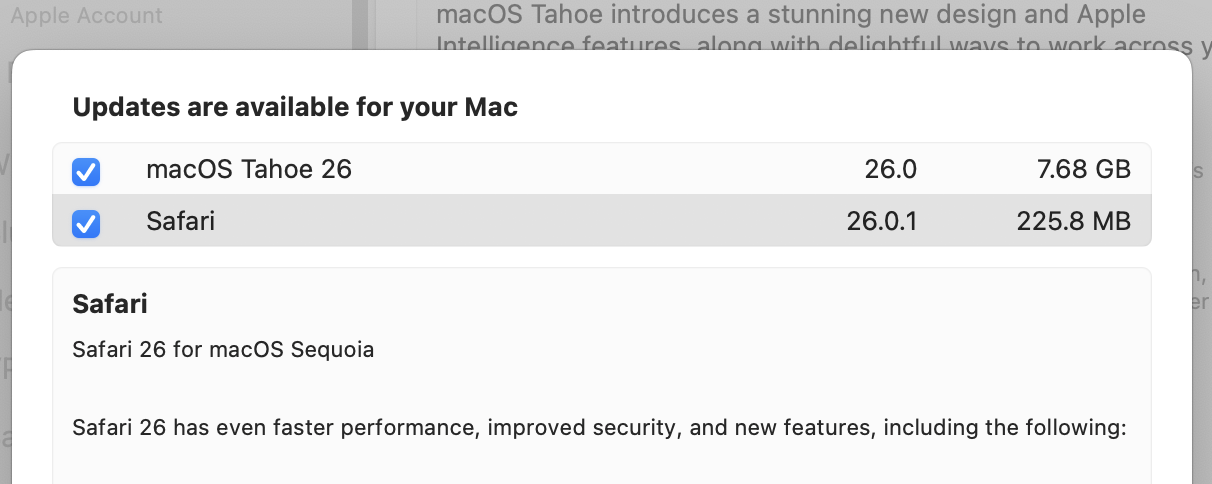
Last night, 17 Sept, I see a Safari 26.0.1 already in Sequoia’s software update and I could not find it mentioned anywhere else on the web.
I suggest to wait a few days before you update to let the dust settle.
Thanks. I might not otherwise have noticed it.
Of course, I don’t normally use Safari either, so …
Be careful downloading Safari! Make sure to click the little “i” icon. Once again, even running the latest Sequoia 15.7, Tahoe is conveniently preselected to download along with Safari.
1 Like
The version fixed the compact tab bar on v14 and 15 which can’t be typed.
I look forward to installing it. I ran into unacceptable performance issues with Safari 26.
At first, I thought Safari might have been re-indexing itself or optimizing its internal database, but it has been more than 24 hours now.
Everything I did in the Mac Safari 26 address bar was very slow. It would take as much as a couple of seconds before the address bar caught up with whatever I was typing in it.
I tried disabling all of the search options in the Safari search preferences, and it may have helped a little, but the basic issue remained. It did seem to improve a bit more when I right-clicked in the address bar pull-down display and turned off “Show Suggestions” and “Show iCloud Tabs”, but again, it didn’t return to pre-26 responsiveness.
The slowness I was experiencing with 26.0 disappeared upon updating to 26.0.1.
I take back my earlier comment. The slowness has returned.
I’m also seeing a slowdown with 26.0.1. on 15.7.
It’s not all sites, but some have a noticeable lag until the pages start to render. This site for example. Meanwhile other tabs loading other sites are as speedy as always. This has clearly changed with Safari 26 vs. whatever macOS 15.6 came with before.
1 Like
If I open a new window in Safari 26.0.1 and then type command-L to “Open Location…” in the address bar, there generally is a pause that lasts slightly longer than it takes to say “One Mississippi” before the address bar is selected and keyboard input is accepted. There are similar delays for the next several keys typed. This did not happen in Safari 18.x.
As mentioned in my earlier comment, deselecting all search options in Safari preferences helps a little, as does turning off “Show Suggestions” and all other options in the address bar pull-down display, but a noticeable lag remains.
This behavior does not occur in any other browser.
I had come to use command-L with auto-completion upon typing that this issue is truly disruptive for me. I am using a MacBook Air with 16 GB of RAM and ample storage (2TB SSD with >500 GB free).
I regret updating to Safari 26.x.
PS. In case my description of the “Show xyz” options in the address bar pull-down was not clear, I am referring to the menu that shows up if you hit command-L or select the address bar and then right-click or control-click in it. See below.
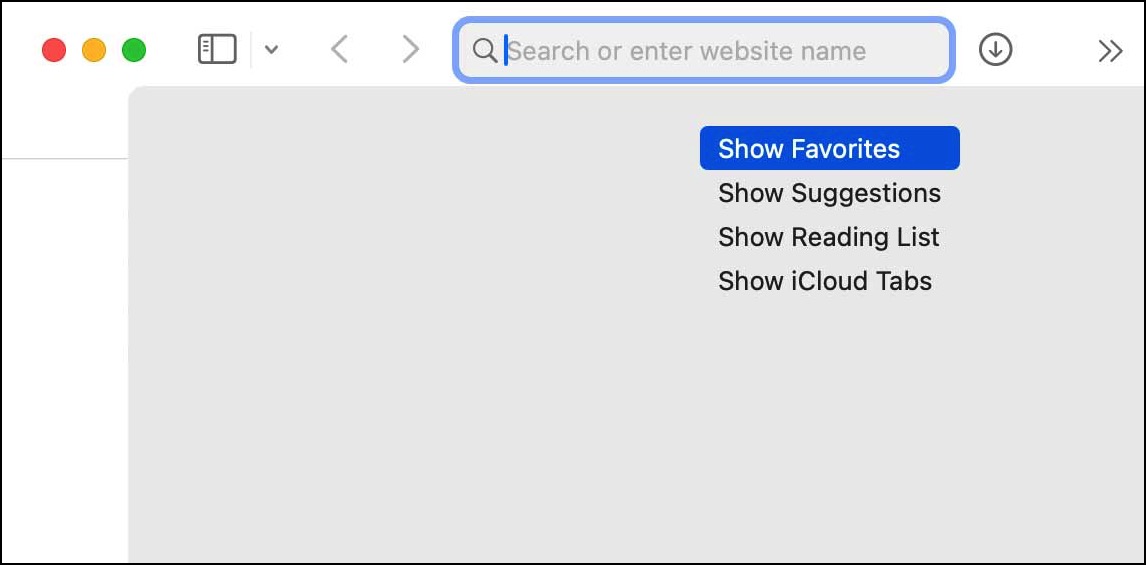
Interesting to see the rendering artifact in the screenshot. In actual use, the menu options appear as a discrete menu list with a lighter gray than the background and a shadow effect.
Are you running any Safari Extensions?
1 Like
Good question. I usually run the old “Better.app” ad-blocker extension, but the problem persists when it is disabled, including after quitting and restarting the browser and/or the machine,
1 Like
I am not seeing a Safari 26.0.1 update available here, running Tahoe 26.0.
1 Like
I may be mistaken, but I believe 26.0.1 is available only for Sonoma and Sequoia.
Also, a bit of progress on the performance issue: it seems to be related primarily to the “Show Start Page” setting in Safari’s search preference pane.
At least as of today, disabling it seems to restore most of Safari’s performance to Safari 18.x levels.
For me 26.0.0 was crashing pages when autofilling payment card details.
Not bought anything since upgrading to 26.0.1 on my machine (macOS 14 Sonoma, might update to 15 Sequoia later today).
Coincidentally, Safari 26.0.1 just crashed for me when attempting to type something in the address bar. One of those long crashes where the screen froze as I started typing, but I was able to cmd-tab into other apps. Safari was frozen for at least 30 seconds at nearly 100% CPU before disappearing. I have seen Safari crash now and then before installing v26.x, but it was a relatively rare thing.
1 Like
Taking a shot to post this here.
Safari 26 on Mac OS Sequoia has broken subtitles playback at AHA video
(Telugu and Tamil streaming content) Thankfully subs work in Firefox.
MacOS 15.7.1 appears to be somewhere in the works. It showed up when I was migrating from a MacMini 2018 running Sonora to a MacMini 2024 running Sequoia 15.7, and I thought I upgraded to the 15.7.1 version, but all the 2024 Mini shows is 15.7. A search this morning found 15.7.1 mentioned on Mac Rumors https://forums.macrumors.com/threads/macos-15-7-1-available.2467213/
New (to me) observation. Safari 26 in both Sequoia and Tahoe seems to have an unhappy relationship with Google drive.
Control clicking a folder to access dropdown menu in order to Share it, for instance, results in a stalled drop. only a top blank area appears … Until I repeat the attempt numerous times