I’m at my wits end: Unable to copy / paste tables created in MS Word for Mac to Pages, Apple Notes and Markdown
I work in the Mac environment with Pages, Apple Notes, and Bear Markdown notes and collaborate closely with someone using the same version of Sequoia but using MS Word for Mac, and allergic to my Mac apps. My collaborator creates brilliant technical tables in MS Word for Mac which contain info in the form of formatted text and images. The cells have varying fill colors.
What I tried: paste (⌘V), paste as HTML and paste as markdown into a MS Word for Mac document. The resulting tables in my apps are grossly distorted, more or less in text format, images are missing and so are cell color fills.
I am very frustrated because of how important it is for me to have access to those tables in my apps.
What happens if you just load the doc into Pages? Does the table look good or is it broken? If it looks good can you copy and paste from there? If it’s already broken I feel there’s no way other than recreating it.
works perfectly. My apologies for not having thought of it. I was focusing on copy paste and in open with in Finder, Pages was not offered as an alternative. My apologies for an ignorant post. I am very grateful for your help!
glad you got this solved before I could chime in with my suggestion. As an aside, no need to be apologetic, that’s what forums like this are for. We all need help sometimes, and while solutions can sometimes be simple, they aren’t simple if one can’t think of them.
Coding copy and paste in a word processor would be rather painful because Microsoft wouldn’t care whether anyone else could read what they are writing to the clipboard, although it would be sensible for them to use something similar to their file format, but sensible and Microsoft don’t often occur together. The file format they use is much more interpretable and so is going to be more useful for transferring to other programs.
I’m glad to read that you’ve already found a workaround.
As for the reason why, this is because Microsoft Office, like all non-trivial apps, copies data to the clipboard in a wide variety of formats. Some are standard (like plain text and HTML) while others are proprietary.
When you paste, the pasting application selects the representation it wants (if you have a “paste special” option, then you can choose one). But the app can’t handle (and will generally ignore) any proprietary formats it doesn’t know about.
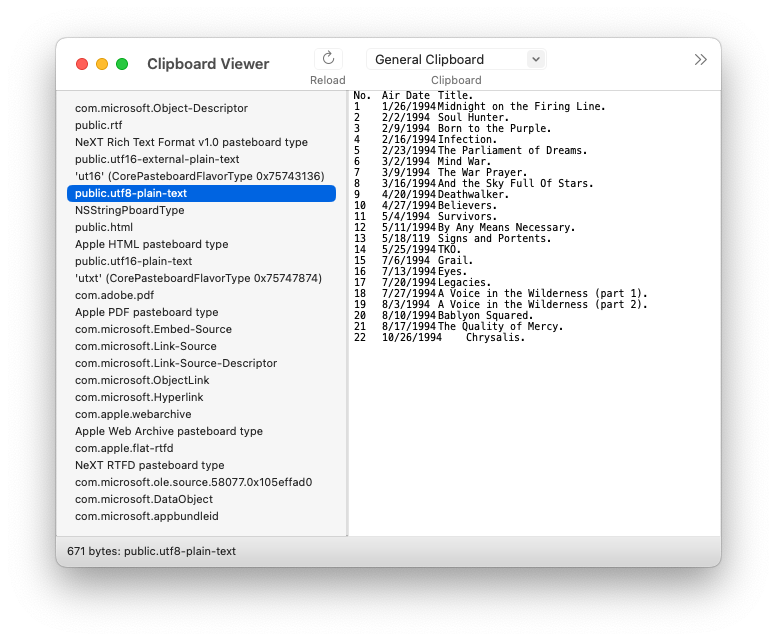
As a quick test, using Apple’s Clipboard Viewer app (one of the additional tools for XCode), here’s what I see on the clipboard when I select and copy a table from Microsoft Word:
Note that there are 25 different representations here!
When you paste into another Microsoft Office document, it is probably going to use one or more of the Microsoft proprietary representations, in order to capture the exact data copied.
But if you paste into something else, that won’t be an option. You’ll paste one of the more generic representations (maybe RTF, HTML or PDF), and the result will be subject to the limitations of that representation.