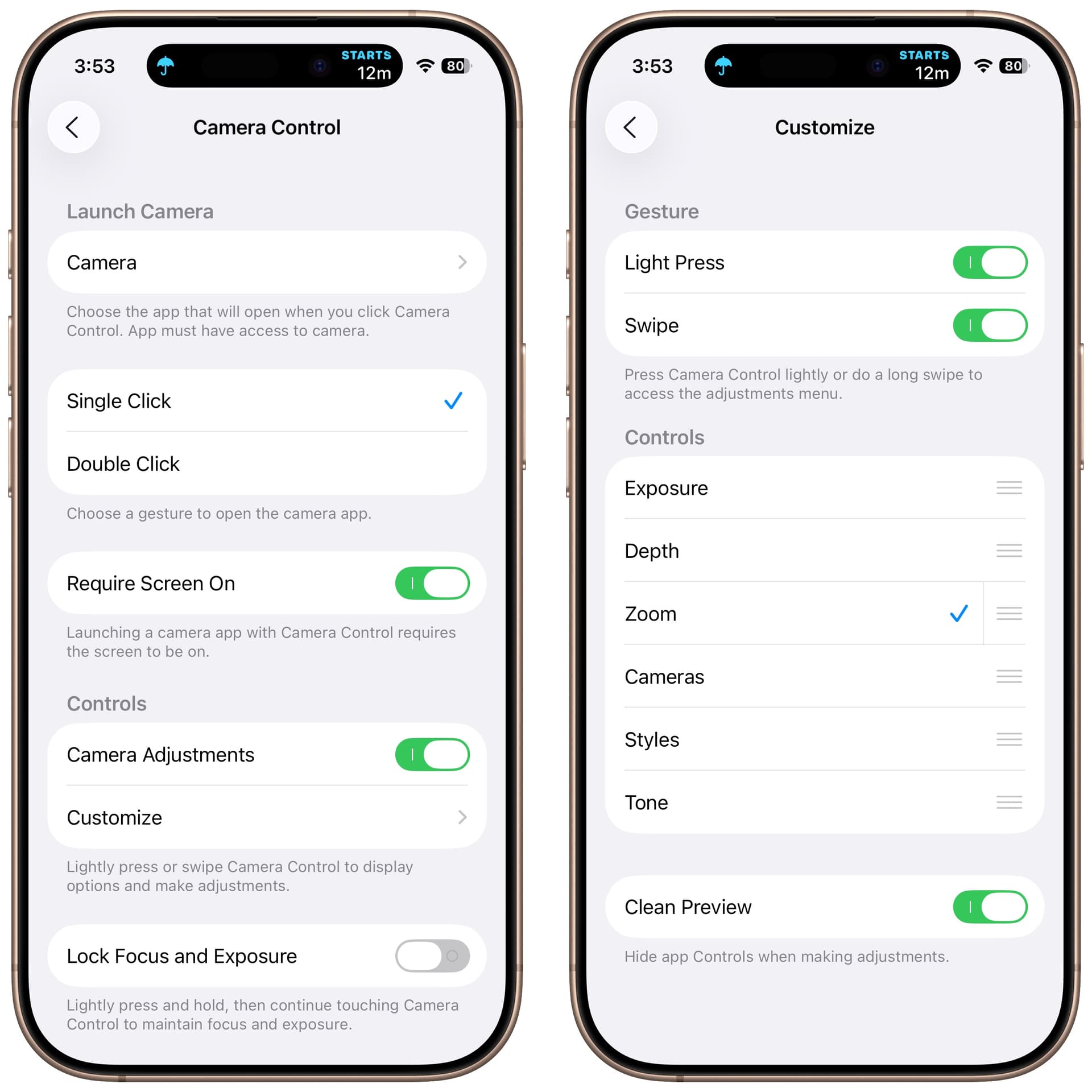
Using IPhone Pro 16. During a recent trip, I found that I was accidentally hitting the camera control (or Gen Z button as I call it) and changing the photos with all these crazy filters and shadings unintentionally. I hold the camera with one hand and use my thumb to shoot pictures with the volume buttons. My fingers hit the camera control and change things on me. I’m really not interested in anything except shooting plain pictures with the option of applying filters later in Photos on Mac. Even when I try to use it, sliding your finger over it or trying to change controls is both confusing and manually difficult. Similar controls are available elsewhere so I had to turn it off for my sanity.
I’m wondering if anyone really uses this button much or is it another of those fancy features Apple keeps piling on with marginal utility.
I love it. Reach into my pocket, press on the button as I’m pulling the phone out, and I’m ready to take a photo much faster than I would be otherwise.
The only time I use it is for visual intelligence. Since it won’t invoke the regular camera unless the screen is on — and I keep my screen launched — it’s an unnecessary extra button push to use for the camera. (When I want to take a photo I simply wake the device and swipe the clock to the left.)
I use Camera Control slider for zoom all the time – it’s much easier/faster for zooming than pinching the screen and I can do it one-handed (I often take pictures on hikes with my dog, so my other hand is holding his leash).
I don’t like the slider for the other variables, like exposure. Too fiddly and not something I change often or want to change accidentally.
I think if I set it that way, based on the position of the camera button, the camera would go on every time I pulled it out of my pocket, which would be a nuisance. I have the Apple silicon case which creates significant friction and requires a strong grip on pulling it out of a front pocket.
I have a pretty friction-full case and haven’t had any problems (the button is protected by a cut-out of the case that adds a bit of a lip). I put my phone in my pocket head down, so when I pull it out, I’m naturally holding so I can look at it immediately. Part of that means that my thumb falls onto the camera control button, making it an easy and quick push to get the camera going. I can literally push the button as I’m getting it out of my pocket and be ready to shoot instantaneously. Quite awesome – really a nice add by Apple.
I’m guessing you put your phone into your right pocket, screen facing towards you, if your thumb is over the camera control button?
I’m a left pocket-er, but would naturally operate a shutter release button with my right index finger.
It’ll be interesting to see how I adjust to this first iPhone I’ve had with the camera control.
Previously I’ve become accustomed to taking a quick snap using the volume buttons and a finger, if holding the phone left-handed, or sometimes with my left thumb underneath on the volume control if holding it in both hands.
Bingo! I’m right-handed, so that makes it immediately accessible (and I also have scratchy things – keys, pocket knife, mini-flashlight – in my left pocket).
Yep – I did a bit of adjusting when I got the 16 so that it would fall to hand naturally. Good luck!
I like the Camera Control a lot, and much more than the Action button, which I’ve never been able to train myself to use for anything.
I’m not a fan of all the light touch controls because they usually just confuse me when I’m trying to take a fast photo, so I’ve turned all of them other than Zoom off in Settings > Camera > Customize.
I thought I had turned on the light touch controls when I first set up my new phone, just to try them out. But when I did, nothing happened. Your comment here made me go and look, and they were off. On my phone the path is Setting > Camera > Camera Control > Controls. From there you can toggle Camera Adjustments. If you do, then the Customize menu appears. I tried them, and I agree they’re a bit to fiddly for me, so I turned them off again.
But while I was there I noticed the Lock Focus and Exposure option. Whoa! I’ll have to play with this a bit, but it appears to be the equivalent of the lock focus (or exposure) ability I’ve had using the back button on my Canon SLR forever. In my brief experimentation, you can indeed set the focus (or exposure) on an object in front of the camera, and then (lightly) hold the camera button down while you reframe the shot as you please.
I had to look it up. I seem to be a Baby Boomer or Early Boomer.
I find the Camera Control button excellent for one-handed fast photos, which I need often. For two-handed use, I use the Exposure and Zoom swiping. I wish I could remove Styles and Tone. Also, the lock focus and exposure is great. It is best for landscape photography, but I use it in portraits too.
Yes, this is one of the features I use for taking those moon pictures (discussed elsewhere). I find locking exposure on the sky or something near the moon often gets the moon exposed better than focusing on the moon itself.
Thanks on Lock Focus. Just got 17 Pro and is my first with all the new buttons. The discussion has been helpful. Zooming seems too fiddly with the Camera Control and one can “easily” do it another way.
The Action Button doesn’t work for me. I keep trying to adjust volume and push it. I suspect I’ll use it for nothing. Must be a frequent problem since that’s an option.
But maybe I’ll get used to the new controls. The Camera Control to turn on the camera and take a picture works well for me.
I’m a left handed boomer. The control button requires two-handed use for me. It needs more dexterity than I can muster beyond a click or double click. The action button is positioned better from the left. Wanna talk about scissors? Or spiral notebooks? Or writing with pencils?