Sure, but as ever, remember that security patches will come anyway, and the 14.x won’t get them. Forcing the eventual upgrade. And the next macOS version may stop support too, of course.
LibreOffice, a free and open-source office suite, works well on macOS and supports various Microsoft file types. It offers half a dozen AI LLM extensions (I’ve not tested) and lacks Apple Intelligence access, but Apple’s current AI offerings are subpar. LibreOffice is snappy on an M1 Mini, displaying Font Book fonts and GNU free fonts within the App Bundle. Microsoft 365 recently changed the default font for the 3rd time, it is now Aptos. However, Aptos is a 365 cloud font. Once you sign-in to your 365 account, it grabs this font. The font is only available to 365 / Microsoft apps that support cloud fonts. Other applications can not see them. This caused a serious issue at work where Adobe Acrobat PDF’s were font substituting as they could not locate the font in Windows nor macOS. I had to go find the Aptos font, verify it’s free to download. Then package it and push to thousands of PCs and Macs to solve the problem. The font is now being installed on newly imaged PC’s and Macs.
2 Likes
Google Sheets has Gemini for providing that sort of help, and Excel has Copilot. I don’t do a lot of spreadsheet work, but I found Gemini useful for developing some complex formulas.
Better than to tell me how, to just do it for me!
Eeeh…that approach has problems, not least of which is that I absolutely do not trust AI at this point to write complex formulas for me that have to be exactly right or my finances get skewed.
1 Like
“Do it for me” is where agentic AI is going, and it has value, but even after the likelihood of it not making mistakes has dropped further, it’s going to run into the problem of people doing a poor job of asking for what they really want. One of the important skills in the new world order is going to be learning how to communicate exactly what you want.
2 Likes
Not sure this quote applies exactly to the ‘interface’ duplication problem, but it is something I haven’t heard/seen in any of the other posts here.
From an Apple Community reply: “The ability to copy/paste is lost between Pages v14.5 and Pages v15.1 documents,“ Source: Can I remove previous version of pages?
1 Like
Just tested that, and it’s true. I could not copy/paste in either direction between the two versions of Pages.
3 Likes
That’s a weird bug, but since you can open both documents in either 15.1 or 14.5 at the same time and copy / paste between them, I’m not sure it’s a crippling issue.
I just noticed a 15.1.1 update for Pages and Keynote, but it doesn’t fix this exceedingly strange bug.
Mmm, thankfully opening all Pages docs in 15.1 and copy-pasting between them works fine. So just delete 14.5 versions and move on to the new 15.x versions (functionally they’re identical).
Interesting. I suspect that there are bigger changes under the covers than just cloud services.
This kind of incompatibility strongly implies that they changed the native clipboard format, or at least changed the tag-name for the format, so the two apps don’t see each others’ data.
If anyone with both apps installed has the Clipboard Viewer app (part of the Additional Tools for Xcode bundle), it should be pretty easy to confirm or refute this theory.
But I’m kind of surprised that it wouldn’t at least paste using a least-common-denominator format (e.g., HTML or RTF or at worst, plain text). It would lose a lot of formatting, but I would think that it’s better than nothing.
2 Likes
Interesting thought. I wonder what happens if you Paste and Match Style?
It still doesn’t work.
But, again, why work in two different versions of the app at the same time?
1 Like
The continuing reminders "this version not supported, upgrade” just seems very Microsoft to me… There should be an option “do not remind me again.”
9 Likes
That touches on the very point that has been bothering me a lot lately: Apple has enormous resources at its disposable, both in terms of brain power and money. And yet, plenty of smaller software makers — think Panic, for example — release products that are more thoughtfully designed, more robustly implemented, and provide attention to detail that puts Apple to shame.
Especially with regards to iWork, there’s a great foundation with some (AFAIK) seriously unique ideas. For example, I find placing multiple tables on a shared canvas a brilliant model. Compared to that flexibility, it’s quite painful to force multiple “independent” tables onto a single huge spreadsheet — only to see them fall apart when you try to add a single row somewhere.
To put it more bluntly, I find it hard to understand what, exactly, all those people at Apple are working on. Sure, their software portfolio is dramatically more broad compared to the indie software makers. Look at the Pro application, such as Logic or Final Cut, though, and you can see that Apple can build something amazing.
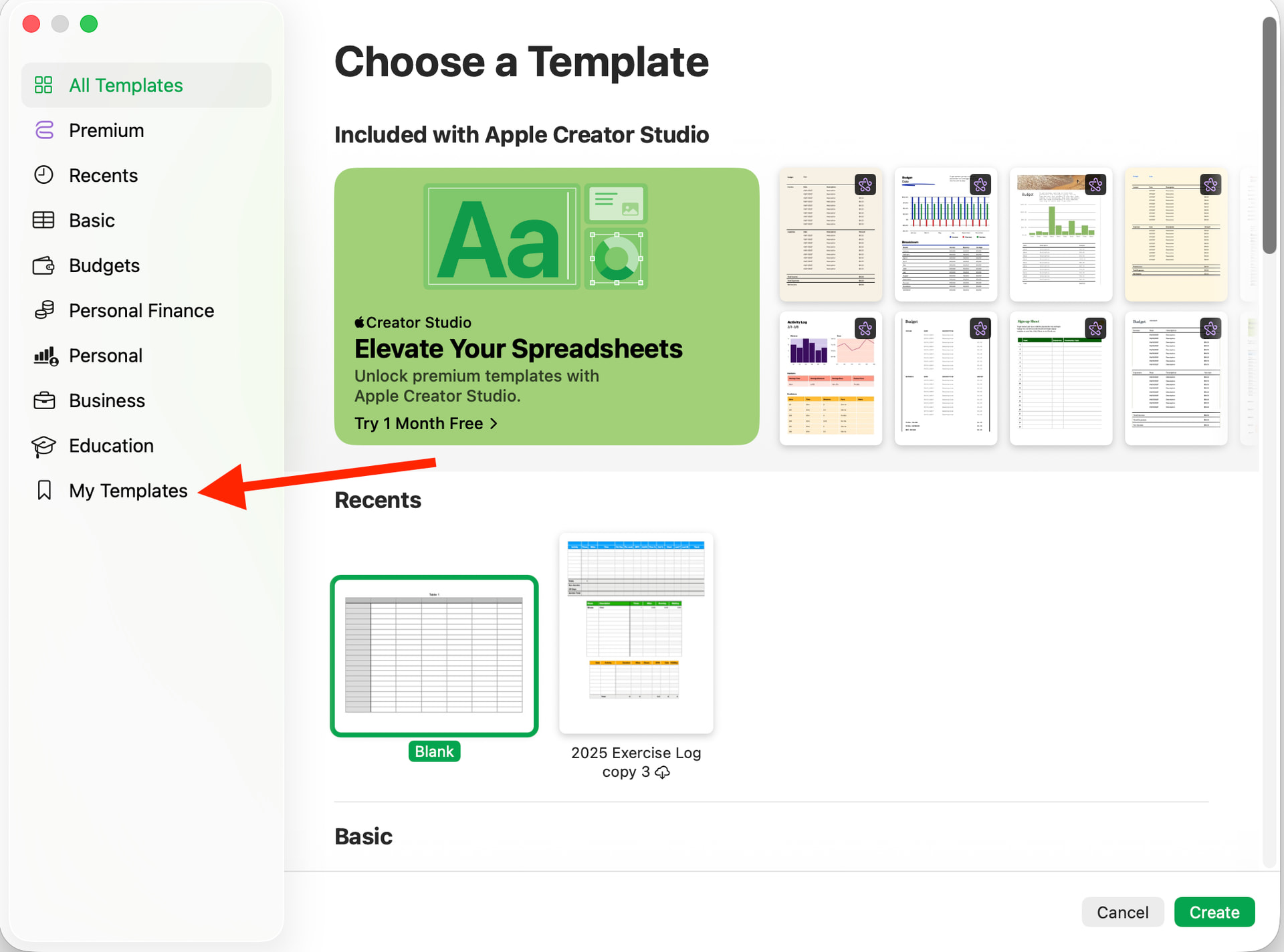
What is it, then, that results in all those little details that are just mind-boggling tedious to use (@beehaze’s mention of “death by a thousand paper cuts” is so apt here)? When I want to create a new document, why don’t I see “My Templates” as that’s where my stuff is? And that’s just one of too many examples.
Here’s hoping that there’s going to be a shift at Apple soon that actually puts the user front and center again. So we’re spared the all-to-common Doctorowian  enshittification that so many other tech behemoths have simply fully embraced.
2 Likes
Keep in mind the entire ecosystem, though!
I kinda feel the same way you do. Whenever I talk to people from the Linux “realm,” however, they usually confirm my long-standing prejudice(!) that the majority of FOSS contributors don’t really that much about user-oriented design.
There are some amazing stand-out products, including LibreOffice. Take a closer look at them, though, and you’ll realize that they often closely copy commercial software in terms of user interface. So you get the “freedom,” but not the UX, of what you can still find in the Mac universe.
IMHO, the key is to look beyond Apple at that universe’s center, and see all the people who make up the Mac-world (sorry ) at large.
I’ve yet to find any non-Mac software whose overall UX is on par with, say, Panic’s Transmit or Nova. It’s a commitment to the platform that is a key ingredient to us users’ everday experiences.
All that said, do you, personally, consider any alternatives to the Mac? If so, what are you looking at, and what have you found out so far? 
2 Likes
Among UX designers, there’s a rule of thumb that “97% of user never change their apps’ settings from the defaults.” The idea is to consider what default settings would work for the majority of users.
Then again, I see plenty of other computers users who have all the default applications in their Mac’s Dock. Who don’t hide that dock. Whose toolbar arrangements do look like the defaults. Etc. etc.
Sure, that’s actually (at least) two biases at work: confirmation bias and availability bias.
Nevertheless, I agree with you that, to those of us who need their UIs to be arranged just so for us to feel at home — and productive! — in them, that customization is absolutely essential. And one can only hope that the designers of the products we (want to) use are fully aware of that fact. 
P.S.: In case you intend to stay on the 14.* branch, and dislike the constant upgrade nagging dialogs, this solution might work. I haven’t tried it myself yet, but I definitely will. After learning a bit more about these config files in general.
2 Likes
Thanks for the help, Doug.
Unfortunately, I didn’t clearly explain what I meant: I want an application to pre-select the “My Templates” when I create a new document. Instead, “All Templates” gets pre-selected every time that chooser dialog opens. Which adds an additional click almost every time I create a new document.
The very least the iWork apps could do is remember the tab I selected (in the given app) when I opened a new document (think “state persistence”). Instead, it defaults back to “All” every single time.
That’s just bad design. 
I do appreciate your attitude of providing help, though, Doug. Talk about that Mac universe, as per my other posting in this thread. 
1 Like