The Wikipedia info is old. Postbox support already responded to my question! They’ve had 60 releases since 2019.
I’ll test it. Thanks.
The Wikipedia info is old. Postbox support already responded to my question! They’ve had 60 releases since 2019.
I’ll test it. Thanks.
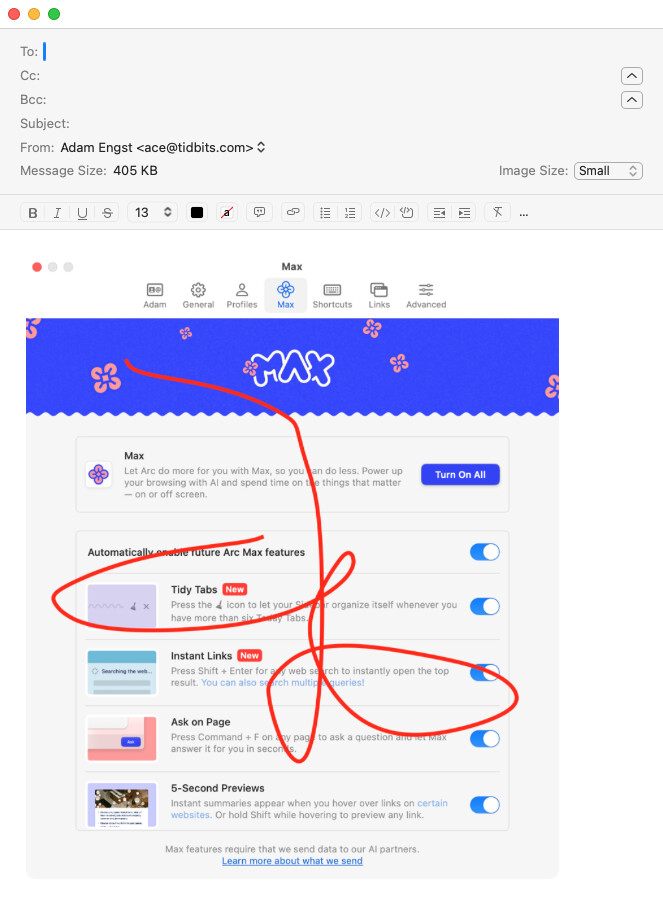
Postbox doesn’t let you mark up embedded images, like adding arrows and text. The same problem as the Mac version of Outlook. A show stopper.
Some more info on this. The developer thinks maybe you are not using Gmail. Is that the case?
That is correct, I’m not using Gmail. (I use Mimestream for that.)
And I’ve mostly moved on, after uninstalling MsgFiler. While I still hit Command-9 a few times a week, it’s harmless, and I just use manual filing.
I certainly hope to someday be able to file messages from the keyboard again, but I’ll survive, either way.
I believe Mimestream doesn’t have a Mail app like feature to annotate images in messages before you send (e.g. add arrows and text), right?
doug
I never knew about the markup feature in Mail, so thank you! This will save me fiddling with Graphic Converter to add labels and arrows.
No, that’s not true. I just dropped an image into a Mimestream message, Control-clicked it, chose Markup, and scribbled. Full Markup support.
Interesting. I thought I tried it more recently, but the last time I tried it was in May, 2022 and stopped using it because there was an automatic selection of “best from” address that was driving me crazy. Their support did say they added an option to not use that feature though.
Maybe I’ll give it another try. Almost all my filing is from Gmail accounts.
It’s a yearly subscription now I believe. But I think they have a free trial.
Why do you prefer Mimestream?
Thanks. I’m going to read that over. I’ve been using Mimestream again for the last couple of days and it’s dramatically improved since I stopped testing in 2022. Then my main issue was the weird “automatically select send account” feature. Now there is an option to “compose from selected account” which is safer by far. I think that should be the default.
I’m still having some issues about selecting an account and sending and then getting an error back about using a different address or alias incorrectly. I never get those in regular Mail. But I’m discussing it with Mimestream support.
Most of my accounts are Gmail, and Mimestream is super fast. And I like being able to use Gmail keystrokes for labeling and archiving. And yes, image annotation works just fine.
For my few small non-Gmail accounts (my iCloud account and a couple of tiny generic IMAP accounts with almost no file structure) I have Mail app open.
I’m still greatly enjoying using Mimestream. But I did encounter one issue and wonder if others are seeing the same thing.
If I paste an image into a Mimestream email it looks not as sharp as the original I copied from with my standard Apple screenshot grabber.
I looked at the same message in Gmail on the web, and in Apple mail, and it looks fine. So I think the recipient (unless they are using Mimestream) will see sharp images. But in Mimestream they don’t look as sharp.
Do others experience the same thing? I contacted support about it and am waiting for an answer.
Also, we cannot move messages from one account to another, like we can in Apple Mail. A minor inconvenience. Basically I love it. Still in my 2 week trial.
I figured out what the problem is with images and also sometimes text not being as sharp. And Mimestream support confirmed it.
This setting:

Is not really a text size scaler. It’s a zoom. So all it does is make the picture (including text and images) larger.
But that tends to blur things when made larger.
I’m trying to decide if this is a showstopper for me or not because it’s sort of driving me crazy. Almost everything else works so well!
I’m not surprised about this affecting images, but I am surprised that it affects text sharpness.
Any zoom option like this should increase font sizes, which get rendered at larger sizes, remaining sharp. You should see the same for any vector-based graphics.
Bitmap graphics (including images), of course, are more likely to become fuzzy. If an image’s content is very large, causing it to be scaled-down for all zoom levels (like many of Apple’s system icons, which are often rendered at humongous sizes), it should look good, although details may be lost. But if the image’s content is not that large, so the “normal” zoom level is rendering its pixels at 1:1, then zooming in is going to make it fuzzy (or blocky, depending on the scaling algorithm used).
There are some very good AI/ML algorithms for image scaling that can produce very good results, but ultimately, any zooming has to degrade the image quality, because you can’t just create content where it didn’t used to exist.
The reason I’m surprised it affects images is because the site setting says it’s for text size. I wouldn’t expect the images to get zoomed in at all.
Maybe the text itself is ok. It might be subtle difference in font color shading and background between Mimestream and Mail that is making me think that. I just expanded your email notification to max size and the text looked sharp. So I take that back.
But increasing text size should not increase embedded image size!
I really do love Mimestream so far, despite the price, while testing it during a trial period.
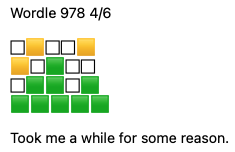
I have run into some issues though, which I’m discussing with Mimestream support. One issue is that when I share Wordle results with friends (usually from my iPhone in the middle of the night) it looks really weird in Mimestream’s Sent folder and when my friend replies. They are not using Mimestream. And if I look at the mails in Gmail on the web it looks fine. It only looks distorted in Mimestream, like this.
The support person at Mimestream insists it looks fine to him though.
I was wondering if there are any Mimestream users here willing to test this with me? If so, you can send me a Message here with your address and I’ll email me a Wordle share and you can tell me what it looks like.
By the way, while I do love Mimestream so far, I’m wondering what alternatives there are, which also do nice message filing with keystrokes, search and opening up folders with keystrokes, image annotation of embedded images (e.g. arrows and text), a “send again” feature and which look nice. The reason I got started on this hunt was because Apple stopped supporting Mail plugins with Sonoma and so MsgFiler will no longer work - especially with Gmail. And most of my accounts are Gmail.
Mimestream excels with keystrokes for labeling, filing, searching, and opening up “labels.” Of course so does Gmail on the web. But Gmail on the web has its own limitations, like not being able to annotate embedded images.
Fascinating. I just received a copy of the e-mail (thanks, Doug). When I look at the raw message source, it is plain UTF-8 text, encoded as Base64:
Content-Type: text/plain; charset=utf-8
Content-Transfer-Encoding: base64
...
77u/V29yZGxlIDk3OSAzLzYNCg0K8J+fqPCfn6jirJzirJzirJwNCvCfn6jwn5+o8J+fqeKsnOKs
nA0K8J+fqfCfn6nwn5+p8J+fqfCfn6kNCg0KRG91Zw0KDQoNClNlbnQgZnJvbSBteSBpUGhvbmUg
ICA=
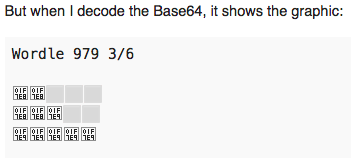
But when I decode the Base64, it shows the graphic:
Wordle 979 3/6

🟨🟨⬜⬜⬜
🟨🟨🟩⬜⬜
🟩🟩🟩🟩🟩

Doug


Sent from my iPhone
Note that the above is text, not an image.
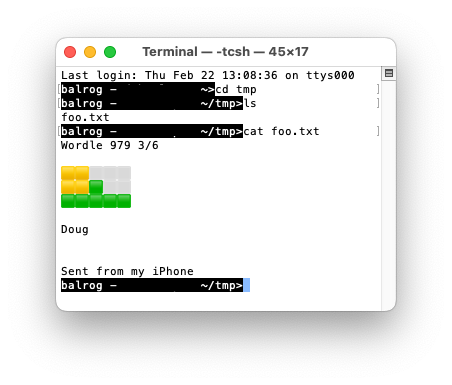
In other words, the “graphic” is actually constructed using Unicode text characters. It even appears that way if I save the UTF-8 to a text file and view it in a terminal:
If I run the text through the Unicode converter web page, I can see the actual Unicode code points, without the Base64/UTF-8 encodings. Interesting things:
U+FEFF, zero width no-break spaceU+0001f7e8, large yellow squareU+2b1c, white large squareU+0001f7e9, large green squareSo it would appear that Mimestream’s bug is font related. Their rendering of “white large square” is a different size from the other two squares, and has a black outline around it. Or the character isn’t in the font they’re using and you’re seeing a “missing character” box.
So… I heard back from Mimestream and they wrote:
Thank you for your patience, Doug! We performed some tests on macOS 13.5 and were able to reproduce the issue successfully.
In summary, this discrepancy arises from the fact that Mimestream uses the “System Font”, while Apple Mail uses the “Body Font” (Arial) and WebKit (Apple’s framework) could not render these wordle characters correctly on macOS 13.5 (as well as on 13.6).
However, it seems that the issue is not present in 14.3 (Sonoma), indicating that it has been resolved in the Sonoma update.
Do you people with Sonoma and Mimestream not see the problem? Can I email one of you to test? If so, please send me a message.
But… I remain confused. Because in my Apple Mail app, the font settings are these:
So the message fonts are Verdana.
Unfortunately in Mimestream there doesn’t seem to be a way to set the message font.
Decisions, decisions. My trial expires in 5 days.
Another data point. When I view this topic on my older computer (running Firefox 115.8.0esr and macOS 10.12.6 , Sierra), I see placeholder images:
According to the Firefox inspector, the fonts used (for the code-block used in this Discourse thread) are Apple Color Emoji, Menlo and Monaco.
Which completely supports Mimestream’s answer - it’s clearly a matter of whether or not the selected font has the characters in question. And it would appear that these characters are not available in Sierra’s fonts either.
Thanks for the extra testing. What I don’t understand is why it can look ok in Gmail on the web, and also in Apple Mail, and in every other mail client (e.g. Outlook), but it doesn’t in Mimestream. It’s not just a matter of Mimestream not supporting a setting to allow the user to set a default message viewing font, like I do in Apple Mail (where it’s set to Verdana)?
Two possibilities. One is just dumb luck - that Mimestream chose a different font.
The other (which I think is more likely) is that web browsers (and quite possibly also Apple Mail’s use of WebKit) may perform font substitution. So if the text has a character not present in the selected font, it will substitute some other font that has the character. Maybe Mimestream needs to add logic to do that or maybe configure WebKit to do the substitution (assuming it has that capability.)
But I’m just making guesses now.