First of all, THANK YOU! I’m loving your feedback.
(3) is incorrect. The clicks appear to be cause by this powered Apple adapter. The un-powered version works fine.
As for (1), yes the aim is click-free recording. But the rest of the aim is to be able to power both the iPhone and the Zoom, rather than having both run on batteries that often don’t make it through a whole show. And the focus of this thread was partly softened by my uncertainty about whether the Zoom was getting any power from this hookup (the iPhone definitely shows it’s getting power).
Yes, and I’ve also devoured the manual :-)
Yes, that USB Mini port in the Zoom is how I bus-powered it successfully with the Apple adapter out of the loop. And yes, I see no specs on the current draw. Zoom has also not yet replied to that email.
Yes, I always use the “iPad” option, which is the only non-Mac/PC option. It appears to require using Zoom battery power, probably because iPad (or iPhone) cannot deliver enough power to the Zoom.
Hmm, now you have me thinking. Maybe the Zoom is refusing the bus power because we enabled the iPad selection which forces the use of the batteries? The only non-battery option is Mac/PC. The manual provides very little explanation of the differences here. It does say the iPad (and presumably iPhone) can only receive a stereo output, not multi-track. But it doesn’t say if there are any other compatibility issues. Anyway, Stereo is fine for me since I’m just feeding the audio stream of a video.
So now I started thinking about using the Mac/PC option, and after some new tests, bus-power is working with the Apple adapter. If you look at the new setup, you’ll see everything is wired the same way, and the battery is removed, but now the Zoom screen lit up.
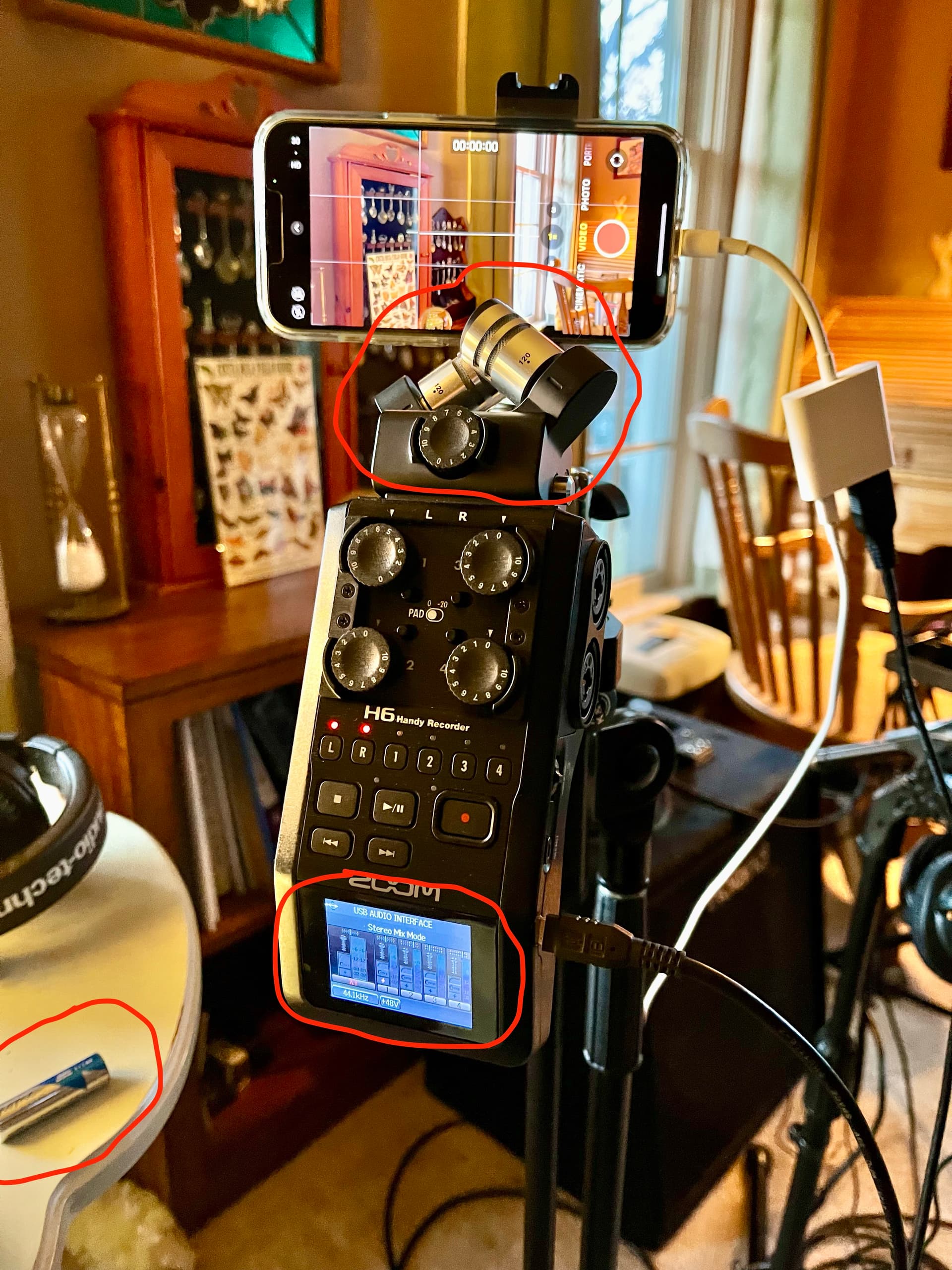
Why didn’t it work before? Notice also that the X-Y mic capsule is now connected to the Zoom. Experiments are showing that, with batteries removed, the Zoom is LESS LIKELY to power up when connected like this if either the X-Y mic capsule is not attached, or if the iPhone is not connected way at the other end of the Apple USB 3 adapter; but sometimes is DOES power up anyway. In my photo yesterday, the mic was not connected, so that’s apparently why the Zoom wouldn’t power up, even though it power up fine without the mic when I removed the Apple adapter from the power path.
I did also test a video to the iPhone using this “Mac/PC” setting, and it seems to sound fine given a rough listen.
So other than the fact that the Zoom has some annoyingly inconsistent behavior, this is great news. It means it’s possible to bus-power the Zoom and still record to iPhone. It also means this Apple adapter is capable of passing audio and powering both devices, as it should; it’s just too darn bad that it provides clicky audio.
Actually, yes, again, after your previous post :-) And given these results, I may have to revisit it. It will be a bit clunky trying strap it to the microphone stand, but I’ll explore options. I just pray to God that the hub doesn’t become the new variable introducing audio clicks. Latency is a concern but might not be a big deal for the reasons you stated: it’s not a round-trip audio path.