There are USB multimeter products which connect inline. I have one of these, which apparently can measure up to 4A of current. (I haven’t looked closely at measuring current draw - I’ve been using it to see if an intermittent car dash cam issue is related to variation in voltage supplied from the car.)
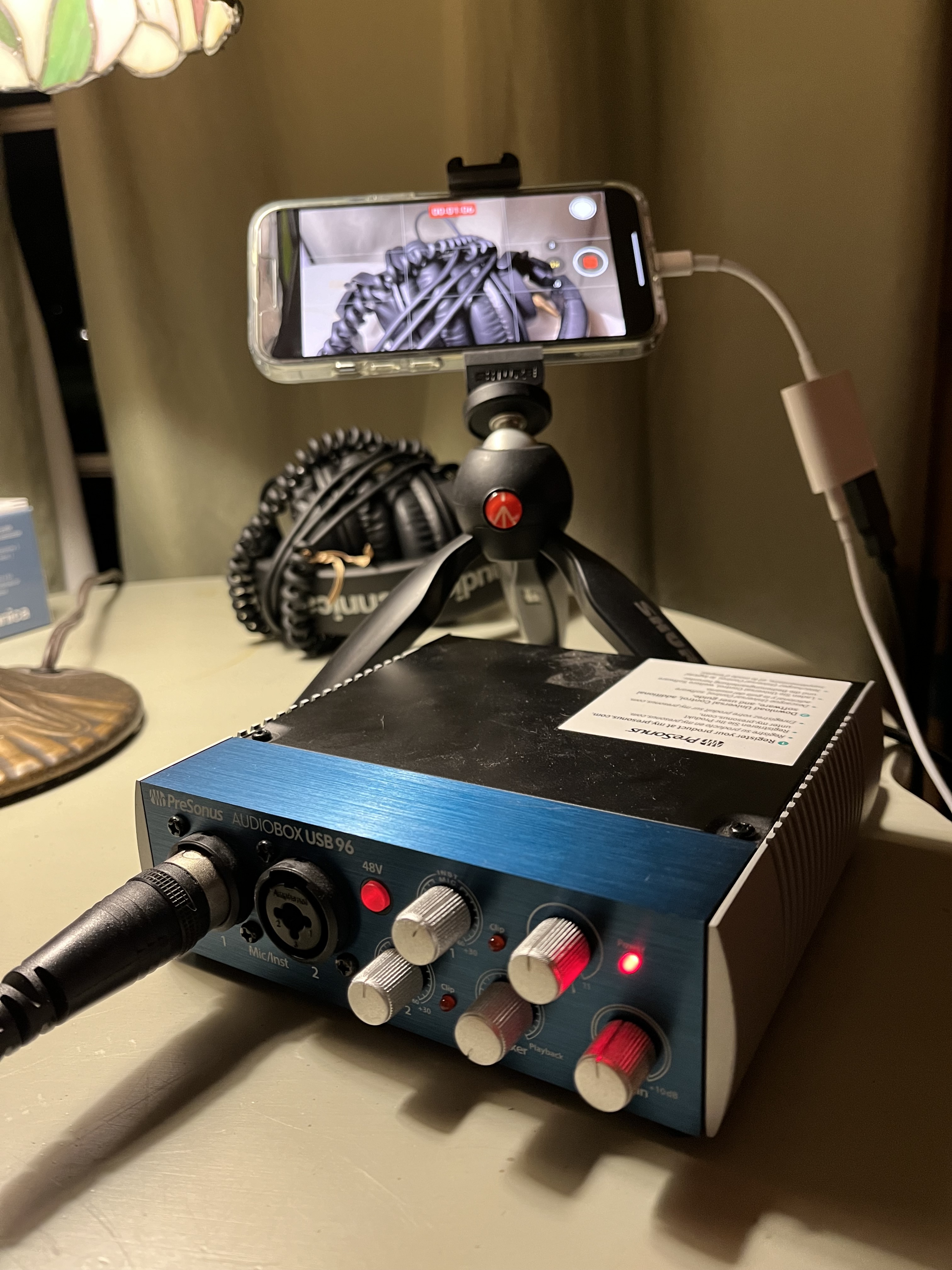
I think it would be possible to connect a device like that to the USB connector on the Apple adaptor, inline between the Apple adaptor and the audio device. Then see what voltage / current your Presonus use, and compare against the Zoom.
You might find, though, that the Zoom draws no power at all. As far as I remember, USB-A ports supply 5V, max 1A (but perhaps I remember incorrectly: Wikipedia says 7.5W, so 1.5A max?), unless the device negotiates more. So perhaps this default is enough for the Presonus, but the Zoom tries to negotiate more (or even draw more, without asking), and the Apple adaptor isn’t able to supply enough.
EDIT: oh - it would also be possible to use a multimeter like this to measure how much power the Zoom uses in your working (but not so useful) USB 3 adaptor bus powered experimental setup.
EDIT 2: unfortunately I think the multimeter I have doesn’t show any details of the USB power negotiation - it just shows voltage & current. I don’t know if fancier models might show that.
But I agree that it would be ideal to see what is being negotiated in the signaling, not just what is drawn. I might have to dig deeper to find one of those. If you find one before I do, please share!
I see “DC 5V” printed on the side of the device above the USB connector (p7). The specs on p103 confirm that USB bus power is an option for power, as you’ve shown. Unfortunately I don’t see more details, particularly about requirements for current.
The section about “Using as an audio interface” on p68 show some menu options to choose (I think) between using power from the USB port or from batteries.
Was the Zoom running from batteries when the clicks were present? (I assume so, since you’ve shown it doesn’t power on when used with no batteries & only the Apple adaptor?)
In which case… perhaps insufficient USB power isn’t the cause of the clicks?
Another random thought (only useful if the above thoughts are on the wrong lines)… have you considered connecting the Zoom via a powered USB hub? If the Apple adaptor isn’t capable of passing enough power through, perhaps a powered hub might.
I’m thinking (this is tricky in words - if this doesn’t make sense, ask and I’ll draw a diagram): let’s say you have a powered USB hub with several USB sockets, a tethered cable with a USB plug on the end (in more conventional situations, this would be plugged into a computer) and a barrel socket which takes power from a mains adaptor. Then: take the setup shown in your recent photo and put the USB hub inline, between the Apple adaptor and the Zoom. Ie: pull out the black USB plug from the Apple adaptor, plug it into a socket on the hub instead. Take the USB plug on the tethered cable from the hub and plug that into the Apple adaptor. Provide power to the USB hub via the barrel socket. Then the Zoom should be taking power from the hub, and passing on digital audio to the Apple adaptor.
I know USB hubs aren’t usually recommended for latency sensitive things like audio, but it might be ok here - if I understand right, you are recording, not feeding anything back, so any latency should only affect the recording. You might end up with an audio/video sync issue, but hopefully that could be fixed afterwards fairly easily in your video editor.
First of all, THANK YOU! I’m loving your feedback.
(3) is incorrect. The clicks appear to be cause by this powered Apple adapter. The un-powered version works fine.
As for (1), yes the aim is click-free recording. But the rest of the aim is to be able to power both the iPhone and the Zoom, rather than having both run on batteries that often don’t make it through a whole show. And the focus of this thread was partly softened by my uncertainty about whether the Zoom was getting any power from this hookup (the iPhone definitely shows it’s getting power).
Yes, and I’ve also devoured the manual :-)
Yes, that USB Mini port in the Zoom is how I bus-powered it successfully with the Apple adapter out of the loop. And yes, I see no specs on the current draw. Zoom has also not yet replied to that email.
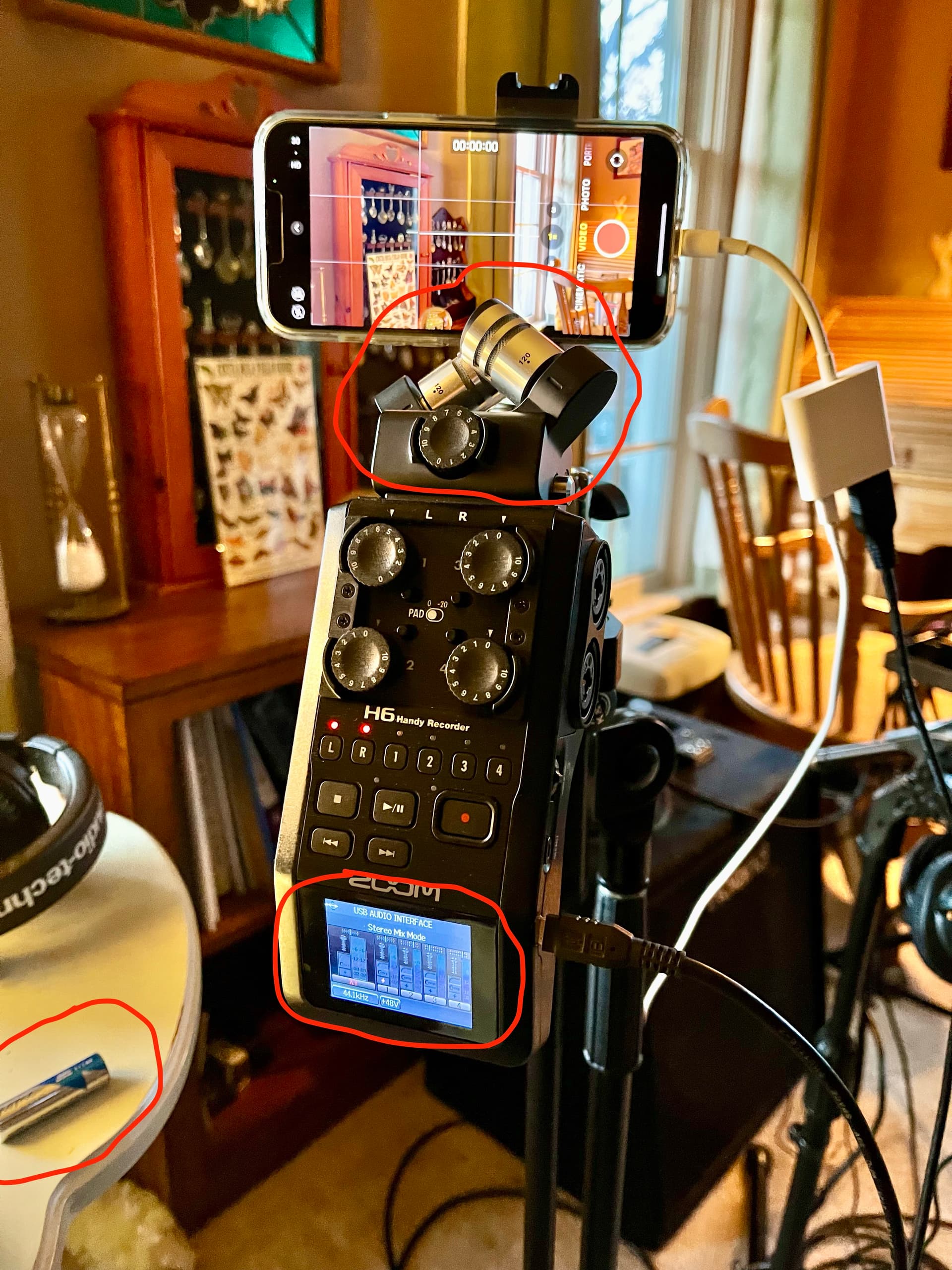
Yes, I always use the “iPad” option, which is the only non-Mac/PC option. It appears to require using Zoom battery power, probably because iPad (or iPhone) cannot deliver enough power to the Zoom.
Hmm, now you have me thinking. Maybe the Zoom is refusing the bus power because we enabled the iPad selection which forces the use of the batteries? The only non-battery option is Mac/PC. The manual provides very little explanation of the differences here. It does say the iPad (and presumably iPhone) can only receive a stereo output, not multi-track. But it doesn’t say if there are any other compatibility issues. Anyway, Stereo is fine for me since I’m just feeding the audio stream of a video.
So now I started thinking about using the Mac/PC option, and after some new tests, bus-power is working with the Apple adapter. If you look at the new setup, you’ll see everything is wired the same way, and the battery is removed, but now the Zoom screen lit up.
Why didn’t it work before? Notice also that the X-Y mic capsule is now connected to the Zoom. Experiments are showing that, with batteries removed, the Zoom is LESS LIKELY to power up when connected like this if either the X-Y mic capsule is not attached, or if the iPhone is not connected way at the other end of the Apple USB 3 adapter; but sometimes is DOES power up anyway. In my photo yesterday, the mic was not connected, so that’s apparently why the Zoom wouldn’t power up, even though it power up fine without the mic when I removed the Apple adapter from the power path.
I did also test a video to the iPhone using this “Mac/PC” setting, and it seems to sound fine given a rough listen.
So other than the fact that the Zoom has some annoyingly inconsistent behavior, this is great news. It means it’s possible to bus-power the Zoom and still record to iPhone. It also means this Apple adapter is capable of passing audio and powering both devices, as it should; it’s just too darn bad that it provides clicky audio.
Actually, yes, again, after your previous post :-) And given these results, I may have to revisit it. It will be a bit clunky trying strap it to the microphone stand, but I’ll explore options. I just pray to God that the hub doesn’t become the new variable introducing audio clicks. Latency is a concern but might not be a big deal for the reasons you stated: it’s not a round-trip audio path.
I reached out to Apple, and they recommended “OTG” (on-the-go) USB cables. The more I learn about USB, the more complicated and therefore annoying it gets. It seems OTG cables are not just “cables” but have smarts that allow one device to act as the “host”. Alas, the “smarts” also means there are countless compatibility and performance risks…
There’s also the “PD” (power delivery) concept, which defines whether you can pass power to(?)/from(?) a given connection. It comes in various incarnations, determining among other things how much power can be drawn. It also defines a protocol for negotiating power.
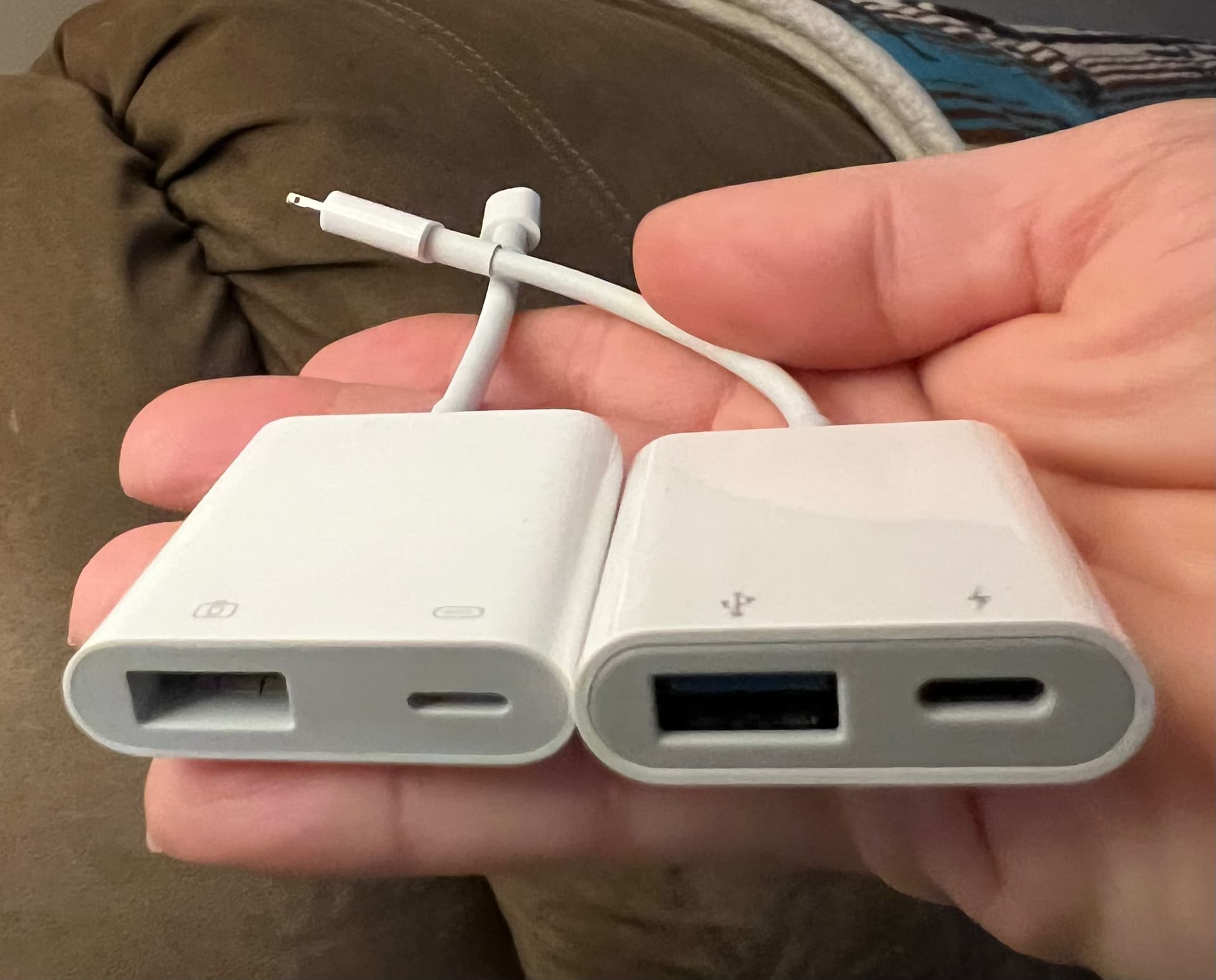
Some OTG cables are forked to allow power injection. I think Apple’s “Camera” adapters are probably technically “OTG” cables, and might support “PD”. So I went to Amazon to look for OTG cables, and found this 3rd party copycat of the $40 Apple adapter I have:
Normally, I would pay the extra for the Apple product to prevent the risk of things like, ya know, audio clicks. But obviously I have nothing to lose at this point.
Some more random thoughts. And apologies - turns out I’ve written a bit of a lengthy brain dump. Also I think I’m probably teaching you to suck eggs in some places (but I don’t know where!). Sorry!
I’ve listened to your recordings. I can hear the clicks in the ones that use the Apple USB 3 adaptor (recordings 1 and 3).
Reading through again (!), I see the Zoom was battery powered in all those three recordings? And I assume the Zoom was in the same “iPad mode” for all those recordings.
So… as you originally concluded, the clicks are introduced when you swap out the Apple unpowered adaptor for the USB 3 powered one… so there’s some incompatibility between the USB 3 powered adaptor and your setup (including, but not limited to the Zoom).
To add even more complexity (!), note that USB 3 adds five more pins to the USB-A plug (compare with earlier USB). An idea (although I’m not at all confident about this - I don’t have a good understanding)… USB 3 seems to add a GND_DRAIN pin, and I agree with Geoff that the clicks could well be caused by a grounding issue. I wonder if your USB cable is perhaps making some contact with that additional USB 3 pin, which would be present on the Apple USB 3 adaptor but not on the unpowered one.
There’s also the problem of trying to make the setup mains powered. Some thoughts about that below. But - I’m a bit wary of trying to solve both this and the clicks problem at the same time.
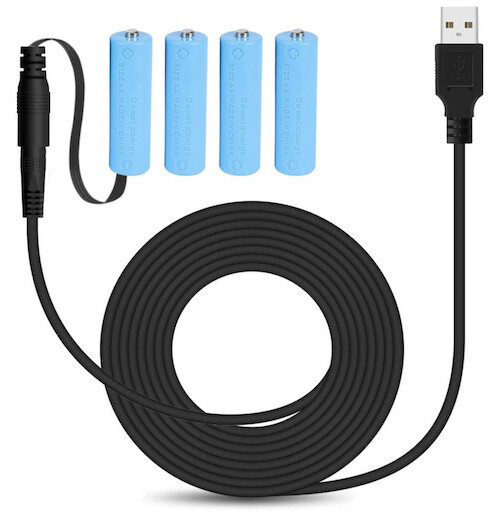
It might be possible to give the Zoom power via the connectors in the battery compartment, rather than via the USB port. I found these this pack of 4 fake AA batteries connected to a mains power supply: a “battery eliminator”. These seem quite expensive, but perhaps there are similar cheaper things. Or it might be possible to make something: I highly suspect the Zoom connects the 4 batteries in series, so you only need to make connections to the terminals in the Zoom at the ends of the chain (from the Zoom manual p16 - I mean at the top left and top right of the battery compartment, or perhaps bottom left and bottom right). But also: for audio, I’d be wary of using a mains power supply to introduce power to a battery compartment. Batteries give a nice stable DC source… mains power supplies can leave some “ripple” and other artefacts from the mains AC source in their output, which might affect the recording device, particularly if the device design assumes that the batteries give stable DC. So, instead of using a mains PSU, perhaps consider using a rechargeable battery. Like this Anker thing (not a recommendation, although I bought this one in 2016 and find it useful for various things - just pointing it out to show what I mean).
Re strapping a USB hub to the mic stand (if that ends up being a good solution). I wonder if it might attach to the back of the Zoom. I’ve been using this kind of gel tape (perhaps “PU gel tape”?) for this kind of thing recently and find it sticks plastic things together very well, yet I can still peel them apart without residue when I need to.
I don’t know much about “OTG”.
I thought USB PD was a relatively recent thing, only applicable to USB-C connectors, but Wikipedia says this is possible with USB-A plugs also, but with a “mechanical mark”…? But I doubt the Zoom H6 implements that (the Wikipedia page says PD was announced in 2012, and the Zoom manual says (C) 2013 and makes no mention of it).
Above, you wondered whether the Apple powered USB 3 adaptor powers “the Lightning device or the device connected to the Camera/USB input, or BOTH”. I found a little more detail in Apple’s “Use Apple USB-A camera adapters with USB-A devices” document: it “provides power to your iOS device and your connected device”.
A reminder that if you are going for a mains powered setup, the quality of the mains adaptor you use to provide power to the Apple powered USB 3 adaptor could well be important - again, potential risk of variations in the power ending up affecting the recording. Consider a rechargeable battery (as per point 6) instead?
Given this is so tricky - I wonder if you’ve considered recording the audio separately from the video? I mean… don’t connect the Zoom and the iPhone (avoiding some of the complexity here). Use the Zoom to record onto an SD card. Record the video (and some scratch audio) on the iPhone. Put the audio and video together in post, in your video editor. It should be fairly easy to sync them up, especially if you have scratch audio from the iPhone. If you are doing multiple takes, it could be useful to say a take number before you start playing. A little more work to press record/stop on two devices. But you could just leave the audio recording going perhaps: a small amount of data compared to the video (probably). Be aware that different devices (here, the Zoom and the iPhone) can record at slightly different rates, because their clocks aren’t 100% accurate. So you might find that the two recordings drift out of sync after say 30 mins of recording. But can deal with that in post by making cuts at suitable places (eg between songs) and realigning for the next bit.
USB OTG (“on the go”) is a protocol that allows a device’s USB port to act as either host-side (like a computer) or device-side (like a peripheral). It can auto-detect what is connected to it and set itself into the appropriate mode. It can also detect when connected to another OTG device, and the two will negotiate to something mutually-compatible.
It is typically used for devices like smartphones and tablets that need to behave as a peripheral when connected to a computer, but also need to behave as a host when connected to peripherals (e.g. a camera, SD card reader, game controller, microphone, etc.) Apple’s lightning connector supports OTG - which is how all those interesting peripheral adapters can work.
There’s really no such thing as an “OTG cable”. OTG devices typically use a hybrid micro-AB connector (or older devices with a mini-AB connector) that can accept either a micro-A or a micro-B cable. These days, a USB-C cable should also be compatible.
Fascinating stuff. And confusing. Thanks for sharing.
This is a big area that’s not clear to me. Are these “OTG Cables” just copper conductors with plugs on the end, and all the negotiation happens in the OTG controllers in the devices? Or is there some silicon and logic inside these cables? I know Lightning cables have circuitry in the plug. But I’m not clear about these USB-OTG cables.
It’s worth noting that OTG can’t pass through a hub. Also:
OTG adds a fifth pin to the standard USB connector, called the ID-pin
Perhaps it’s this (apparently critical) pin/wire that defines a cable as “OTG”.
In related news, I now know the formal name for the feature that injects power into this OTG setup:
Accessory charging adapters (ACA)
So what I need is an “OTG ACA” USB adapter… that has all the right kind of ports, and doesn’t corrupt my audio. Seems simple enough
No more than any other USB cable (e.g. some of the ID logic in type-C cables).
Not surprising, since a hub contains type-A and type-B ports. These are going to force an OTG device at the other end of the cable to assume the opposite role.
But connectors aside, it wouldn’t make any sense. A hub’s purpose is to connect multiple peripherals to a single host. It is flat-out impossible (within the USB spec) to have multiple hosts connect to a single peripheral. That is, without a switch of some kind to make sure the peripheral only connects to one host at a time - which is not how hubs work.
The ID pin is part of the standard for any of the mini/micro-A/B connectors. See also: Wikipedia: USB § Pinouts
OTG uses this feature of the connectors to ensure that the two ends of the cable are always opposite roles. One must be type-A and one must be type-B, and the OTG socket can read the ID pin to know which end it is using.
Since OTG doesn’t work over a full-size type-A or type-B receptacle (there’s no way to design a cable compatible with those two connectors), it isn’t actually introducing anything new to the cable/connector spec.
It seems like what you need. Whether or not it corrupts your audio remains to be seen.
Yes and yes. It was only the recent test(s) where I said I learned that I could run it in Mac/PC mode, and bus powering would work.
Eh, sure. I was blaming the adapter, because swapping in the other one was sufficient to fix the issue. But it’s true that I have not tried things like swapping the iPhone for an iPad, or swapping the Zoom for the Presonus. I need to find a way to monetize this… :-)
Now you’re going in deep You’re talking about some type of shorting going on. I think it’s unlikely that it would manifest so intermittently rather than just fail to record at large. But I don’t know.
Keep in mind – I think I mentioned it above – my initial audio tests, which were focused on the clicking issue and not the bus-powering requirement, were done with NOTHING plugged into the power port on the adapter. So no connection to mains/AC. Like you and Geoff, I was also concerned early on about the condition of power on the AC line. But going completely battery powered didn’t help that.
Clever, and lots of cool ideas here But given that the audio problem manifests without an AC connection, going this route would be just following a red herring, right?
Thanks! And yes, my recent tests you saw showed that both devices did get power using this setup, once I overcame all those variables that were preventing it, like iPad mode on the Zoom, attaching the mic capsule, etc.
Haha, good point. The Zoom is, actually, my solution to NOT having to go through what I found to be the quite laborious effort of syncing audio to video after the fact. Picture multiple shows, with 15+ videos per show. Getting them all on YouTube and tagged is already a brutal time kill. In longer songs, when recording audio and video separately, sometimes the audio and video become slightly out of sync at the end, and make for an iMovie headache to “stretch” and fix. I designed this setup to make all that headache go away. And both Apple and Zoom designed these products to work this way.
I ordered that cheap Amazon knock-off of the pricy-but-problematic Apple adapter. When it comes, I’ll see if the audio issue goes away…
I hear ya. And I did read that. But I also see a lot of distinction online both in discussion groups and in products for sale at Amazon that make a distinction between “regular” vs “OTG” USB cables. So I’m not convinced any USB cable that “fits” will enable OTG host vs. device switching. Here’s one discussion with diagrams that appears to explain how the OTG cables are different:
According to the Wikipedia page and a USB OTG whitepaper from Infineon, the ID pin should be floating (disconnected) on a micro-B connector and shorted to ground on a micro-A connector.
The Quora comment you referenced is saying the opposite, so I believe it to be wrong. It is showing a type-A to micro-B cable (connect phone to a PC host), which should have the ID pin floating in the micro-B connector. The pull-down jumper depicted should only be found in a micro-A connector (for connecting your phone to a peripheral or to another OTG device).
It appears that there is a convention (not sure about standard) that allows a resistor (instead of a short) to connect the ID pin to ground on a micro-A connector in order to request a reversal of power delivery (peripheral powering the host). But that’s a different feature and shouldn’t be required for OTG to work.
Yea, I thought maybe he said that backwards. But my main point is that “OTG” does appear to be something a cable has to support, not just the device interfaces.
Sadly, the Amazon adapter has the same audio clicks as Apple’s, maybe even worse. I went back to the unpowered adapter to confirm I had a solid baseline, and that one still works without clicks. As a side note, the Amazon, like the Apple, also bus-powers both devices properly.
Unfortunately, the Presonus is a vastly inferior device and doesn’t have the features I need for live recording. It also has an unrelated nasty bug whereby the audio stutters nonstop if you don’t connect the device and open the video app in the right order. Even replaying your clip resets the sequence. But I digress.
So this means there are at least two variables working together to cause this: Apple’s adapter is one. The Zoom appears to be another. But I should probably try to find another USB cable for the Zoom to eliminate that suspect.
Yes, but for the micro-B side of the cable, that pin has always been disconnected, so it should be no different from an ordinary cable.
For the micro-A connector, yes, but that’s only when your phone will behave as a host. As far as I can tell, the micro-A connector was invented for OTG (before that, I think hosts always used full-size type-A connectors), and I’ve never seen that connector used in a generic USB cable. (And for an iPhone, the Lightning connector has its own voodoo, which I’m sure the Apple adapter properly implements.)
a. The “ACA” adaptors (the Apple powered USB 3 one, and the Amazon knock-off) can provide power to the Zoom via its USB port… but these setups give clicks in the recordings.
b. The unpowered Apple adaptor gives click-free recordings, but the Zoom then has to run on AA batteries.
c. When running the Zoom on AA batteries, it doesn’t last long enough to record a 2 hour show.
An idea.
Use the unpowered Apple adaptor, for click-free recordings. Provide power to the Zoom via its battery compartment (leaving the USB port to be data only, not power). Use something like this fairly cheap 4x AA battery “eliminator” with a USB input. I haven’t used one of these, but it seems plausible to me: USB is 5V, the Zoom manual specifies alkaline batteries (4x 1.5V = 6V) or Ni-MH batteries (4x 1.2V = 4.8V), so the USB voltage is within the acceptable range.
The Zoom might expect smooth DC power from its “batteries”. So providing power to the “eliminator” from a mains powered USB power supply (which probably gives an output with ripple etc), might result in (different!) problems in the recording. Or it might work fine.
If a mains PSU is problematic, I’d suggest using a largeish USB battery to provide the power (something like the Anker one I mentioned in an earlier post - again, not particularly recommending this, just showing an example). I haven’t done the calculation, but I’d expect that to last several times longer than 4x AA batteries: hopefully plenty enough for a 2 hour show.
Another idea. Assuming that the clicks are coming from the power supply feeding the ACA adapter and not from the adapter itself, perhaps you could feed it from an external battery pack, like the Anker pack you linked to.
If you have a battery pack on-hand (even if it’s not big enough for a 2-hour recording), you could run a test with it to see if the clicks are still there.
It’s a great idea! But I ruled out the power source early on by reproducing the problem with NOTHING plugged into the power port on the adapter (everything running off of battery). The clicks still manifest.

 You’re talking about some type of shorting going on. I think it’s unlikely that it would manifest so intermittently rather than just fail to record at large. But I don’t know.