I don’t know why I’ve never stumbled on this key sequence before, but I’m betting it’ll become muscle memory within a week with all the Junk email I’ve been getting for the last couple of months.
Yeah, it still won’t stop the downloading of hundreds of spam emails per day, but it’s sure the next best thing for me.
Again, Apple isn’t permitted to not deliver all messages addressed to you unless it is found to contain known malware. And if that were the case, it would likely have been stopped along the way, before it ever reached Apple servers. Filtering it into your Junk mailbox is the best they can do.
“Again, Apple isn’t permitted to not deliver all messages addressed to you unless it is found to contain known malware.”
Not permitted by who? Mail services drop mail on the floor all the time, and have ever since spam became a thing. I’ve run mail servers and mailing lists for decades, and my logs have shown many occurrences of outgoing mail that has been accepted for delivery by gmail, hotmail, apple, etal. that the recipients never get even in the spam folder. It just vanishes. No pattern to it, and there’s no systematic problem such as a misconfiguration. I’m pretty sure there have been discussions here about icloud mail not reliably delivering all of the real mail.
Aside from that, pretty much everyone uses blocklists such as spamhaus or more elaborate intermediate services such as proofpoint, and they often err on the side of if in doubt, toss it. Neither the sender nor the recipient get notice, though it shows up in the logs.
For some odd reason, users are much more inclined to complain about getting spam than not getting their real mail, so that’s the way the services are run.
What I would like for Apple to do is provide the means to notify all senders of mail in my junk folder to unsubscribe me.
Also, frequently, when I click on the “unsubscribe” that apple offers on mail, the mail is unable to be sent so it ends up in my outbox to delete.
As others have noted, this year there is a significant increase in junk mail - for me, probably 600 a day. I’ve tried unsubscribing but I fear that just adds me to another list and has had little impact on the number I get.
I “command” “delete” then do that again for trash - doesn’t take too much time but some emails that should be in junk get there so I have to scan - not many - maybe one or 2 a day.
Al, I know Apple filters out email before it reaches me. As I have mentioned, I buy wine from a Southern California wine store. Their emails to Apple Mail customers was blocked for many months. I had them change to my gmail address and that flows through without problem. Then, a few months later, the Apple mail started getting through again. The “malware” concept is really difficult to define - but I know most of the spam mail I get tries to get you to click on a link to cheat you. And this wouldn’t be an issue if the (advertised) client features to manage the spam email actually worked.
What would that accomplish? As you already figured out, spam usually has forged addresses, so attempts to reply or unsubscribe just go to invalid mailboxes (or worse, to innocent bystanders’ mailboxes). And lots of spammers accept an unsubscribe request as proof that your mailbox is “live”, and will increase the amount of spam they send you.
Unsubscribing will work if you’re getting junk mail from legitimate advertisers, but it won’t do a thing (and may make matters worse) for all of the scam and phishing mail that comprise the majority of spam.
Oh, yes, I thought that Apple is notorious for this. (See this old InfoWorld article). Frankly, I’d rather have them put everything that they think is junk into my junk folder and let me deal with it later. I also have a recent example of this; I was auto-forwarding from an old email address I no longer use on my own domain to an iCloud email address and the mail stopped appearing; it took me a while to notice. When I changed the forward to my fastmail account, they started showing up.
But, boy, I don’t know about the rest of you, but I still get enough false junk reports of mail that there is no way I want junk auto-deleted by Apple (or any other mail server.) I usually check all of my spam/junk folders once to a few times a week, and in my estimation there is at least one mail message a week or two that is falsely flagged as junk. I’m just fine having the messages sent along so that I can deal with them later. (What I do is I have all of the junk mail folders filtered for unread email, go through the All Junk from bottom to top with newest at the top, and then mark them as read, with the mail app set to delete junk after 30 days automatically.)
The amount of mail in my junk mailbox has increased greatly in recent months, from being in the low teens to well over 100 per day. Nevertheless, the procedure I developed a year ago makes it a minor annoyance. When I initially open Apple Mail in the morning, I open the Junk mailbox and quickly scan the sender and subjects of the message. I may find a message or two that may not be junk, and using the control-click dropdown (triggered with a 2-finger tap on my trackpad), move those to my Inbox. I then switch to the inbox and use the keyboard shortcut to erase the Junk mailbox. At most, this takes a minute or two per day.
A message or two may escape the Apple Mail junk filter–I move those (again via a dropdown entry or a toolbar icon) to the Junk mailbox. Note that I rely solely on Apple Mail’s filtering–I don’t use SpamSeive or any other add-on tool.
Do you blame the mail carrier for filling your snail mail box with catalogs, ads, and flyers? Apple is doing the right thing by attempting to flag junk for you, but taking on the liability of just dropping everything that might be spam into the bit bucket? Not gonna happen.
No, I don’t blame the mail carrier or Apple. But I do ask Apple to please provide a setting where I can choose to delete everything iCloud places in my Junk folder on the server before I ever have to download it.
My situation is different from many others, where everything in my Junk folder is indeed, reliably, Junk. I’m retired and if some acquaintance’s email is erroneously placed in my Junk folder, deleted, and I never see it, no big deal to me. To me, it’s worth it, especially in the last couple of months where I’m getting flooded with hundreds of spam emails.
I get where active business people can’t have that happen even once, or the consequences would be horrible. And that’s the point, everyone has their own needs and wants. So, once again Apple, why not just give the end user a choice? What a concept. Then we can choose what works best for each of us.
I don’t see what the big deal is unless you are on a slow or data-limited Internet connection. If it’s really a concern to you, you could always turn off automatic email delivery in your Apple Mail settings, sign onto iCloud.com and delete the Junk mail there.
One solution for lots of spam over a slow connection is to use a mail client such as Thunderbird that supports subscribing to a mailbox. Then you can set it to not subscribe to the spam (or any other) folder and it won’t automatically download. Of course you have to be able to tolerate TBs assorted quirks, but at least it’s free.
For scanning a spam folder, I find that sorting by sender is extremely useful, since the spammers/phishers tend to use the sender field for the hook, so you can grab a block of dozens or hundreds at once, depending on how often you check.
I don’t see anything odd about that, for one simple reason: visibility. You (theoretically) see every message you do receive, but you don’t see the messages you don’t receive. So every spam that gets through is an opportunity to be annoyed, while every message that gets mistakenly stopped is invisible unless you were expecting it. You won’t complain about not getting messages you don’t know were sent.
“You won’t complain about not getting messages you don’t know were sent.”
Yeah. Except that so many users I’ve had do know that they’re losing real mail because I tell them, and they still don’t care. Maybe too much social media numbing the brain?
That’s it exactly for my case. At my family’s rural ranch, the top internet speed is 0.75mbps. Everything takes forever to download at that rate. You can watch all the webpage elements load one at a time, like the early 1990’s with a modem. So downloading 100+ junk emails at a time is a real hassle.
But good point about going to iCloud.com and deleting them from there. That’s always doable.
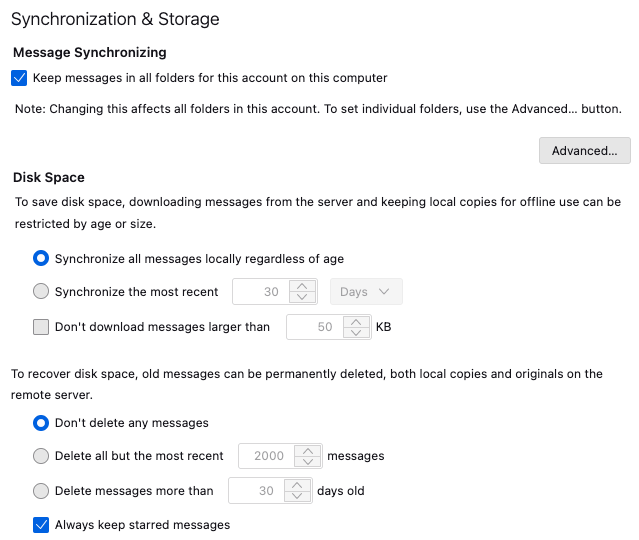
Some mail clients will let you select how your local cache of messages is synchronized with the remote IMAP server. For instance, Mozilla Thunderbird offers the following options:
So you can tell it to not automatically sync your local and remote folders. You can also tell it to only auto-download the most recent files and/or files smaller than a given threshold.
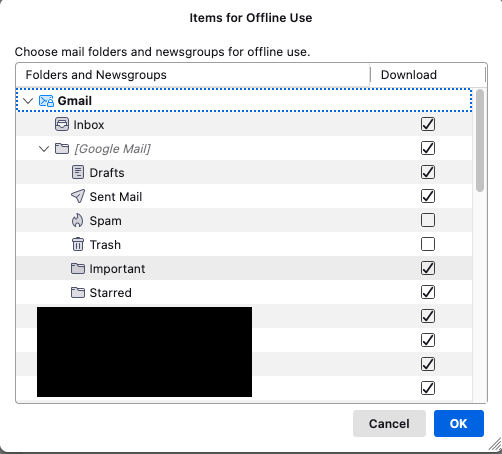
You can also select specific server-side folders to auto-sync:
So you can (for example) not auto-download the contents of the Junk folder, but sync the others.
I don’t use this feature (I generally use web-mail for everything), but if you can download only the headers and not the message bodies, that will make it much faster to manually filter that junk folder.
Do others here know if Apple Mail has similar capabilities?
I started this thread and have an update. A couple of days ago the volume of junk mail I get decreased by about 90%. I figure Apple has started blocking this (obvious) junk at the front end so it doesn’t make it into my junk mail folder. That is a huge improvement. A few things get incorrectly classified as junk (the LinkedIn stuff is often flagged) but it is easy to check before emptying the junk mail folder.
You are probably correct, if Apple has been receiving many “report junk” messages:
This was useful info from that page:
“Spammers use the email image-loading feature to determine whether your email account is active. Here’s how to keep images from loading automatically:…”
Also,I wonder if the iCloud filtering rule function can be utilised to delete unwanted emails before they are downloaded (they would need constant editing to keep up with new spam):