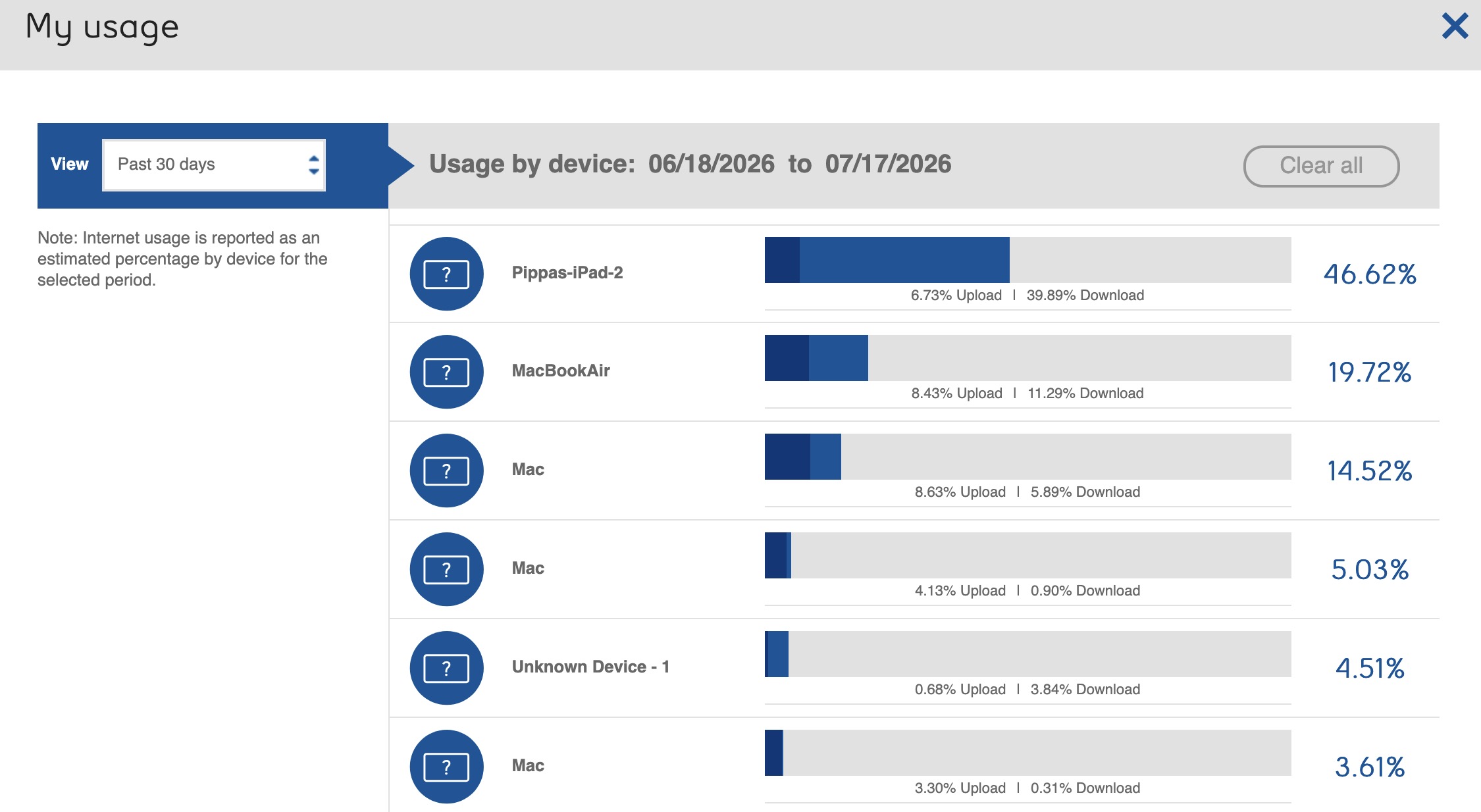
The last three months I have had my Bell internet speeds capped because we have exceeded our 600GB data cap. Today, only the 17th of the month, I get a notice that it is about to happen again. I looked on the Bell router to see details of usage, and find that my wife’s iPad, which is on but hasn’t been used is hogging the data:
I see that having switched it off, most of the info there has been scrubbed.
Looking at Data Analysis, there is a good deal of stuff related to Mail. Summarizing messages etc. Surely it hasn’t been quietly summarizing thousands upon thousands of e-mails has it?
If I understand you and the graph you shared correctly, that means your wife’s iPad has transferred approximately 300 GB of data without much actual use. Even if that includes some iPadOS updates plus a lot of email, that’s a lot of data.
My top guess would be to check for streaming media apps (video, podcasts, music) downloading and caching content, even content that hasn’t been ordered. Another possibility would be subscribed Podcasts or purchased Music set to download automatically.
For example, before I stopped using Amazon Prime, I noticed that the app would download shows I had never expressed any interest in watching and then suggest that I try them. Insanity! (I think I eventually found the setting to turn off that “service,” but I stopped using Prime and removed it from my devices in protest of declining service and increasing surveillance.)
None of those things seem to apply here. Some of it might be explained by Photos updating with new images she has put on her Mac.
Maybe there is a clue in that she has had this iPad since August, and the data cap issue has only arisen in the least three monthly billing cycles. I may have installed a software update three months ago that started this behaviour. I see 26.4.1 and 26.4.2 were released in April.
Do you also have access to wired/cable/satellite Internet at your home? If so, and you have a WiFI access point, iPadOS should default to WiFi unless that option is deliberately turned off in Settings.
As an aside, this is why I’ve never been enthusiastic about various wireless (as in telephony) Internet access plans I’ve seen advertised. The things we download grow in sie and number every year. The plans don’t appear to keep up. That couldn’t be a malevolent plan on the part of the telcoms, could it?
If she uses iCloud Photos, I wonder if her iPad has Settings / Apps / Photos / Download & Keep Originals turned on? This would have the iPad download a full-res version of each photo in the library as it is added.
The same if she is a subscriber to Apple Music - Settings / Apps / Music, see if Automatic Downloads is turned on.
The iPad is wi-fi only. My internet router is connected to a Bell cellular aerial, which for practical reasons is my best choice for internet connection.
You don’t want the iPad to burn through a bunch of data while on a trip so I’d recommend trying to get to the root cause now. Two ideas:
In Settings>Battery, look at the top apps list for the last 10 days. Hopefully that wasn’t cleared due to shutting it off.
If 1) doesn’t help, turn the iPad back on for a day and see if the behaviour returns. One possibility is that it might be trying and failing to install a OS update. Is it an older machine or low on storage?
It was bought in the fall of 2025, and has lots of empty space. iPadOS has been kept up to the latest version. It does have a keyboard/case attached.
Looking at Settings>Battery>View All Battery Usage, it just shows what percentage of battery has been used each day for the lest ten days, not a per-App usage.
I’m not having battery issues but for the heck of it I checked battery activity. It showed 11 minutes of Home Settings activity today but I don’t have the Home app installed, have never even opened it, or ever created a home. What’s up with that?