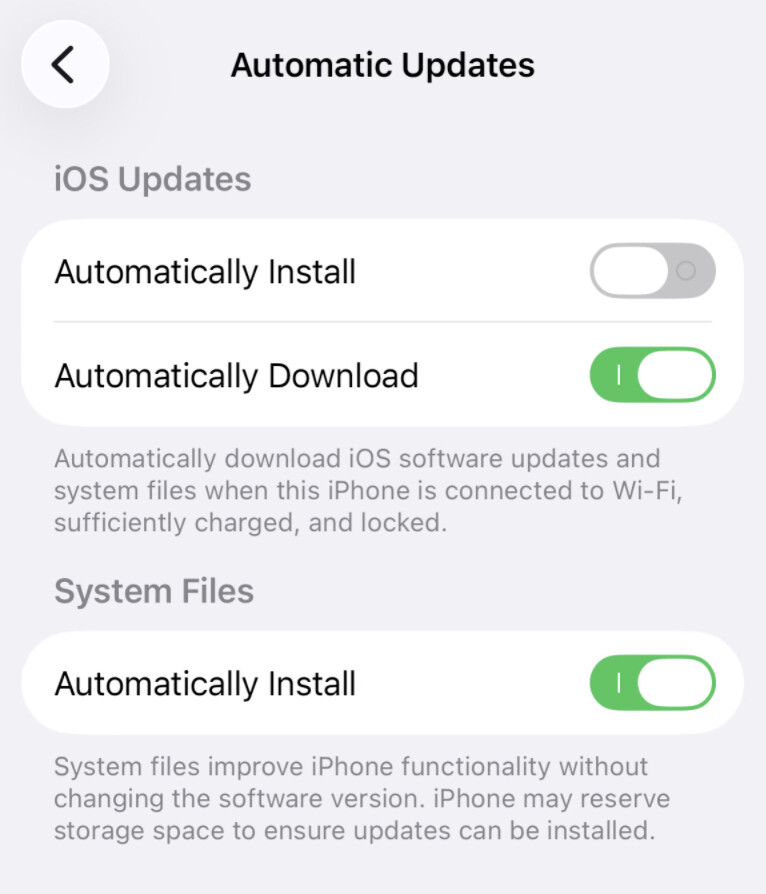
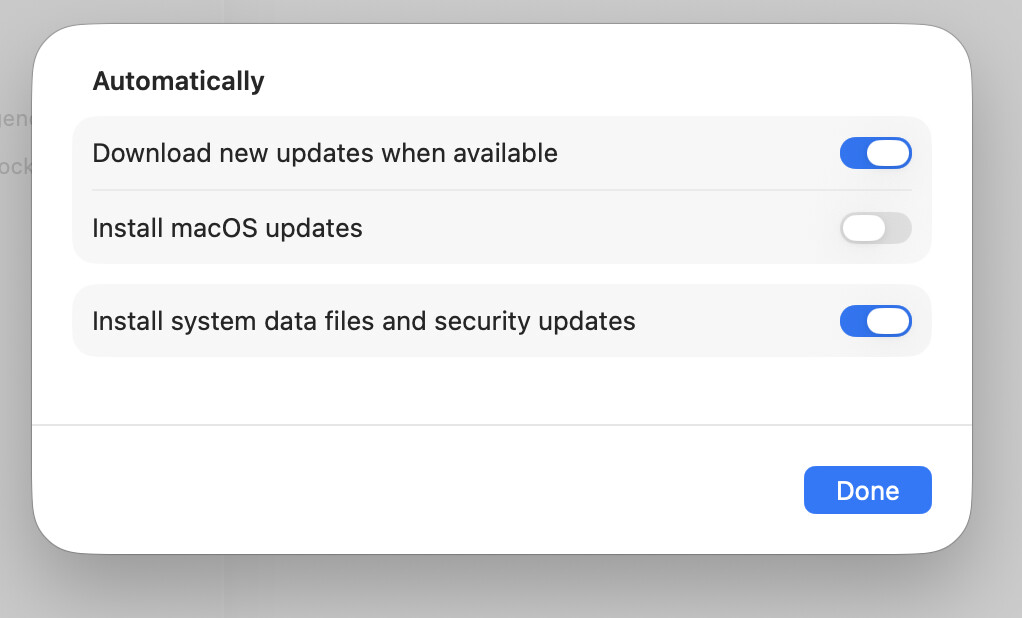
So like macOS, in iOS there’s the Automatically Install option at the top of update options. I believe everybody knows what that automatically installs (OS updates). Then under Privacy and Security, at the very bottom, there is in iOS also like in macOS the automatic install option for BSIs. But in iOS under General > Software Update > Automatic Updates > System Files there’s another Automatically Install option. What does that do? Is that the same as macOS’ “Install system data files and security updates” that essentially updates malware definitions and the like?
And on a related note, why is the order of the top two items in there (install and download) swapped between macOS and iOS even if both are on 26.4?
Automatic downloads will not auto-install. It will download the installer (taking up space on your phone’s storage) but will wait for you to manually install it.
Personally, I think it’s not terribly useful, although I have a pretty high speed Internet connection (500 MB cable modem), so it’s only a few minutes longer than just installing a pre-downloaded copy.
… unless you have a slow Internet connection, in which case you may want to background-download it (which might take several hours), so you can skip the download step and go straight to the verify/unpack/install parts of the installation.
… or you can do what I do, and start the installation just before going to bed, so it will be finished before I wake up. Unless that download/install takes more than 6 hours, I’ll never know or care.
You really, really, really do need to move to 26 if you value security. Don’t count on Apple to keep 18 users safe if they are able to run 26. And 26 is not as bad as many keep saying here. Some are just not into any changes.
Al, I need to delete 16 gigs!!! From my iPad Air 5 before I can download 26. I’m working on it. But it’s almost like downsizing my house!!! My grandkids don’t want me to delete their games. I don’t want to delete mine!! I need to go through thousands of photos, too. So a work in progress.
It may be more than you need for just this task, but the (IMO) appropriately-named utility iMazing can install system updates to your i-device from your Mac in very tight circumstances. Not sure how it does it (maybe offloads stuff temporarily?), but it saved me the "agony of what to delete” dilemma many times with my old iPad, which had way too little space to update in place.
I know I can save some space in Notes. I have transferred all my notes from Evernotes in batches. Is there an easy way to delete duplicate notes in Notes?
You can back up the data and just offload the games that occupy the most memory. It will not delete their progress, which will be saved. Then install the update, reboot, reinstall the games. Go to Settings, General, Iphone storage. Pick. And app then choose the Blue Option Offload App.
That’s got to be wrong obviously since iOS has, as I already detailed above, its own and independent toggle for BSI under Settings > Privacy and Security, at the very bottom.
So far, it still appears nobody can say what General > Software Update > Automatic Updates > System Files > Automatically Install actually does.
While we’re at it, why doesn’t “General/Software Update/Automatic Updates/Download new updates when available”…well, download new updates when available? I’ve never found them automatically downloaded, even days after they’re released.
As I understand it, the releases are gradual - they make it available to a certain number of users and wait to see if there are problems, then turn it on for more users, and so on. If you weren’t chosen to be an early bird it can indeed be many days after the initial release before they open the floodgates, so to speak, and your phone starts bugging you to upgrade.
i have nothing against iOS 26 (or any of the other 26s) in terms of content. It’s the visual interface. Aesthetic concerns aside, it simply makes many things impossible to see (even with the retconned addition of contrast controls), or very difficult, particularly for us geezers. An enormous step backward in human interface design.
 Thank you. Typo fixed.